Over the next few weeks, YuJa Verity will begin rolling out exciting new features such as AI quiz generation based on LMS content, brand-new question types for YuJa Verity assessments, and AI-powered automatic grading.
-
Test-takers now have access to YuJa Verity’s new assessment resources in our upgraded toolbar
Test-takers now have easier access to administrator-granted tools with YuJa Verity’s upgraded, draggable toolbar so they can move it around according to where they are working on the screen. The toolbar also displays important notifications such as voice chat and live chat pings.
Alongside the Calculator, Whiteboard, Live Chat, and Raise Hand buttons, test-takers can now access:
-
References: View instructor-approved references in a convenient on-screen pop-up.
-
Password Bank: Auto-fill passwords in the Assessment Page instantly.
-
Permitted Websites: Navigate to instructor-approved websites in a new tab.

-
-
Increase assessment security using YuJa Verity’s new Screen Activity Not Detected flag
YuJa Verity will now automatically flag an event in the post-assessment report if a test-taker has not moved their cursor or their recording has been inactive, allowing instructors to pinpoint potential cheating during assessments that may require human review. Similarly, this new flag signals if a test-taker has shared the wrong screen or if their camera froze during the assessment, providing more insight into test-taker activity and a more precise post-assessment review process.

-
Identify installed desktop tools with YuJa Verity’s app and extension monitoring for increased transparency
Proctors and instructors can now see a complete list of desktop applications and extensions test-takers have installed for more transparency before, during, and after assessments. With this tool, instructors can now ensure that test-takers have the required extensions installed for their assessment or spot unapproved tools.

-
Allow test-takers to access YuJa Verity assessments instantly in their browser with a new zero-install workflow
Test-takers can now complete YuJa Verity-proctored assessments directly within their browser without requiring a browser extension or the YuJa Verity Lockdown App. This allows them to start proctored assessments immediately without downloading anything. Test-takers can simply open their browser and begin their assessment, reducing workflow friction and eliminating any device compatibility issues that may arise with app downloads.

-
Streamline post-assessment review with AI-powered automatic grading for Verity assessments
YuJa Verity now supports AI-powered automatic grading for all question types in the YuJa Verity Assessment Builder, including essay questions. Instructors can provide grading guidelines and review the AI-generated justification to ensure that they approve of the grade assigned, helping them grade test-takers at scale while applying consistent standards. They can also adjust the grade and provide written feedback all within the same streamlined workflow.

-
Accelerate assessment creation in the YuJa Verity Assessment Builder by generating quiz questions directly from course content
Instructors can now streamline assessment creation with automatic quiz generation based on course content in the Verity Assessment Builder. YuJa Verity will complete a course scan, then automatically generate quiz questions that are context-specific, helping save time and reduce manual effort for instructors while ensuring that questions are related to course materials.

-
Create more flexible assessments with new question types in the YuJa Verity Assessment Builder
The YuJa Verity Assessment Builder now features four brand-new question types for instructors to choose from: Drag-and-Drop, Dropdown, Audio Recording, Coding, Spreadsheet and File Upload.
-
Drag-and-Drop: Interact with the question by clicking on instructor-provided options and dragging them into their correct spot within a sentence to fill in the blanks.
-
Dropdown: Use the dropdown menu to select the correct response from a list of possible answers.
-
Audio Recording: Create a voice recording to answer a prompt or question.
-
Coding: Complete a coding assignment in a designated visual editor.
-
Spreadsheet: Fill out spreadsheet cells according to instructor-provided cell values.
-
File Upload: Upload one or more files to respond to a question.

-
-
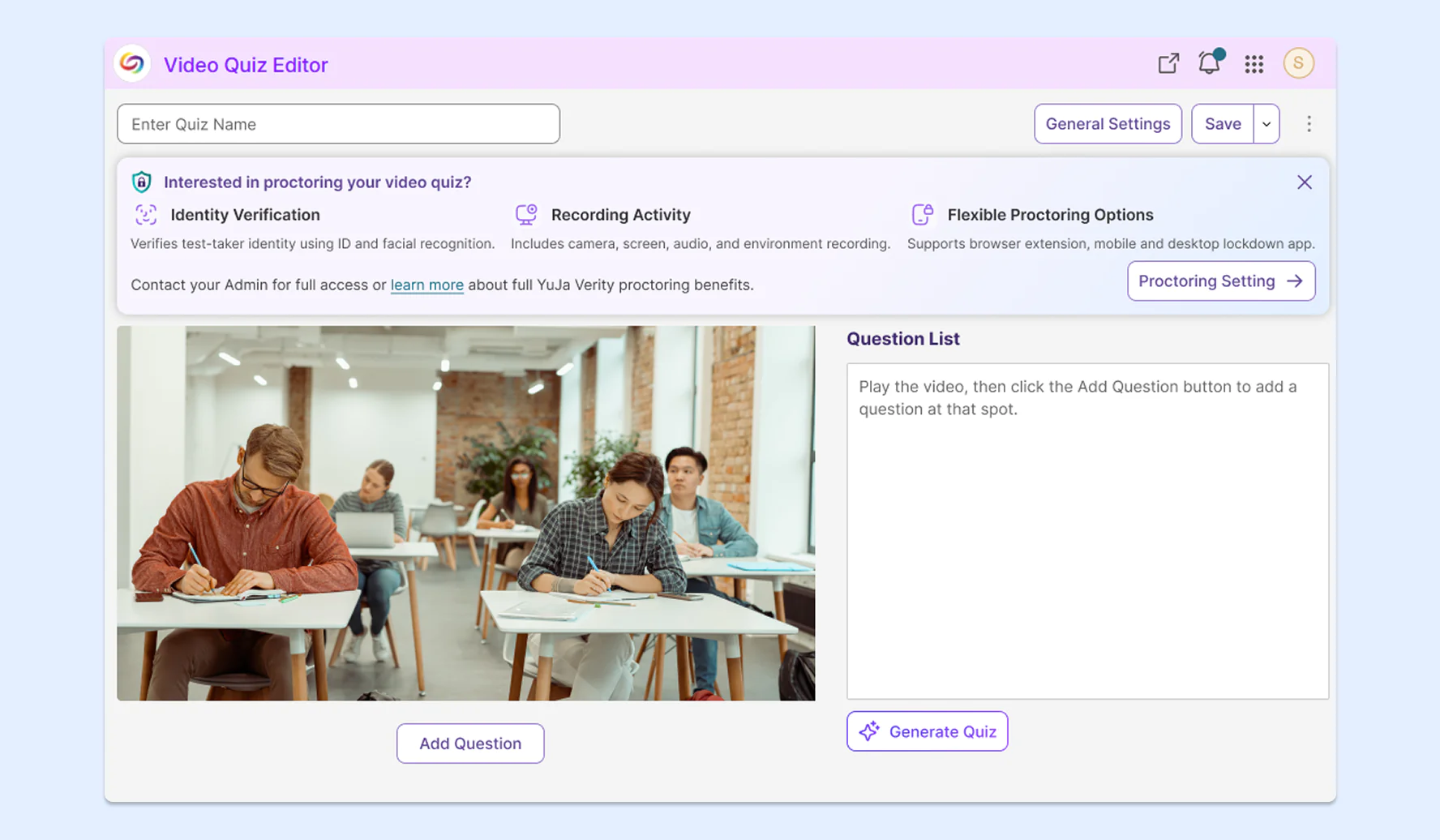
New YuJa Lumina integration for a secure proctored video-quizzing experience
Institutions that have both YuJa Lumina and YuJa Verity can now enable proctoring for video quizzes inside YuJa Lumina. This integration combines an engaging and active learning strategy with secure proctoring, allowing institutions to protect academic integrity without leaving YuJa Lumina. This feature is credit-based and available at no extra cost to YuJa Verity users.
-
Delete previous assessment attempts for enhanced privacy and security
Furthering our efforts to ensure that test-taker data remains private and secure, we’re giving instructors and administrators more control over the retention of assessment recordings by allowing them to delete individual attempts directly from the post-assessment report. This allows instructors to remove individual recordings rather than requesting bulk removal across all test-takers in an entire course or institution.