









Ensuring Accessibility Is Our Priority
Read more >
Boost Video Accessibility with the GenAI Video PowerPack!
Try Now
Supercharge Your Compliance Efforts with AutoPilot Remediation Max!
Try Now
Strengthen Your PDF Accessibility Efforts with Structural Remediation Max!
Try Now
Don't Miss Any of Our Upcoming Webinars—Save Your Spot!
Register
The YuJa Community is here! Connect, get updates, and access exclusive content.
Join Now

The YuJa EqualGround Website Accessibility Platform detects and automates remediation for accessibility, SEO, and performance issues across your website, internal intranet, and applications.
Scrolling logos of YuJa’s clients such as SUNY Corning, University of Cambridge and University of Calgary, etc.
YuJa EqualGround evaluates digital content across multiple areas, including ARIA compliance, accessibility best practices, SEO optimization, usability standards, and performance metrics. See the detailed chart below for specific issues detected in each category.
| WCAG Criterion | Name | Description |
|---|---|---|
| 1.1.1 | Missing Alt Attributes on Non-Text Content | The img element is missing alternative text. |
| 1.1.1 | Missing Alt Text for Image Buttons | This image is used as a button, but it has no alternative text, so screen reader users cannot tell what the button does. |
| 1.1.1 | Missing Alternative Text on Elements with Img Role | This element is marked up as an image (role=img) but has no description. |
| 1.1.1 | Missing Presentational Roles on Decorative Content | This decorative element is announced by screen readers even though it carries no information. |
| 1.1.1 | Redundant Title Attributes on Images with Empty Alternative Text | This image is marked as decorative (empty alt text) but still has a tooltip title, so screen readers announce it anyway. |
| 1.2.1 | Missing Audio Transcript Issues | This audio player has no transcript, so people who are deaf or hard of hearing cannot access its content. |
| 1.2.2 | Missing Captions in Embedded Vimeo Videos | This embedded Vimeo video has no captions. |
| 1.2.2 | Missing Captions in Embedded YouTube Videos | This embedded YouTube video has no captions. |
| 1.2.2 | Missing Captions in Video Content | This video has no captions, so people who are deaf or hard of hearing cannot follow it. |
| 1.3.1 | Improper Definition List Structure | This description list contains content that is neither a term nor a description, so the pairing breaks down. |
| 1.3.1 | Improper List Structure | This list contains content that is not a list item, so screen readers announce the wrong number of items. |
| 1.3.1 | Incorrect Use of headers Attribute by Using scope in Tables | This table uses plain data cells as headers, so screen readers cannot link each value to the right heading. |
| 1.3.1 | Incorrect Use of Scope Attribute in Tables | The scope attribute is used on a cell that is not a header, so screen readers cannot work out the table’s structure. |
| 1.3.1 | Missing Aria-Level on Heading Roles | This element acts as a heading but does not say what level it is, so screen reader users cannot tell where it sits in the page outline. |
| 1.3.1 | Missing Fieldset or Group for Same-Name Inputs | These radio buttons or checkboxes are grouped together, but lack a label telling screen reader users what the group represents. |
| 1.3.1 | Missing Legend in Fieldset | The <fieldset> element is missing a <legend>, so screen readers cannot identify the context or group label for these form fields. |
| 1.3.1 | Missing Parent for Definition Elements | This term or description is not inside a description list, so screen readers cannot pair the two together. |
| 1.3.1 | Missing Parent for List Items | This list item is not inside a list, so screen readers do not announce it as part of a list. |
| 1.3.1 | Table Headers Do Not Contain Table Data | This table’s header cells have no data cells associated with them, so the headers describe nothing. |
| 1.3.4 | Apple Mobile Web App Orientation Issues | This page locks itself to one screen orientation, so people who mount their device in a fixed position cannot use it. |
| 1.3.4 | Meta Viewport Orientation Issues | This page’s viewport settings lock the orientation or block zooming, so people who need to rotate or magnify the page cannot. |
| 1.3.5 | Invalid Autocomplete Values in Form Fields | This form field does not tell the browser what kind of information it collects, so it cannot be filled in automatically. |
| 1.3.5 | Missing Autocomplete Attribute in Form Fields | This form field does not tell the browser what kind of information it collects, so it cannot be filled in automatically. |
| 1.4.1 | Missing Link Styling for Links | This link is only distinguished from the text around it by its colour, so people who cannot see colour differences will miss it. |
| 1.4.2 | Missing Audio Controls in Audio Players | This audio plays without giving the user any way to pause or stop it. |
| 1.4.3 | Low Contrast Issues in Text | This text does not stand out enough from its background, so people with low vision may not be able to read it. |
| 1.4.6 | Enhanced Contrast Issues in Text | This text does not meet the enhanced contrast level required at WCAG AAA. |
| 1.4.8 | Absolute Font Sizes in Paragraphs | This paragraph’s text size is fixed in pixels, so it does not respond when a reader increases their browser text size. |
| 1.4.8 | Absolute Line Heights in Paragraphs | This paragraph’s line spacing is fixed in pixels, so it does not grow when a reader increases their text size. |
| 1.4.8 | Insufficient Line Spacing in Paragraphs | The lines in this paragraph sit too close together, which makes the text hard to read for people with dyslexia or low vision. |
| 1.4.8 | Justified Text Alignment in Paragraphs | This paragraph is justified, which creates uneven gaps between words and makes the text harder to read. |
| 1.4.10 | Viewport Restriction Issues | This page does not adapt to the width of the screen, so people on small screens or at high zoom have to scroll sideways to read it. |
| 1.4.11 | Controls with Low Contrast Issues | The border, background or text of this form control does not stand out enough, so people with low vision may not see it. |
| 1.4.12 | Inaccessible Letter Spacing | This text stops readers widening the space between letters, which some people need in order to read comfortably. |
| 1.4.12 | Inaccessible Line Height | This text stops readers increasing the space between lines, which some people need in order to read comfortably. |
| 1.4.12 | Inaccessible Word Spacing | This text stops readers widening the space between words, which some people need in order to read comfortably. |
| 2.1.1 | Inaccessible Scrollable Regions | This area scrolls, but keyboard users cannot reach it because it cannot receive focus. |
| 2.2.1 | User-Controlled Timed Content Changes | This page refreshes itself on a timer, which can interrupt people who read slowly or use a screen reader. |
| 2.2.2 | Deprecated Tags in Content | This content uses a blinking or scrolling tag that browsers no longer support, and that can cause problems for people with attention or vestibular conditions. |
| 2.4.1 | Missing Bypass Mechanism | Keyboard and screen reader users have to tab through the whole header on every page before they reach the content. |
| 2.4.2 | Missing Page Titles | This page has no title, so it shows as Untitled in browser tabs, bookmarks and search results, and screen readers announce nothing when it loads. |
| 2.4.3 | Incorrect Focus Order | Keyboard focus jumps around this page instead of following the order things appear on screen. |
| 2.4.9 | Link Purpose Issues | Several links on this page share the same text but go to different places, so screen reader users cannot tell them apart. |
| 2.4.10 | Missing Page Headings | This page lacks a main heading, making it difficult for screen reader users to quickly understand the main topic or navigate the structure. |
| 2.4.10 | Missing Section Headings | This section has no heading, so screen reader users cannot tell what it contains or skip past it. |
| 2.5.5 | Insufficient Interactive Element Size | This control is too small to click or tap reliably, which is difficult for people with limited dexterity. |
| 2.5.8 | Small Touch Target Size | This control is too small to tap accurately on a touchscreen, or it sits too close to the one next to it. |
| 2.5.8 | Small Touch Target Size | This control is too small to tap accurately on a touchscreen, or it sits too close to the one next to it. |
| 3.1.1 | Mismatched Declared Language | This page declares two different languages, so screen readers cannot tell which pronunciation to use. |
| 3.1.1 | Missing Language Declaration | This page does not say what language it is written in, so screen readers may read it with the wrong pronunciation. |
| 3.1.2 | Invalid Value for Lang Attribute | The page uses an invalid language code, causing screen readers to fall back to default settings and mispronounce content. |
| 3.2.5 | Users About New Tabs | This link opens in a new tab without warning, which can disorient screen reader users and people using magnification. |
| 3.3.1 | Error Descriptions for Input Fields as Atomic | When this error message updates, screen readers read out only the part that changed, so the message stops making sense. |
| 4.1.2 | Missing Accessible Name on Buttons | This button has no text or label, so screen reader users hear only element’s generic name. |
| 4.1.2 | Missing Accessible Name on Input/Select/Textarea | This form field has no label, so screen reader users do not know what to enter. |
| 4.1.2 | Missing Accessible Names for <iframe> | This embedded frame has no title, so screen reader users cannot tell what it contains before they enter it. |
| 4.1.2 | Missing Link Descriptions | The link does not have descriptive link text or an accessible label, causing screen reader users to hear only link without any indication of its destination. |
| 4.1.2 | Nested Interactive Controls | One clickable control is placed inside another, so screen readers and keyboards cannot tell them apart or reach both. |
| Name | Description |
|---|---|
| Invalid ARIA Attributes | This element has an ARIA attribute that is not allowed on it, so assistive technology may describe it incorrectly. |
| Invalid ARIA Attributes | This element has an ARIA attribute that is not allowed on it, so assistive technology may describe it incorrectly. |
| Invalid ARIA Roles | The element does not have a valid role value. |
| Missing Accessible Name for Braille Properties | This element has a braille label but no corresponding text label, leaving no text alternative for users who rely on assistive technologies. |
| Missing Accessible Name for Braille Properties | This element has a braille label but no corresponding text label, leaving no text alternative for users who rely on assistive technologies. |
| Conditionally Incorrect ARIA Attributes | The conditions for the use of the ARIA label are not appropriate. Certain ARIA labels can only be used on elements if certain conditions are met. |
| Use of Deprecated ARIA Roles | The value assigned to the role attribute is deprecated and no longer valid. |
| Invalid ARIA Dialogs | The dialog lacks an accessible name, making it difficult for screen reader users to identify its purpose or determine what has opened. |
| Hidden Body Element | The entire page is hidden from assistive technology, preventing users from accessing any of its content or functionality. |
| Missing Accessible Names for Input Fields | This input does not have an accessible label, so screen reader users cannot determine what information they are expected to enter. |
| Use of Prohibited ARIA Attributes | The ARIA attribute is prohibited from being used for the element’s role. |
| Redundant ARIA Roles | This element already has the semantics provided by the role, so the role is redundant. |
| Missing Required ARIA Attributes | This element’s role requires an attribute that is missing, so assistive technology cannot report its state. |
| Missing Required ARIA Children | The element has a missing child role value. |
| Missing Required ARIA Parent | The element has a missing parent role value. |
| Use of Invalid ARIA Role Description | The element with the aria-roledescription attribute requires an explicit or implicit supported role. |
| Use of Abstract ARIA Roles | The assigned ARIA role value is not valid. Role values should be checked for spelling errors and correspond to existing ARIA role values. |
| Invalid ARIA Role Usage | The assigned ARIA role value is not valid. Role values should be checked for spelling errors and correspond to existing ARIA role values. |
| Use of Unsupported ARIA Roles | The assigned ARIA role value is not valid. Role values should be checked for spelling errors and correspond to existing ARIA role values. |
| Missing Accessible Names for Input Fields | The element with a semantic role does not have an accessible name. |
| Invalid ARIA Attributes | This attribute is not a real ARIA attribute – it is misspelled or does not exist, so assistive technology ignores it. |
| Invalid ARIA Attribute Values | This ARIA attribute of the element contains an invalid value. |
| Global ARIA Attributes on Presentation Role Elements | This element is marked as decorative but remains keyboard accessible, causing screen reader users to encounter an element that is not announced. |
| Focusable Elements Using the Presentation Role | This element is marked as decorative but remains keyboard accessible, causing screen reader users to encounter an element that is not announced. |
| Name | Description |
|---|---|
| Mismatched Accessible Name and Visible Label | The text displayed as the label for the interactive element does not appear in the programmed accessible name specified in the HTML, such as those provided by <label> and <aria-label> tags. |
| Empty Headings | Headings do not contain any meaningful description, which can be confusing when navigating. |
| Skipped Heading Levels | Certain heading levels have been skipped in the page, which breaks the logical structure of the content. |
| Repeated Alt Text on Images | This image’s alt text repeats wording that already appears right next to it. |
| Landmark Roles on Nested Elements | The role of the landmark is not applied to the correct page hierarchy. |
| Incorrect <noscript> Elements | The page includes <noscript> elements that provide content only when JavaScript is disabled. |
| Missing Heading One (H1) | The page does not include a level one heading, which is meant to identify the main topic or purpose of the page. |
| Use of Visual Tags Without Semantic Meaning | The page uses visual-only tags to style text instead of semantic tags. These tags only change how the text looks but do not provide meaning to assistive technologies. |
| Missing or Improperly Defined Surrounding Regions | This content is not contained within a landmark, making it harder for screen reader users to find when navigating by region. |
| Duplicate Captions on Tables | Two or more tables on this page share the same caption. |
| Duplicate Landmark Regions | This page has more than one landmark of the same kind, so screen reader users cannot tell them apart. |
| Issue Type | Description |
|---|---|
| Canonical Tag | Canonical tags prevent duplicate-content issues by telling search engines which version of a page is preferred. |
| Crawlable Links | Links with a missing, empty or broken destination stop search engines from finding linked pages. |
| Language & Region Tags (hreflang) | Hreflang tags tell search engines the language and region a page is meant for, so the right version shows up in search results. |
| Page Status Code | Pages that return an error status code may not be indexed by search engines. |
| Page Indexability | Pages blocked from indexing (for example by a “noindex” tag or header) can’t appear in search results. |
| Descriptive Link Text | Descriptive link text helps search engines understand what the linked page is about. |
| Meta Description | Meta descriptions summarize a page and improve click-through rates from search results. |
| Meta Description Length | Meta descriptions that are empty or longer than 160 characters may be cut off or ignored in search results. |
| Page Title | Every page needs a title. It’s the main headline shown in search results and browser tabs. |
| Page Title Length | Titles longer than 65 characters may be cut off in search results. |
| Robots.txt File | An invalid robots.txt file can stop search engines from crawling the site properly. |
| Social Sharing Tags (Open Graph) | Open Graph tags control how content looks when it’s shared on social media. |
| Structured Data | Structured data (JSON-LD) helps search engines categorize content and can improve how the page appears in results. |
| XML Sitemap | A sitemap that includes the page helps search engines crawl the site effectively. |
| Internal Link Count | More than 100 internal links on a page can dilute link value and hurt ranking. |
| Page Redirects | Pages that redirect to another URL slow loading and can weaken search ranking. |
| Mobile Viewport Tag | Viewport meta tags make pages display properly across devices, and mobile-friendliness is a ranking factor. |
| Main Heading (H1) | Each page should have exactly one H1 heading so search engines understand its main topic. |
| Image Alt Text | Alt text helps search engines index images and improves accessibility. |
| Issue Type | Description |
|---|---|
| Readability | Content is too complex or hard for the intended audience to understand. |
| Spelling Errors | Spelling mistakes undermine a website’s credibility and professionalism. |
| Broken Links | Broken links hurt the user experience and SEO performance. |
| Unsafe Domains | Links to domains flagged as unsafe or malicious put visitors at risk. |
| Personal Information Exposure | The page may be exposing sensitive personal information by mistake: |
| Social Insurance Numbers | The page contains what look like Social Insurance Numbers (SINs). |
| Phone Numbers | The page contains phone numbers. |
| Email Addresses | The page contains email addresses. |
| Issue Type | Description |
|---|---|
| First Contentful Paint (FCP) | The time from navigation until the browser renders the first piece of content. |
| Largest Contentful Paint (LCP) | The time from navigation until the largest visible content element is rendered. |
| Total Blocking Time (TBT) | The total time between First Contentful Paint and Time to Interactive when the page can’t respond to user input. |
| Cumulative Layout Shift (CLS) | How much visible content moves around unexpectedly while the page loads. Lower is better. |
| Time to First Byte (TTFB) | The time from navigation until the browser receives the first byte of data from the server. |
| Speed Index (SI) | How quickly the page’s content visibly fills in, measured as the average time visible parts of the page take to appear. |
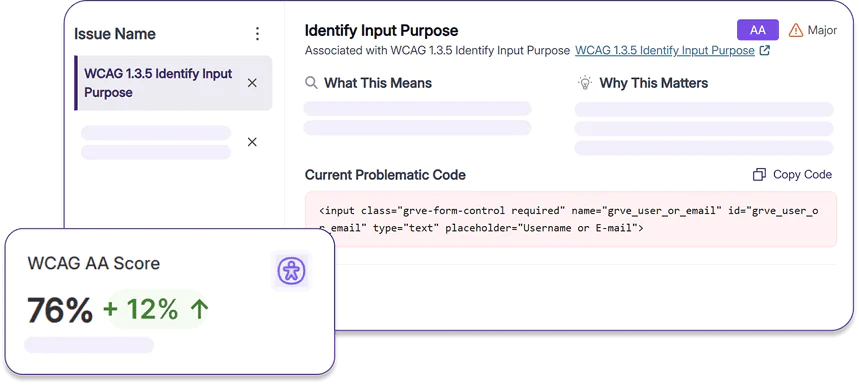
YuJa EqualGround’s accessibility checkers use compliance policies directly from the source guidelines. WCAG, ABP, SEO, usability, performance, and ARIA standards are embedded in the platform’s programming, allowing you to trust that your website is scanned against up-to-date regulations to help keep you compliant.

“Accessibility compliance allows access to print, audio, and visual media for users to choose the best medium for their learning needs. Accessibility allows for inclusion of all users by all people being able to perceive, understand, navigate, and interact with the electronic information.”
— Amanda Rosenzweig, Ph.D., Canvas Administrator, Biology Professor and Department Chair, Delgado Community College
Join the 1,000+ Organizations Deploying High-Impact Solutions