


We’re rolling out updates to all YuJa Panorama LMS Accessibility Platform instances over the next few weeks. This release will introduce professional document remediation services through the new DocAssist module, a redesigned issue fixing workflow for faster remediation, expanded HTML accessibility checks with automated fixes, historical usage report access in the admin portal, and enhanced security features including multi-factor authentication. Additional updates include support for .htm file scanning, bulk image alt text updates for Canvas, alternative text history tracking, and streamlined user management capabilities across all major LMS platforms.
-
New HTML Accessibility Checks Expand Coverage to Additional Standards
YuJa Panorama will now detect 10 new HTML accessibility issues with automated remediation options, helping institutions identify and resolve previously undetected barriers in their HTML content.

-
Deprecated Inline Tags: Automatically identifies and provides replacement options for blink, font, and marquee tags.
-
Deprecated Head Tags: Detects basefont tags in document head sections with automatic removal upon confirmation.
-
Unique ID Attributes: Flags duplicate ID attributes across documents with text field remediation for new unique IDs.
-
Unique Accesskey Attributes: Identifies duplicate accesskey values with single-character replacement options.
-
Unique Frame/Iframe Titles: Detects duplicate frame titles with text field remediation for unique descriptions.
-
Button Text Requirements: Ensures buttons have discernible text with aria-label field remediation options.
-
Mobile Scaling Protection: Removes user-scalable=”no” restrictions from viewport meta tags automatically.
-
Proper List Structure: Converts non-list-item elements within lists to proper li tags automatically.
-
List Item Containment: Provides multiple remediation options for li elements outside proper list containers.
-
Document Language Specification: Ensures root html tag elements have required lang attributes with language selection options.
-
-
Request Professional Document Remediation Services Through New DocAssist Module
Institutions can streamline complex accessibility remediation by leveraging YuJa’s team of professional accessibility specialists or streamlining internal workflows through a centralized request system. This service addresses the growing challenge of meeting strict accessibility compliance deadlines while managing limited staff resources, allowing institutions to focus their internal teams on strategic initiatives rather than time-intensive document fixes. The dedicated DocAssist admin panel provides complete visibility into remediation requests, progress tracking, and completion status, while automatically updating finished documents in their original LMS locations to eliminate the manual file replacement process that often creates versioning confusion and workflow bottlenecks.

-
Access Historical Usage Reports Directly in Admin Portal
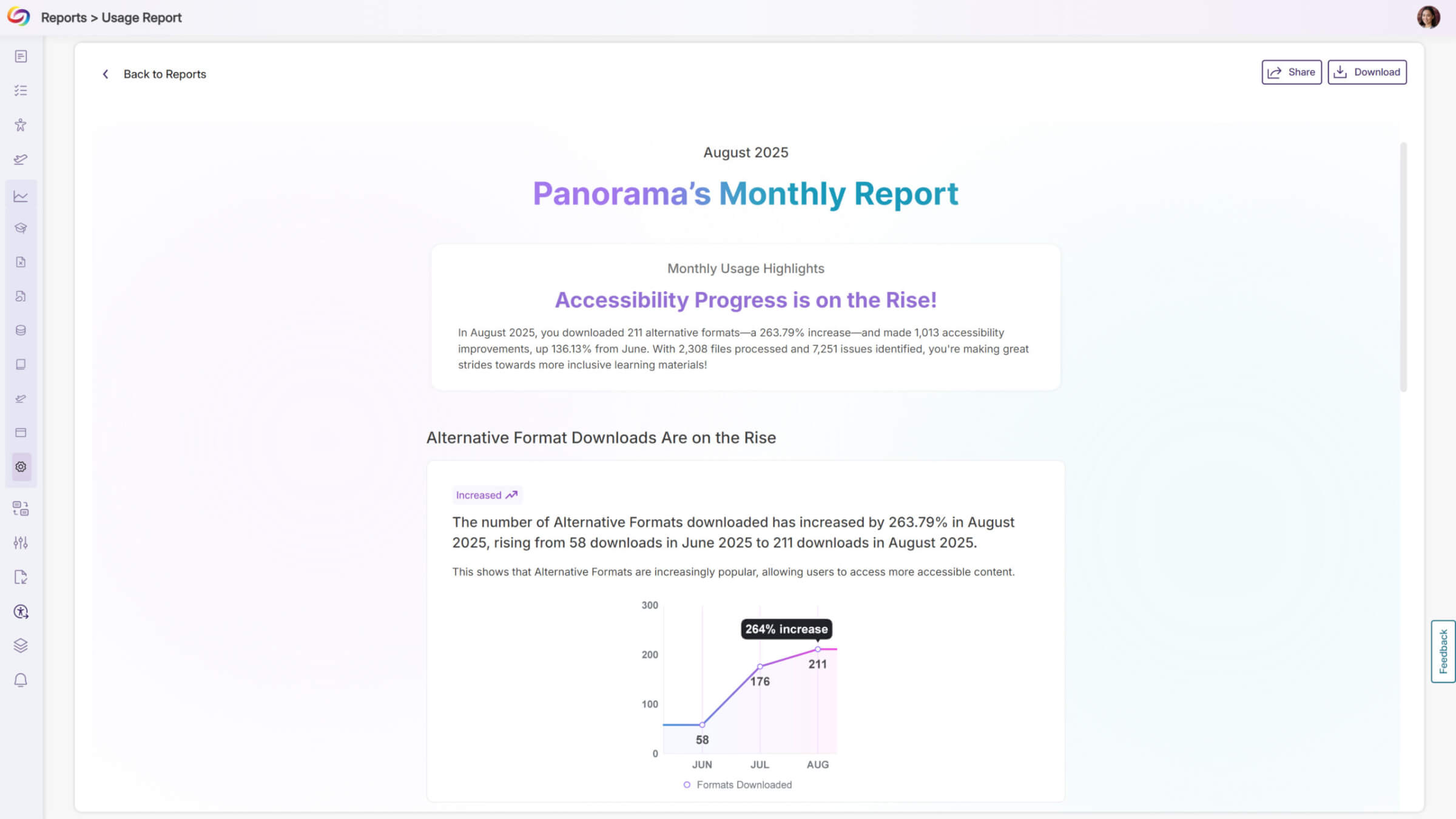
Administrators will be able to access all previous monthly usage email reports within YuJa Panorama’s admin portal. On their first login each month, administrators will receive a popup displaying the latest usage data, helping ensure they stay informed about their institution’s accessibility progress without interrupting their workflow.
-
Navigate Through Accessibility Issues Faster with Redesigned Workflow
The accessibility issue remediation process’s redesigned workflow provides a bulk remediation capabilities that can handle multiple issues simultaneously. The new interface will allow users to stage corrections across issues, navigate between issues using arrow buttons, and automatically advance to the next issue after each resolution, reducing the time typically spent on document accessibility compliance across both WYSIWYG content and files.

-
Enable Manual Dismissal of Accessibility Issues During Remediation
Administrators will be able to enable a setting that allows users to manually dismiss accessibility issues from the accessibility report, providing flexibility to skip remediation for specific cases.

-
Automate Image Alt Text Updates Across Entire Canvas Courses
Canvas administrators will be able to upload CSV files containing context ID, filename, and alternative text to automate image alt text replacement across multiple courses simultaneously. This new Actions sidebar feature includes file validation, search and filtering capabilities, and real-time table updates to track bulk alternative text modifications.

-
Support for .htm File Scanning Across LMS Platforms
YuJa Panorama will now scan .htm files across all LMS platforms and generate alternative formats for this common file type. Students will be able to access alternative formats for .htm files just like other supported document types.

-
Improved Issue Highlighting Accuracy in Document Accessibility Reports
Accessibility issue highlighting in DOCX and PPTX files will now pinpoint the exact location of problems with improved coordinate accuracy. This eliminates cases where highlighting boxes appeared in incorrect sections, making it easier for users to identify and remediate specific accessibility issues within document previews.

-
Add and Edit User Names During Account Creation and Management
Administrators will now be able to enter first and last names when manually creating users and edit existing user names through roster management. This update also supports CSV uploads with optional First Name and Last Name columns for bulk user creation with complete name information.

-
Filter Reports by Academic Year with Multiple Term Selection
Administrators will be able to select multiple terms when filtering console reports, providing accurate academic year data without including outdated courses from previous years. This update supports multi-select functionality across all report types and includes additional filtering options for accounts, impact types, and websites, depending on the report.

-
Enhance Login Security with Multi-Factor Authentication for Manual Login Accounts
Administrators will be able to enable multi-factor authentication for manual login accounts, requiring users to set up and enter one-time passwords after entering their username and password.

-
The Immersive Reader Will Display Only Link Text Without Raw URLs
The Immersive Reader will now display only the descriptive text of hyperlinks instead of reading both the link text and the full URL address, creating a cleaner reading experience by eliminating lengthy URL announcements that can disrupt content flow.

-
Support SSO Role Mapping for Multiple Roles Separated by Commas
SSO role mapping will now support multiple role names separated by commas in the text box, allowing institutions to map several customized role types simultaneously. This update provides greater flexibility for institutions with complex role structures in their SSO-SAML configurations.

-
Ability to Disable User Accounts Without Losing Historical Data
Administrators will be able to disable user accounts instead of permanently deleting them, preserving user data while removing access to Panorama features. Disabled users will be hidden from roster management, enrollment workflows, and notification filters.
-
Collect Detailed Feedback for Lower NPS Scores to Improve Product Experience
Users who submit NPS scores of 7 or below will now see a description box asking for additional feedback about their experience to help identify specific areas for improvement while maintaining the existing survey flow.


