Product Updates

Get the latest platform updates, features, and announcements—all in one place.

Help Shape What's Next

Join discussions, request features, and vote on ideas.

Join Community

Built With Passion

Learn about the people behind YuJa.

About Us

Trial Program

We offer an opportunity to try our products.

Request a Demo
  • January 26, 2024

    YuJa Panorama Digital Accessibility Platform – “Mana Peak” Version Released to US, CAN, AU, and EU Zones

    We have successfully pushed an update to all YuJa Panorama Digital Accessibility Platform instances residing in the United States, Canada, European Union, and Australia. This release provides our users with updates to our Remediation Engine to support PDF documents, a new AI-powered tool to propose accessibility fixes, enhanced support for OCR conversions, SAML-SSO integration for the Panorama Platform, the option to add users outside of the LMS, new accessibility design tools, Panorama support for files up to 50 MB, the option to bulk changes fixes, and more.
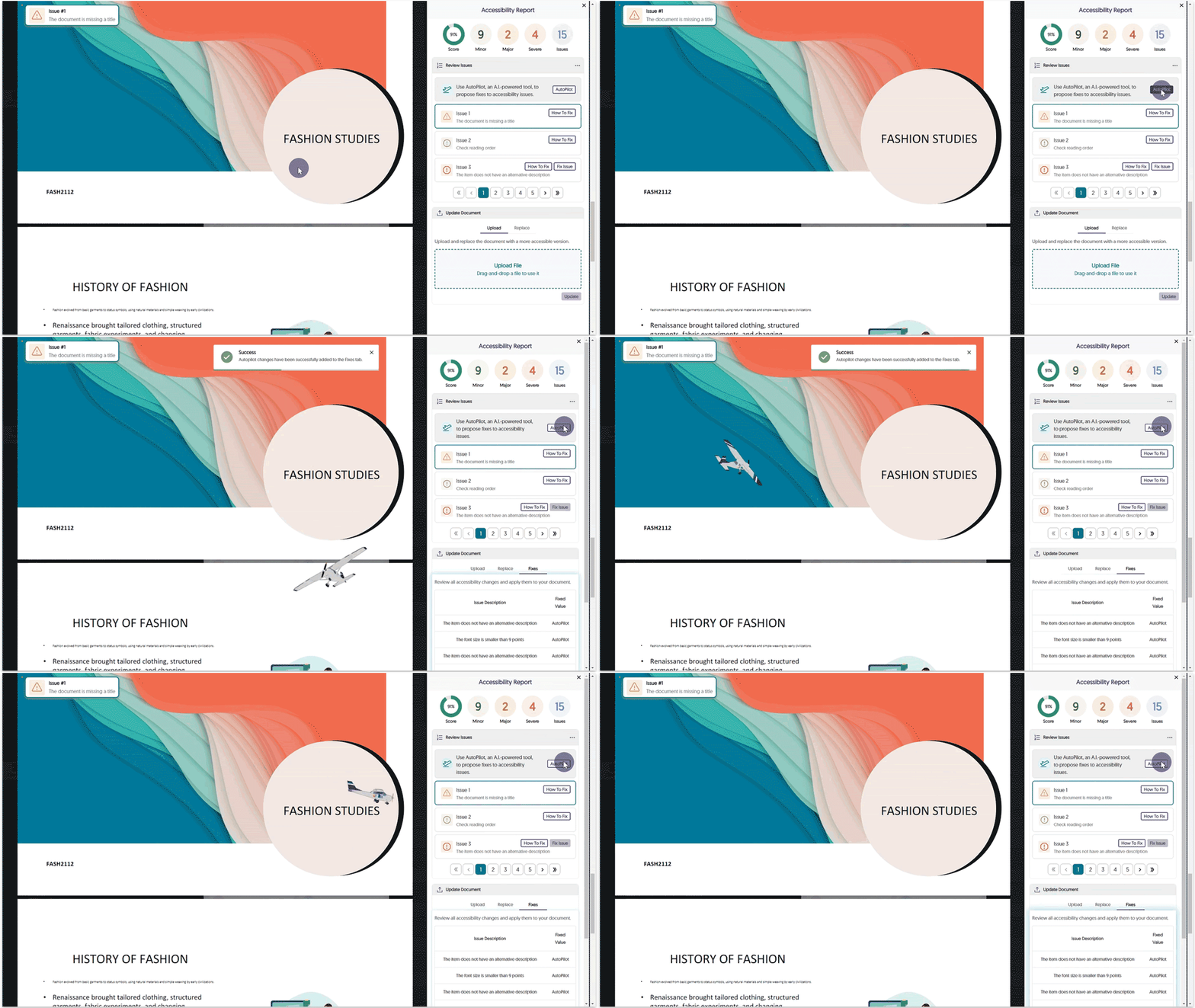
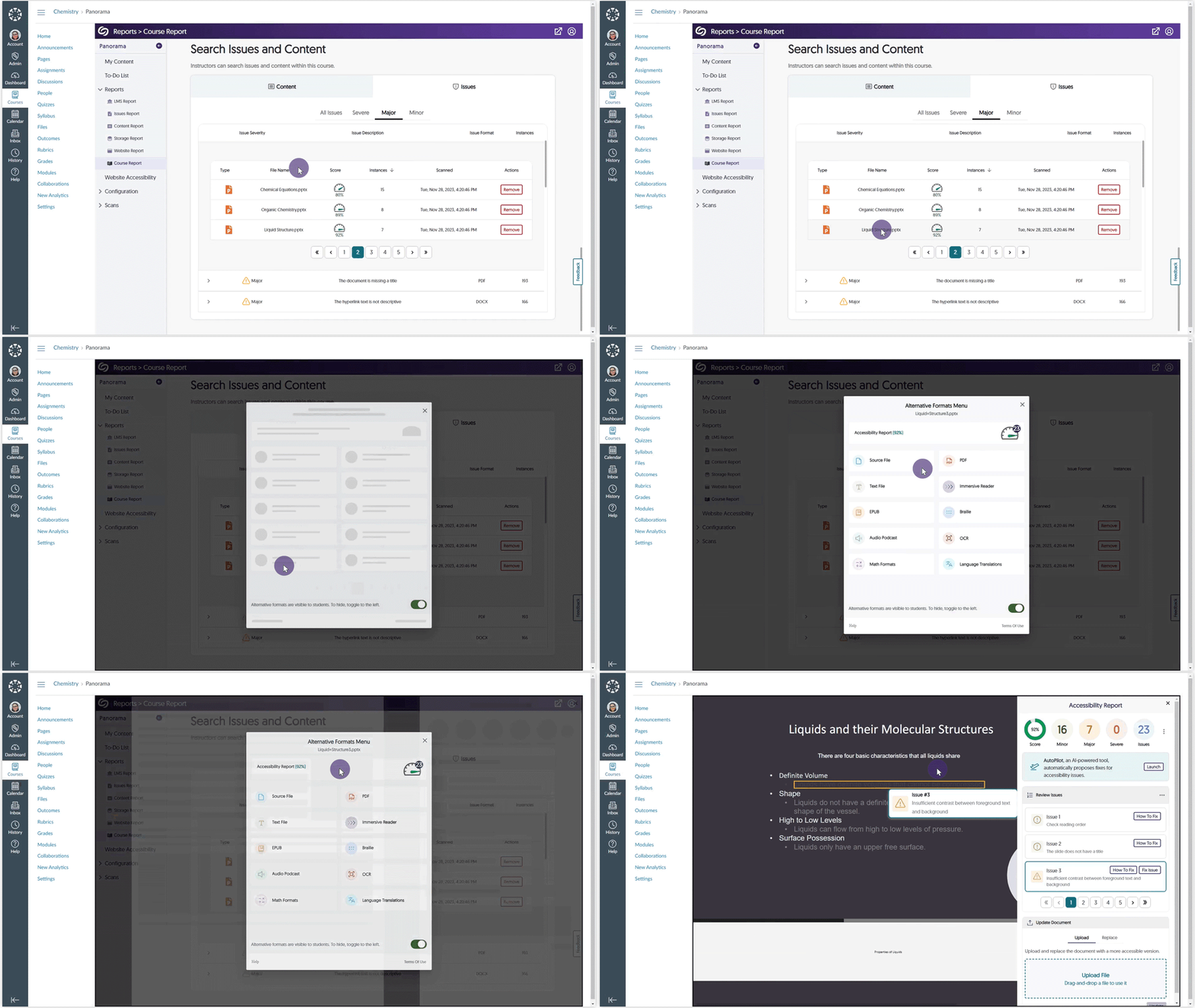
    1. New Tool! AutoPilot: AI-Powered Tool to Propose Accessibility Fixes We’re introducing an industry-first feature by launching AutoPilot, an AI-powered tool that automatically proposes document accessibility fixes for PDF, DOCX, PPTX, and HTML files. With just one click, AutoPilot users can send proposed fixes to the Remediation Engine, which will automatically remediate the document. In the future, AutoPilot will propose fixes for other issue types, as well as broaden the scope to Course and the full LMS. AutoPilot will currently propose fixes for the following issue types:
      • Font size
      • Color contrast
      • Missing alt-text
      The AutoPilot button is selected and proposed fixes are automatically applied.
    2. Enhanced Support for OCR Conversions: OCR Text and OCR Immersive Reader We are expanding our OCR conversion engine to provide two new capabilities for generating distinct documents based on the OCR’d content.
      • OCR Text: Generate a brand new text file.
      • OCR Immersive Reader: Use the immersive reader for OCR’d content.
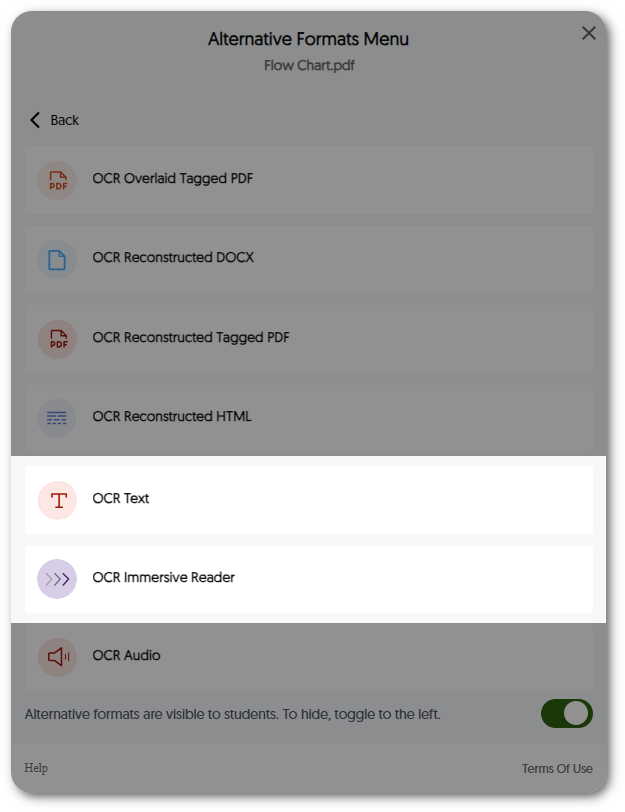
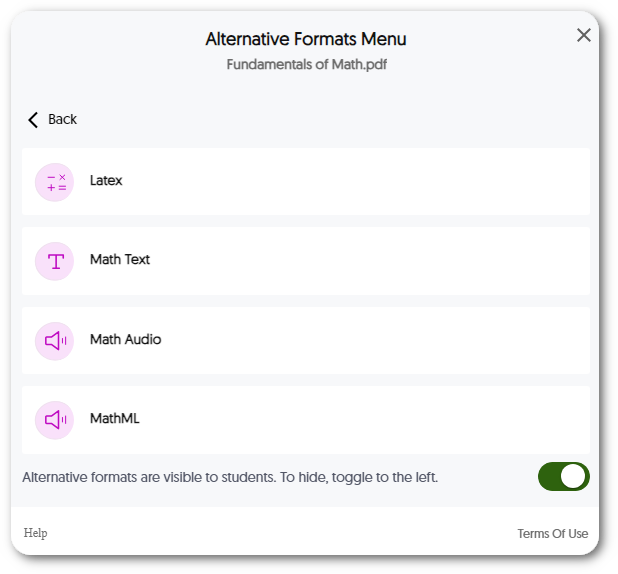
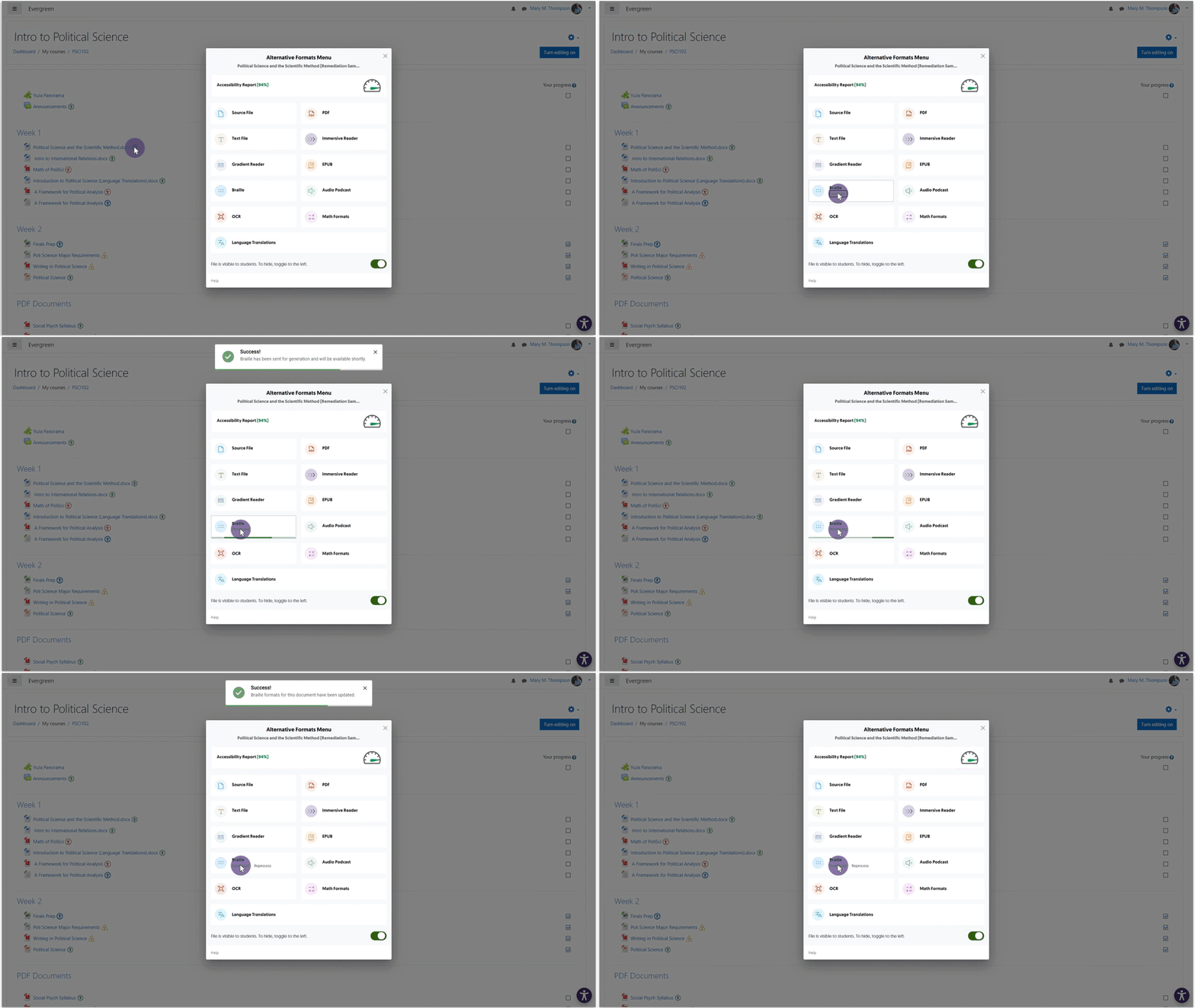
      The Panorama Alternative formats menu for OCR.
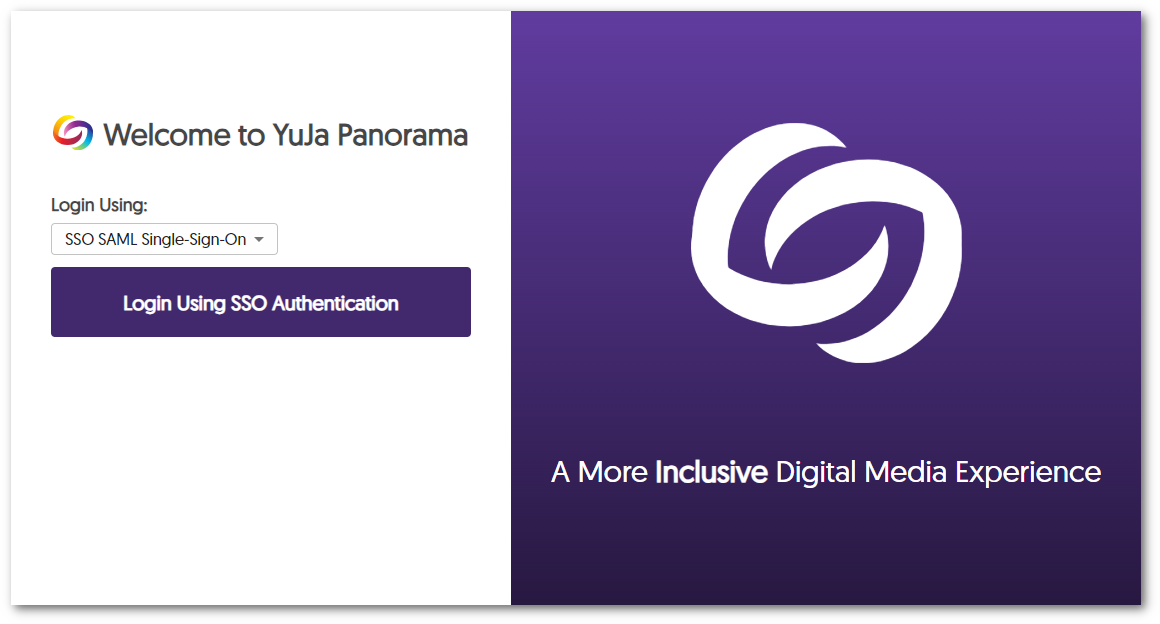
    3. No LMS Required! SAML-SSO Authentication Support for the Panorama Platform Administrators, instructors, and students can access their respective reports and accessibility settings by signing in to the Panorama Platform directly with their SAML-SSO integration. Panorama SSO SAML sign-on page.
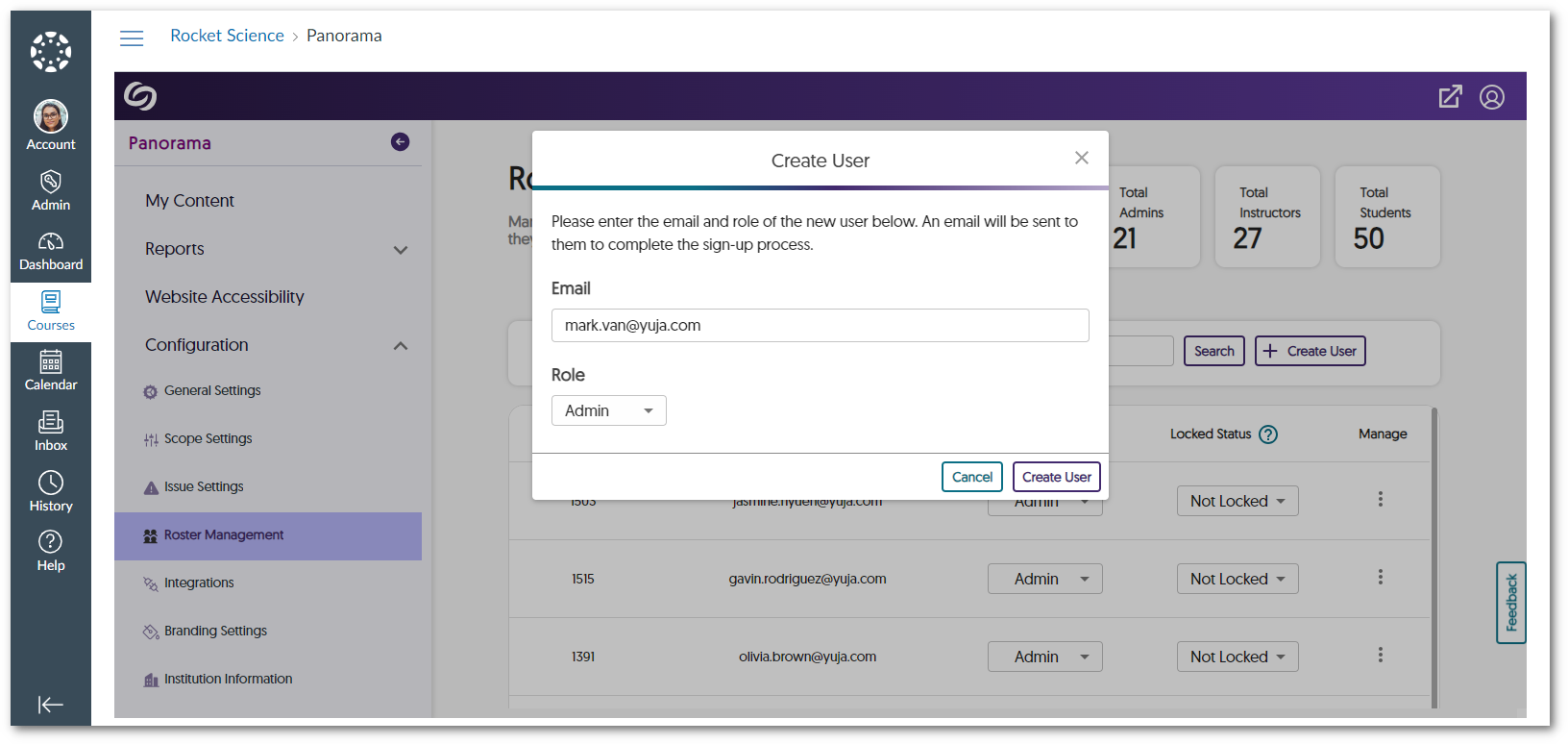
    4. Add Users Outside of the LMS to the Panorama Platform Administrators can add users not registered for their LMS into the Panorama Platform to manage Panorama reports and settings based on their assigned roles. The Create user modal inside Roster Management.
    5. Custom Panorama Portal URL Prefix Institutions can create their own custom Panorama Platform URL prefix. Simply contact your dedicated Customer Success Manager to get started.
    6. New Accessibility Design Tool Elements We have expanded our Accessibility Design Tool to incorporate two new elements when creating HTML content.
      • Progress Bar: Content Creators can place progress bars for long-form content to help their viewers keep track of their progress.
      • Expander: Content Creators can place discrete expandable cards to show viewers additional content.
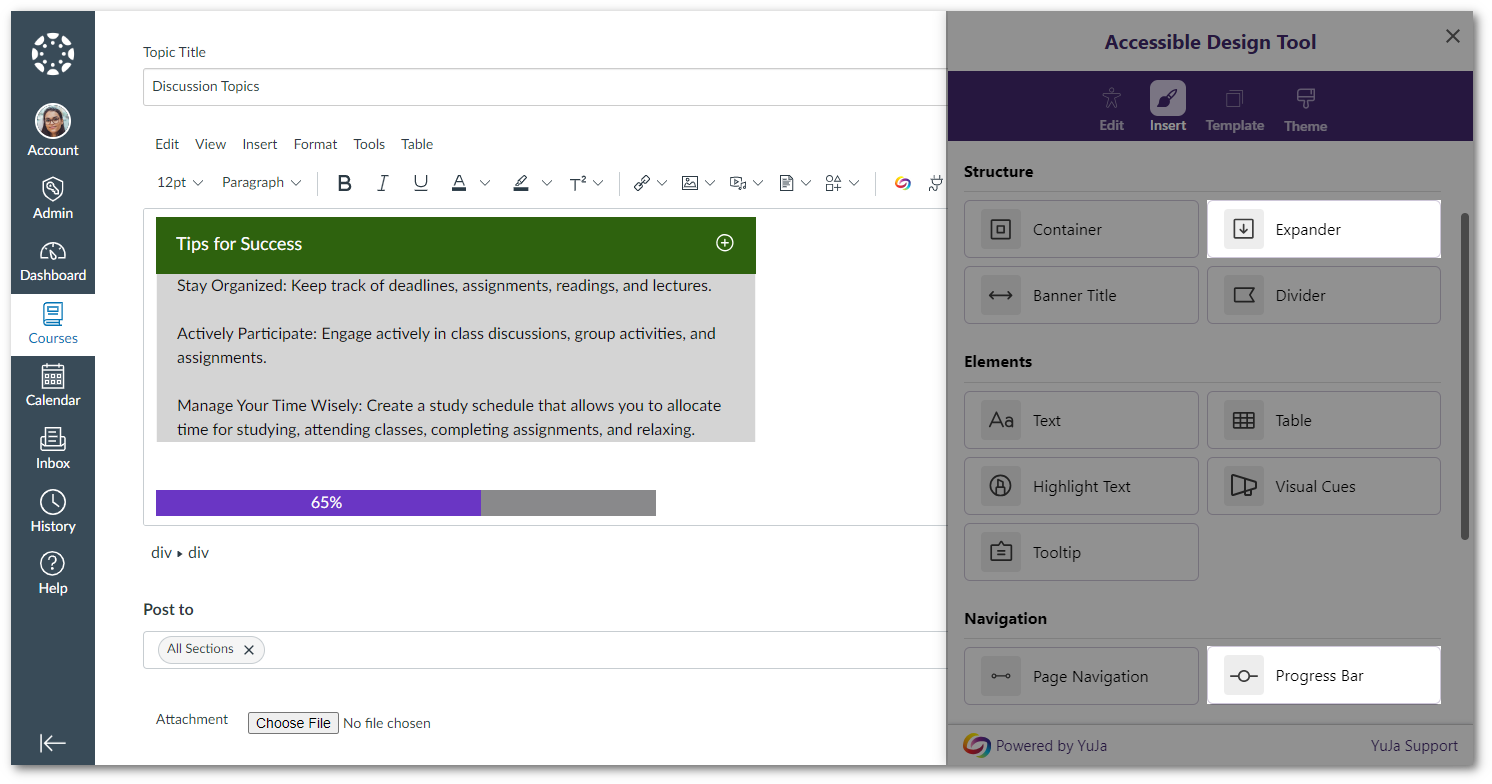
      The expander and progress bar tools are added within an HTML editable area in Canvas.
    7. Generate Panorama Reports for Files up to 50MB Panorama will now support generating Accessibility Reports and Alternative Formats for files up to 50 MB in size.
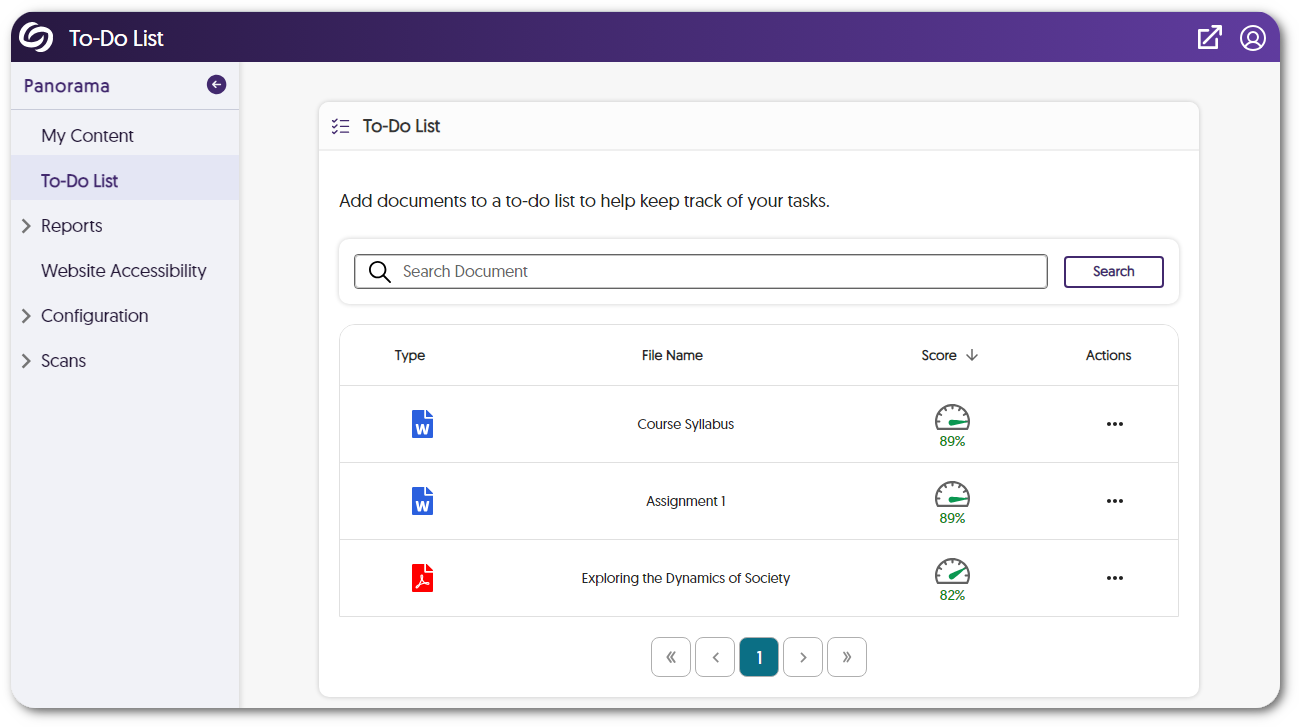
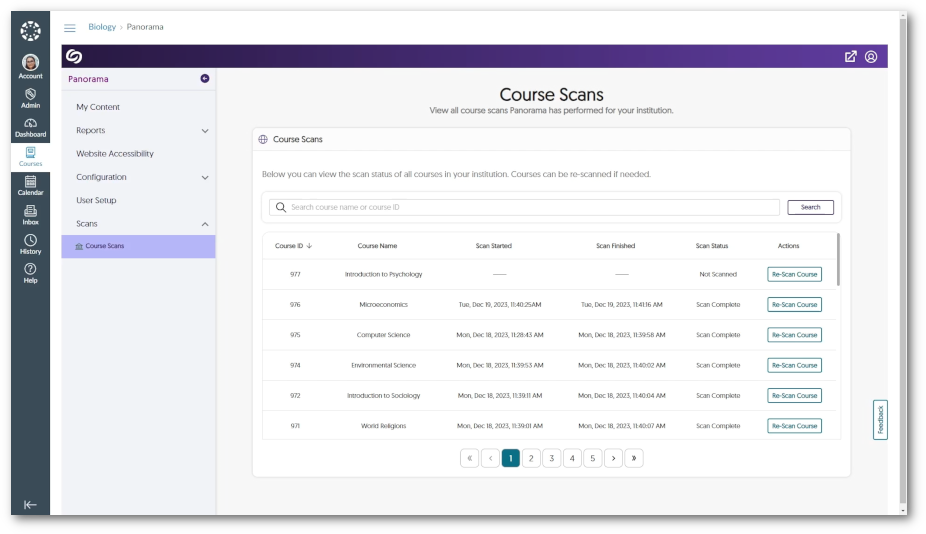
    8. New Course Scans Page to View the Status of Courses Administrators can track the progress of Panorama’s course scans and view a list of all courses within their institution. If desired, they can also scan or re-scan courses to locate new documents or pages within the course. Panorama's course scan page shows a table of scanned courses.
    9. Panorama for Canvas: Website Accessibility Enabled Canvas-Wide The Website Accessibility icon is no longer restricted within a course. Instructors and students can access the Website Accessibility icon from anywhere within Canvas.
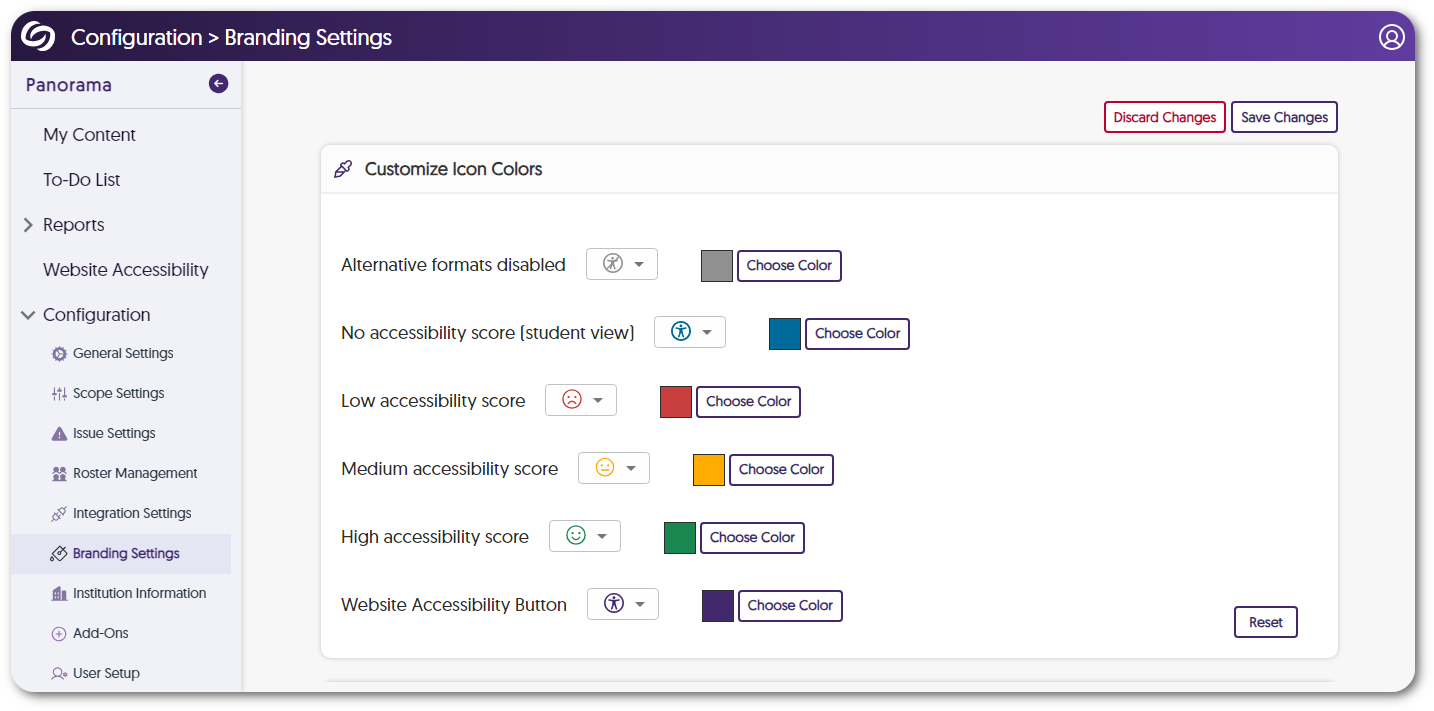
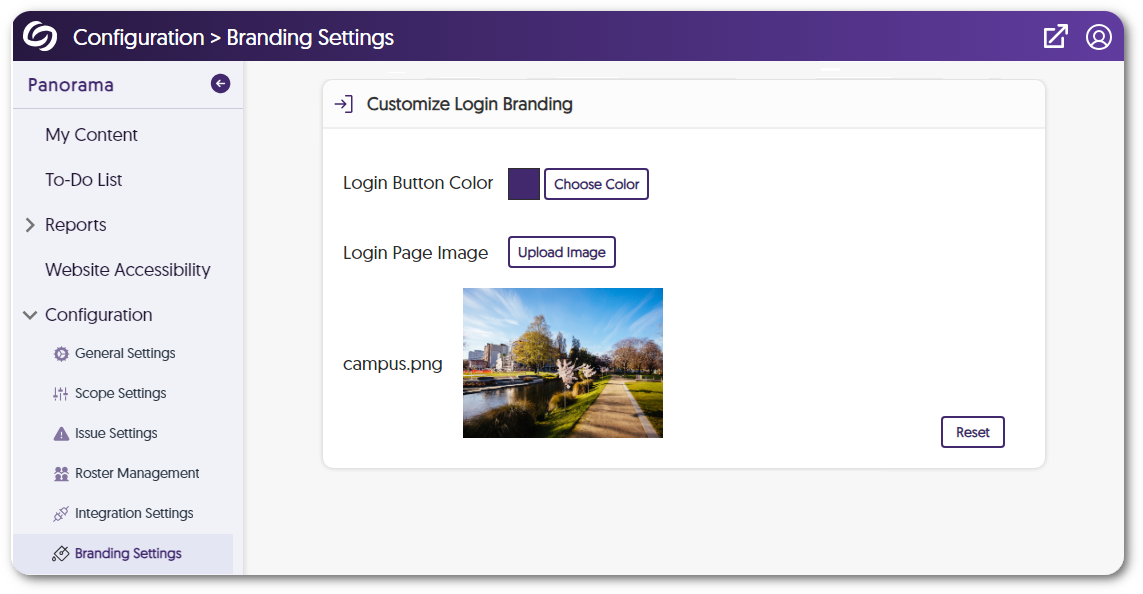
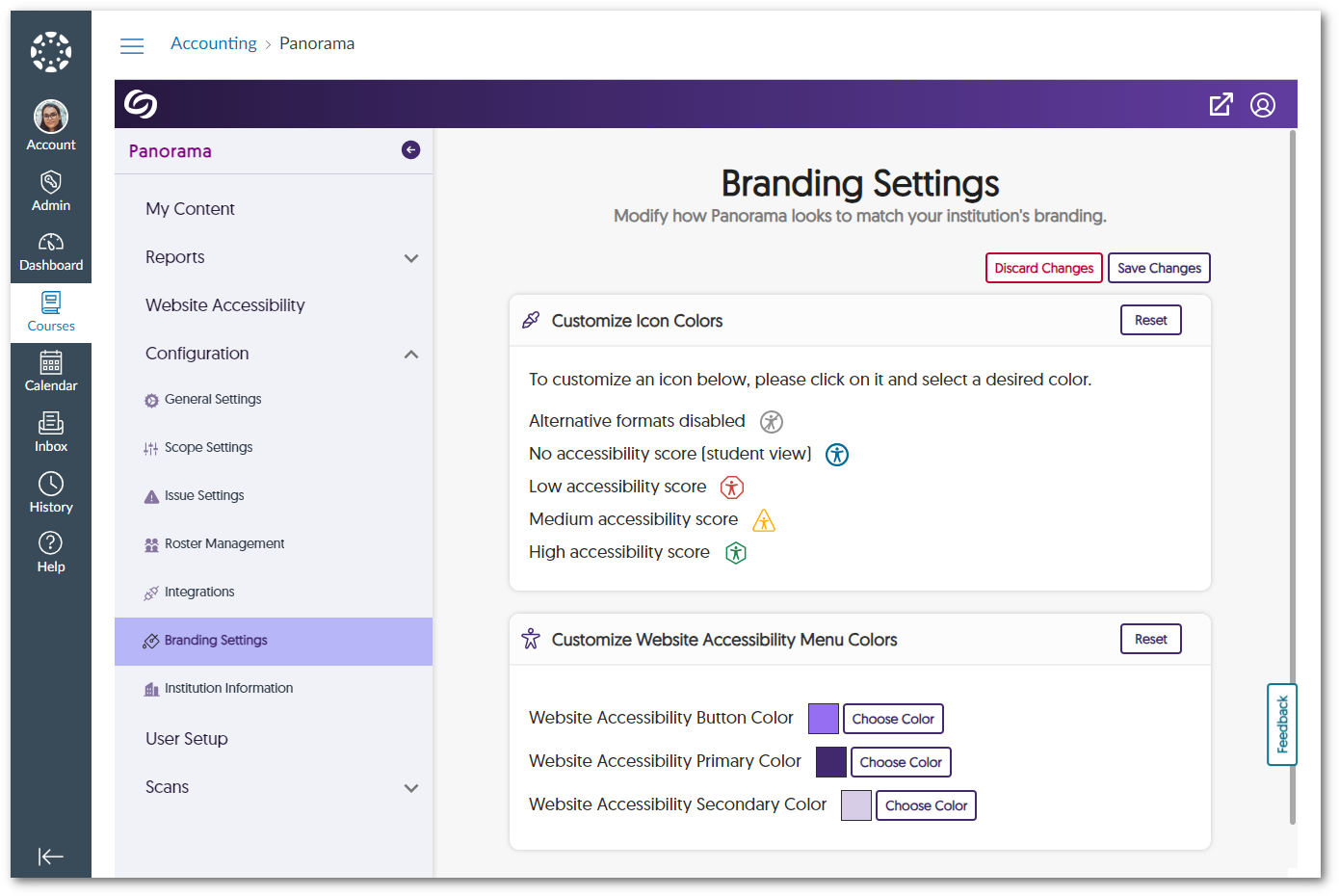
    10. New Branding Settings to Customize Website Accessibility Colors We have added a new Branding Settings tab that allows administrators to customize the colors of the Accessibility Icons and the Website Accessibility menu. Options to customize icon colors and the website accessibility menu colors.
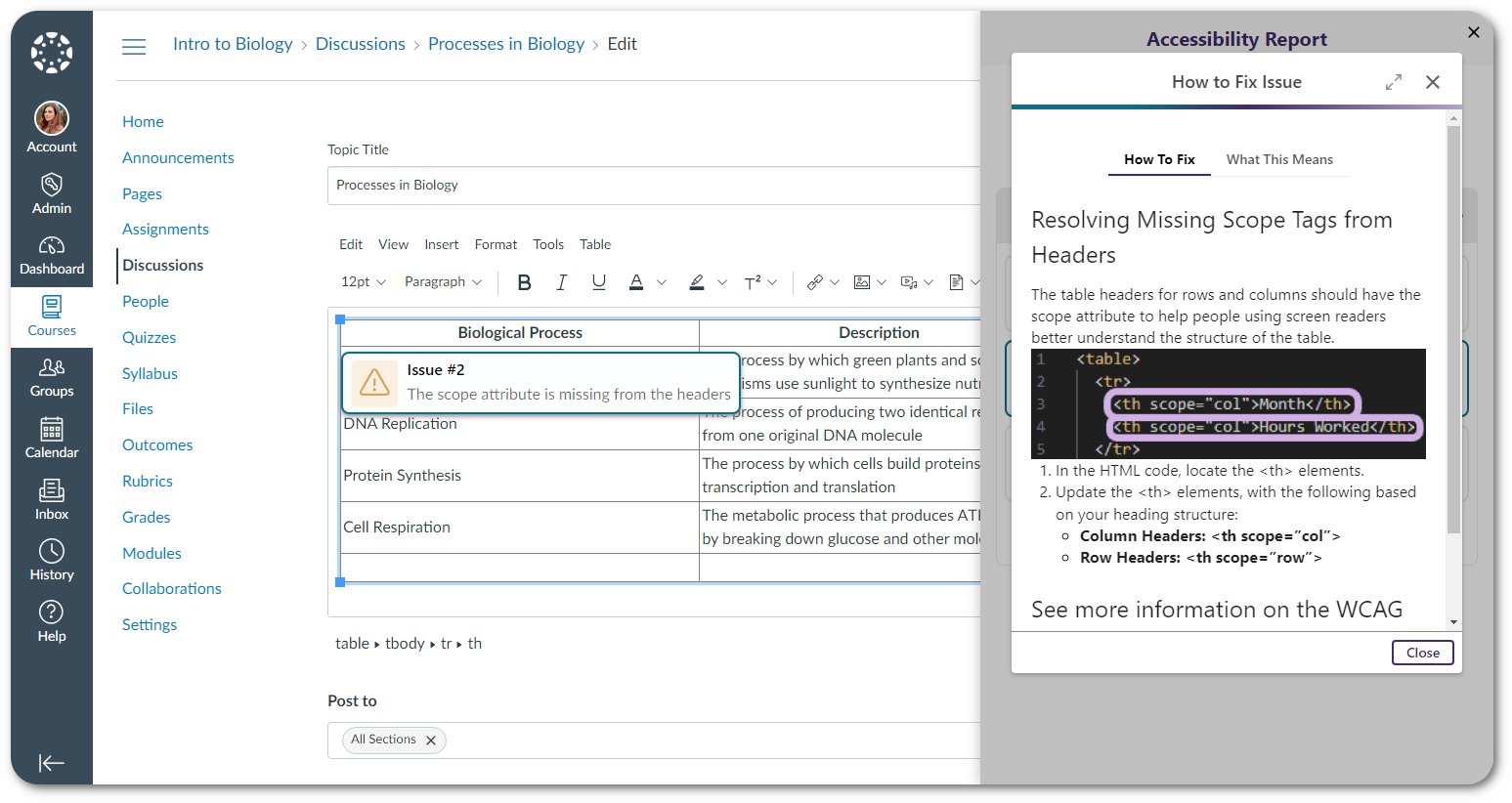
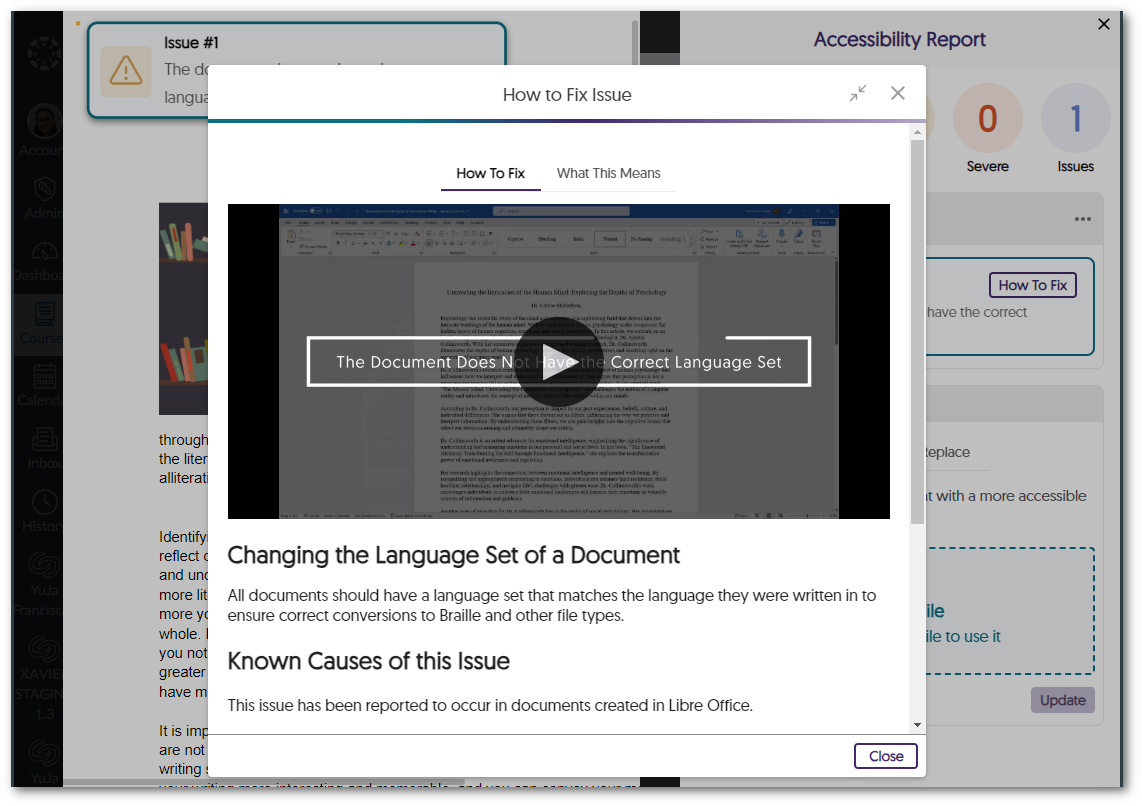
    11. Pop-Out the How-to-Fix Window for a Wider View We have introduced a new pop-out feature in the How-to-Fix panel that displays the steps to resolve an issue in a larger window, making it easier to view. A pop-out view of the how to fix issues modal.
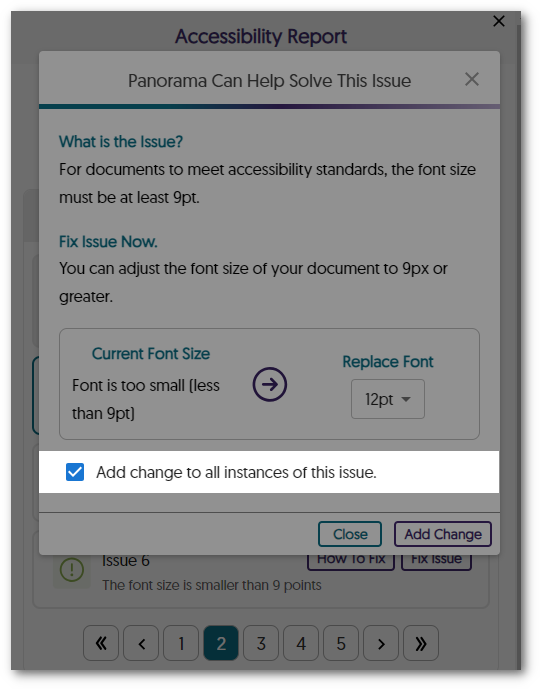
    12. Bulk Change All Instances of the Same Accessibility Issue Users can now choose to apply their accessibility changes to all instances of the issue when remediating a document.
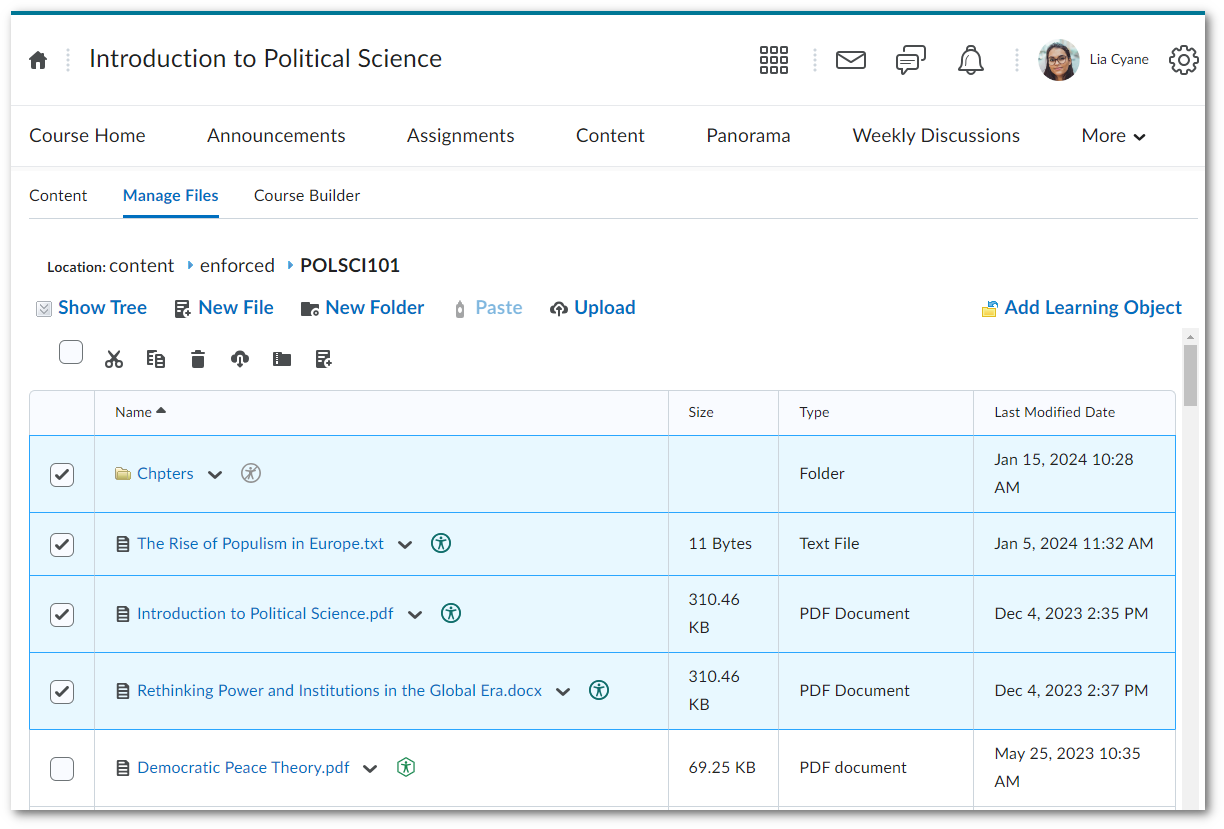
    13. Panorama for D2L: Accessibility Reports for Documents within the Manage Files Page Panorama now supports generating Accessibility Reports and Alternative Formats for documents found within the Manage Files page in D2L Brightspace.
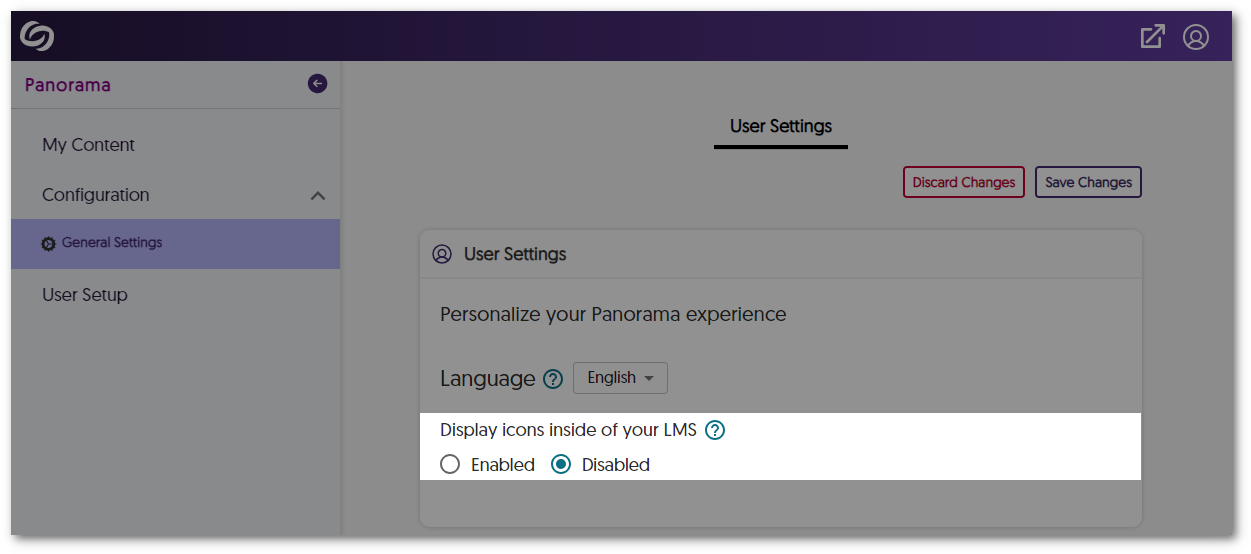
    14. Students Can Disable Panorama Accessibility Icons Panorama Accessibility icons can now be disabled by individual students.
  • December 8, 2023

    YuJa Panorama Digital Accessibility Platform – “Lincoln Peak” Version Released to US, CAN, AU, and EU Zones

    We have successfully pushed an update to all YuJa Panorama Digital Accessibility Platform instances residing in the United States, Canada, European Union, and Australia. This release provides our users with updates to our Remediation Engine to support HTML documents, the option to add alt-text to all occurrences of an image in Canvas, a new OCR conversion engine, enable Panorama in specific LMS sub-accounts, new design tool elements, Themes and Templates for the Accessible Design Tool, increased accessibility checks for images, HTML and DOCX files, and so much more!
     
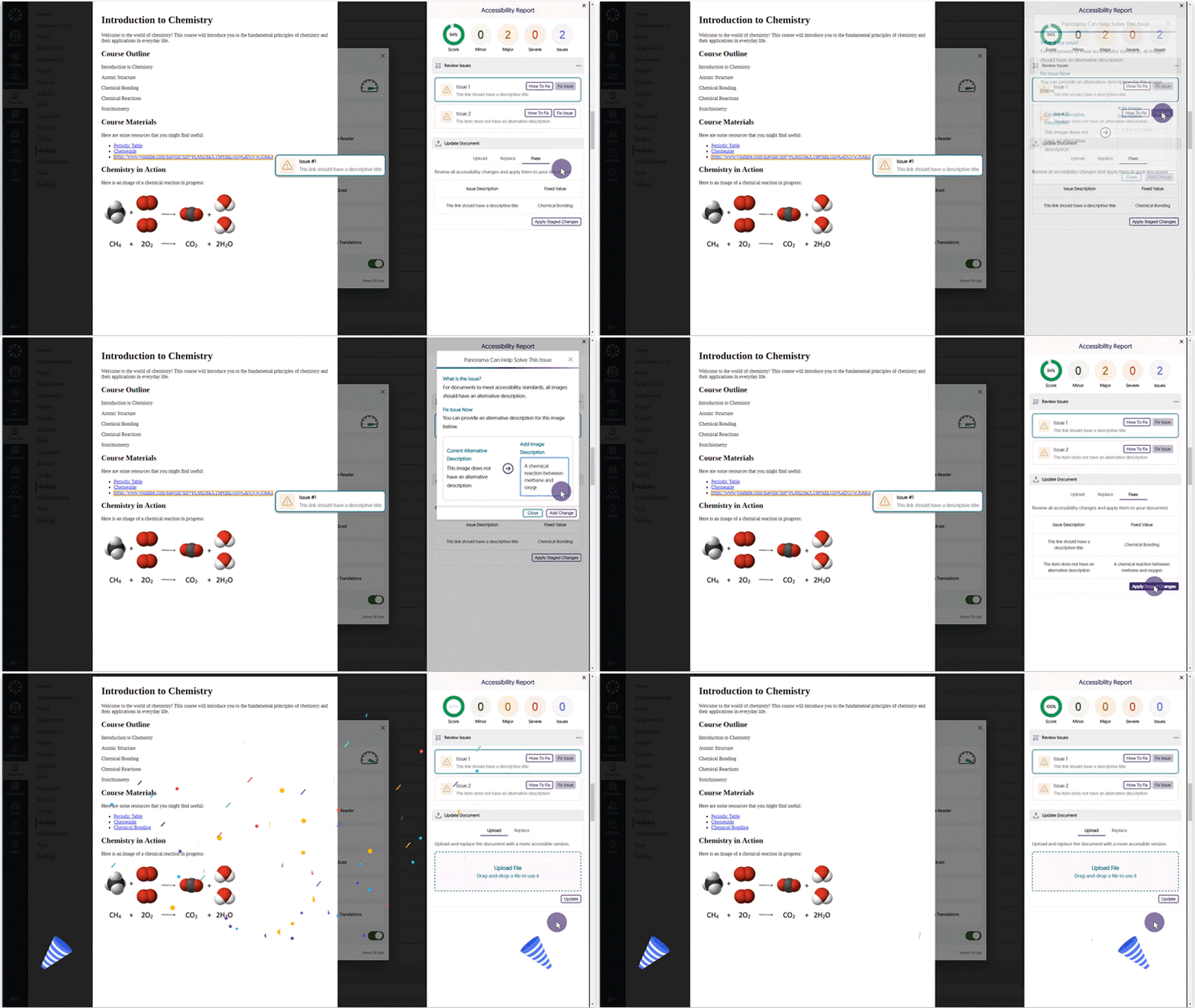
    1. New Inline WCAG 2.1-Aligned Remediation Engine for HTML Issues Directly within Accessibility Reports Complementing our Remediation Engine for inline accessibility issue resolution of Microsoft Word documents and PowerPoints, we’ve now extended these capabilities to HTML documents inside Accessibility Reports to resolve issues such as:
      • Alternative text for images.
      • Non-descriptive hyperlink text.
      • Unformatted lists.
      HTML document issues are resolved in the Accessibility Report.
    2. Find-and-Tag to Add Alt-Text to all Occurrences of an Image Within Canvas Tired of alt-tagging the same image in multiple courses? Now Content Creators can instantly create and apply alt-text to all instances of the same image in multiple HTML areas of their LMS or only to instances without a description. Option to add alt-text to be applied either to all instances of the image or to instances that do not have an alt-text.
    3. Enhanced Support for OCR, PDF Tagging, DOCX, and HTML Conversions We’re introducing an OCR conversion engine to provide greater capabilities in generating distinct documents based on the OCR-ed content.
      • OCR Overlaid Tagged PDF: Generate a tagged PDF that allows for selectable text overlaid on the original document.
      • OCR Reconstructed Tagged PDF: Generate a brand new tagged PDF.
      • OCR Reconstructed DOCX Document: Generate a brand new DOCX file.
      • OCR Reconstructed HTML Document: Generate a brand new HTML file.
      The Alternative Formats menu showing a list of OCR formats.
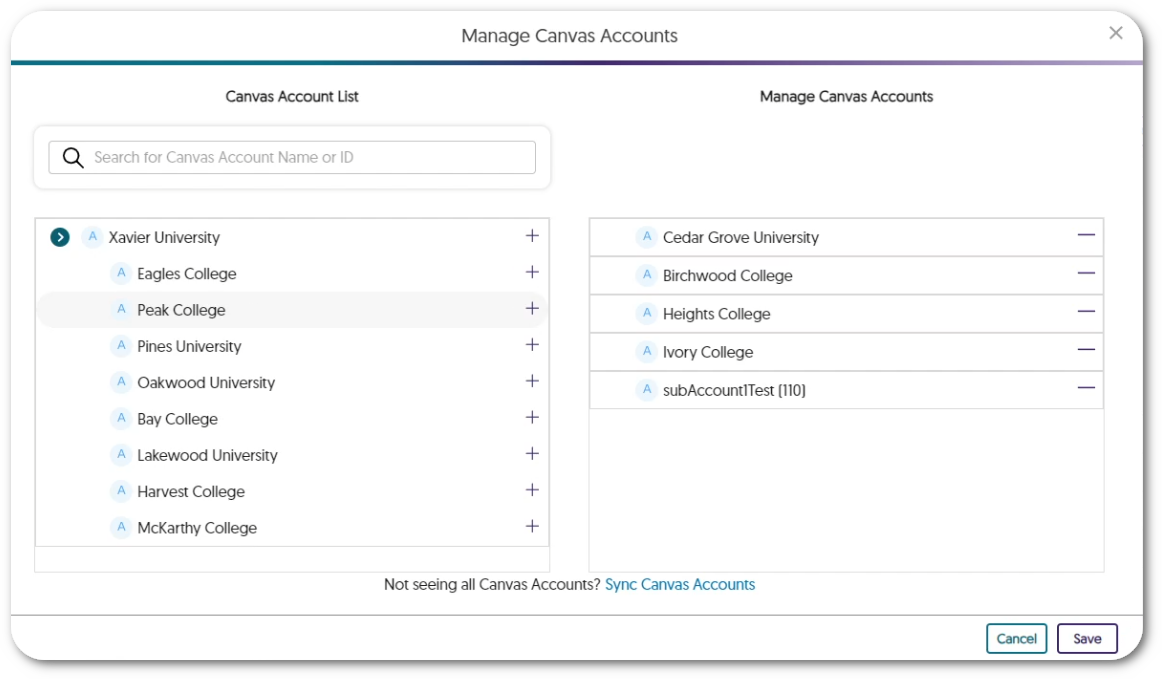
    4. Enable Panorama in Specific Sub-Accounts / Sub-Orgs / Nodes Admins can now view a hierarchical list of institution sub-accounts / sub-orgs / nodes and choose which accounts to enable Panorama in to allow course-scanning for Accessibility Reports, Alternative Formats, and more. A modal shows a list of sub-accounts on the left side with sub-accounts that are active with Panorama on the right.
    5. Accessibility Report: Docx Lists Will Be Checked for Proper Formatting The Accessibility Report for DOCX files will check if ordered and unordered lists within the document are formatted correctly. Accessibility Report shows an issue for an unformatted list in a DOCX file.
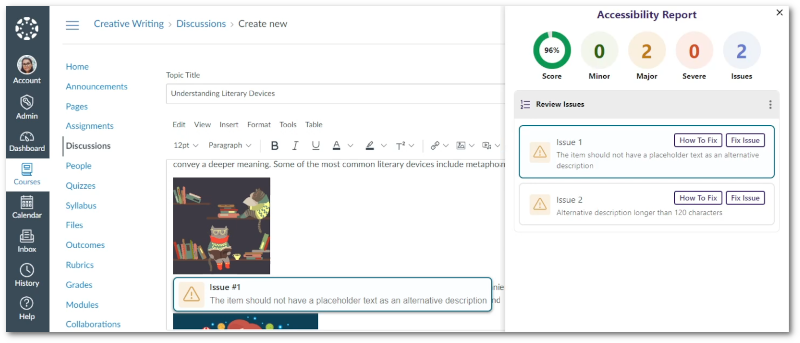
    6. Broader Set of Accessibility Checks for Images We’ve added additional accessibility checks to ensure images are accessible to all viewers.
      • Flag alternative text longer than 120 characters.
      • Flag images that have the file name as the alternative text.
      • Flag images that have placeholder text as the alternative text (e.g. “Photo” or “Image”).
      WYSIWYG editor with Panorama’s Accessibility Report detecting issues for images.
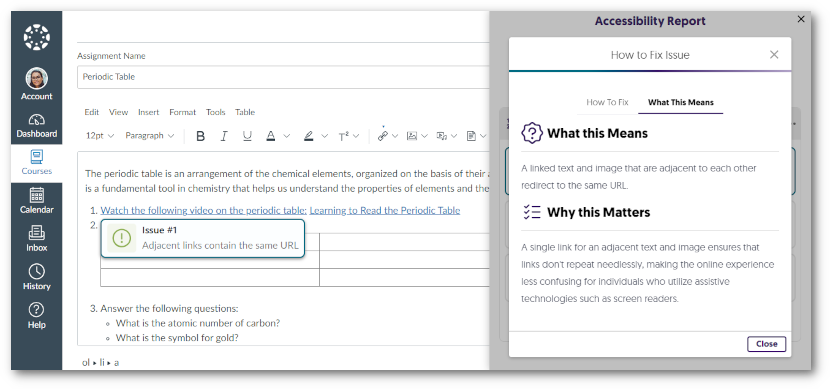
    7. Increased the Number of Accessibility Checks for HTML Content We’ve also added additional accessibility checks to ensure that HTML content is accessible with two additional checks:
      • Flag adjacent links with the same URL.
      • Flag tables with no content.
      WYSIWYG editor with Panorama’s Accessibility Report detecting issues for HTML Content.
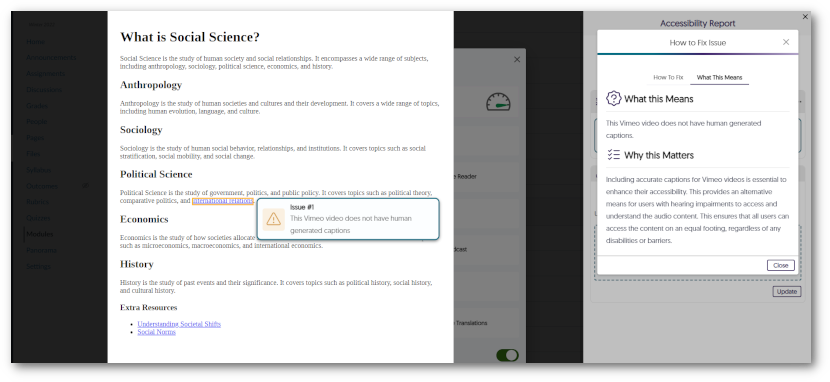
    8. Accessibility Check to Ensure Vimeo Videos Contain Captions Linked Vimeo videos in HTML documents will be scanned to ensure the video contains captions. Panorama's Accessibility Report has detected a linked Vimeo video without captions.
    9. Export Reports With a Date Range and the Preferred File Format Admins and Instructors can now select the date range of data to include in their reports and receive them as a JSON or Excel file via email. dates are selected for a storage report before requesting a download link to be sent by email.
    10. Downloaded Course Reports Will Include All Issues When downloading a Course Report, it will now contain all issues detected within the course. This will allow admins and instructors to receive all the information of the report as seen within the Panorama LTI app.
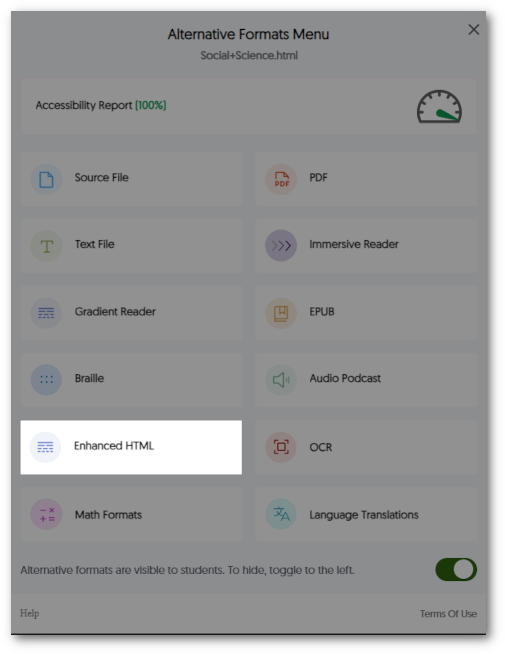
    11. New Alternative Format: Enhanced HTML View With Enhanced HTML view, HTML documents can be displayed in a dedicated tab to customize the appearance of the document using the Website Accessibility tool for a more personalized viewing experience. Alternative Formats menu showing the Enhanced HTML option.
    12. Keyboard Accessibility Support for the Design Tool Creators can access and navigate through the Design Tool through the use of their keyboard.
    13. Disable the Check for Specific Accessibility Issues We now allow administrators to turn off their preferred checks for accessibility issues. While we recognize the significance of not disabling issues that Panorama can detect, we understand the importance of providing institution administrators with the flexibility to meet their institution’s accessibility needs. Panorama Issue Settings to disable specific accessibility checks.
    14. Panorama REST API to Generate Alternative Formats Reports We have added additional support for third-party API integrations to allow individuals to access information regarding their documents and options to generate Alternative Formats and Accessibility reports. To learn how to use our APIs, please visit our Panorama API guide.
    15. Option to Disable the Panorama Design Tool We have provided a course-level setting instructors can use to disable the Panorama Design Tool. The option to disable the Design Tool.
     
  • October 20, 2023

    YuJa Panorama Digital Accessibility Platform – “King’s Peak” Version Released to US, CAN, AU, and EU Zones

    We have successfully pushed an update to all YuJa Panorama Digital Accessibility Platform instances residing in the United States, Canada, European Union and Australia. This release provides our users with remediation capabilities for PowerPoint issues, an Accessible Design Tool to replace YouDoIt design tools, enhanced website scanning to support linked pages and documents, removed the need for third-party cookies, new faster processing queues for Alternative Formats, the option to hide the Website Accessibility Icon, enhanced UI designs, and so much more.
     
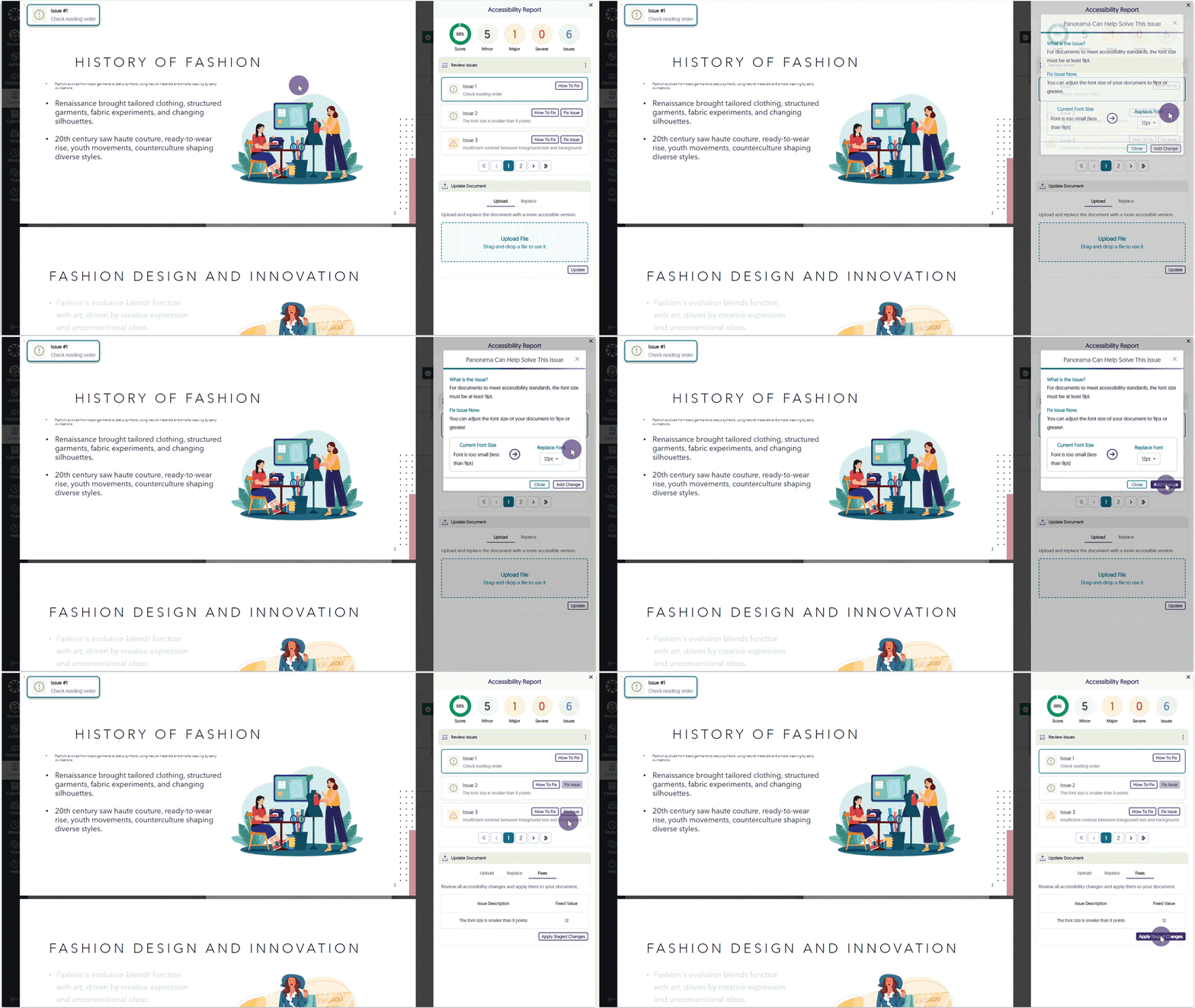
    1. New Remediation Engine – WCAG 2.1 Aligned Microsoft PowerPoint Issues To recap, we offer Accessibility Engines to identify accessibility issues across all major document types. Remediation Engines take things to the next level by actually fixing the document all while inside your LMS. With the introduction of our Remediation Engine tailored for real-time resolution of Microsoft Word documents, we now extend these capabilities to Microsoft PowerPoint. The new Microsoft PowerPoint Remediation Engine enables users to address PowerPoint-related WCAG 2.1 compliance issues directly within the LMS, including issues such as contrast, font size adjustments, provision of alternative text for images, and dozens more.Remediating PowerPoint font size issue.
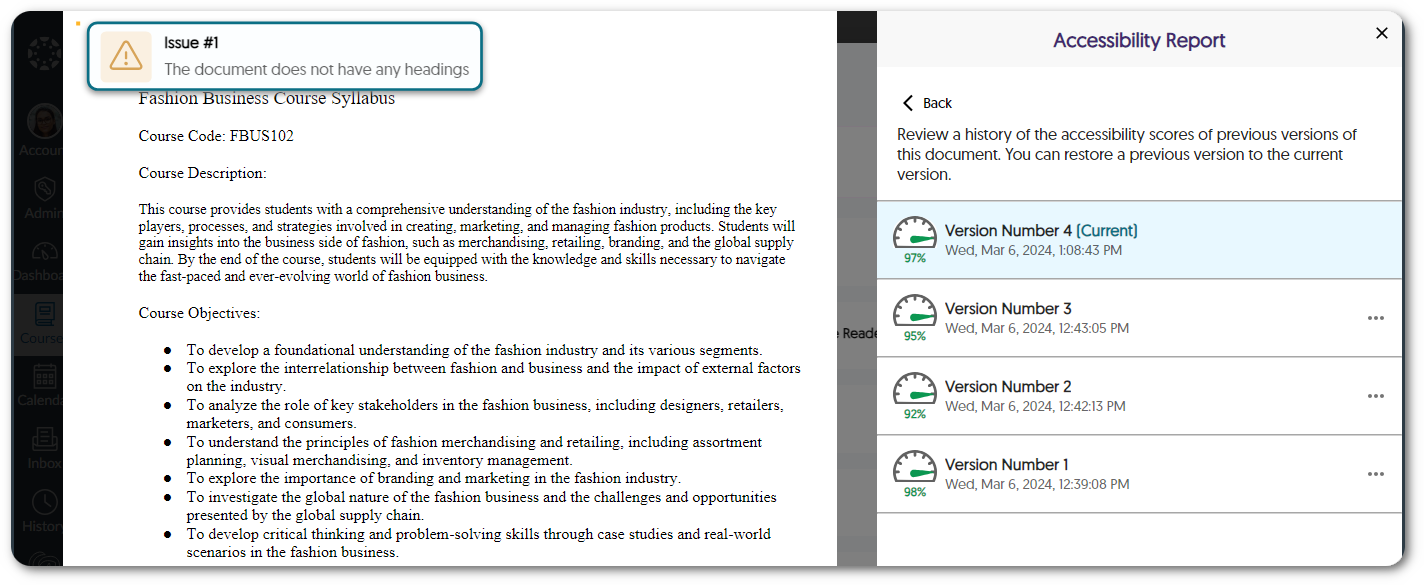
    2. Gamify and Celebrate Your Accessibility Improvements (a Newly Architected Processing Pipeline Makes It Possible) Improving the accessibility of documents is important work, and here at YuJa, we believe such efforts should be celebrated. Enjoy your success in using the Remediation Engine effectively with cheerful streamers and confetti animating your screen. We encourage and appreciate your ongoing efforts to impact student learning positively. For those more technically inclined, to provide ultra-fast inline remediation and gamification-ready response times, we rebuilt the processing pipelines to have multiple “swim-lanes”, each with independently scaling infrastructure. This updated architecture was purpose-built to accelerate Accessibility Engine processing. Document updated animation.
    3. WCAG 2.1-Aligned Website Scanning Tool Enhanced to Offer Accessibility Insights for Linked Pages and Documents To provide accessibility assistance outside of integrated LMS domains, Panorama offers Website Accessibility scanning designed to extend accessibility checks and support beyond integrated LMS domains. The scanning tool operates in three phases, starting by identifying content and linked pages within a specified domain. It then performs a scan to generate Accessibility Reports for the domain, documents, and linked pages. Finally, it enables users to create Alternative Formats for discovered documents. A comprehensive list of all scanned domains can then be viewed within the Website Report, offering the overall accessibility score, individualized scores for content found within the domain, and access to generate Alternative Formats. Robotic space alien scanning a web page.
    4. No More Third-Party Cookies! Panorama’s LMS integration, with its established and IMS-certified implementation of LTI 1.3/LTI Advantage protocols, has traditionally utilized third-party cookies to ensure secure data transfer between integrated tools. Now, thanks to the adoption of new enhanced protocols, the necessity for third-party cookies is no longer required. This development enables users to benefit from a more secure connection and straightforward product integration, especially with browsers that might default to having cookies turned off. A no cookies symbol.
    5. On-Demand Processing Queue for Faster Accessibility Report and Alternative Formats Generation As Panorama continues to expand, we have built an Elastic Media Cloud (EMC) that can process institutions and courses with hundreds and thousands of files within an hour. We’re now introducing an extension to the EMC, On-Demand Processing, to help manage processing requests for Alternative Formats and updates to documents made through our Remediation Engine. With a workload that is 99.9% lighter than the traditional general processing workload, the On-Demand queue assures the completion of these immediate processing tasks in two minutes or less. An Alternative Format being generated.
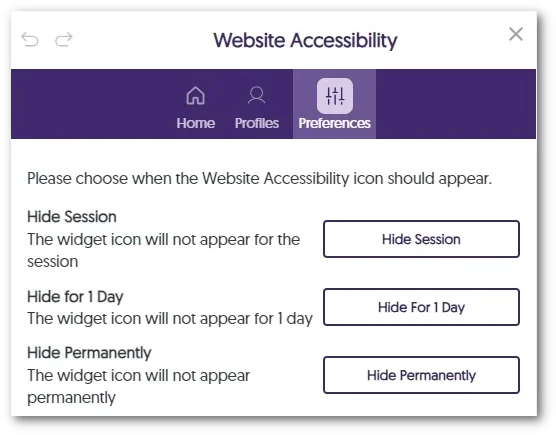
    6. Option to Hide the Website Accessibility Icon With an approach to optimizing viewability on smaller screens, such as mobile devices, instructors and students can conceal the Website Accessibility icon until they navigate to a new page or for a specified duration of one day. For those who prefer a consistently minimal interface, the option to hide the icon permanently is also available. Visibility options for the Accessibility icon.
    7. Customize the Institution Name on the Institution Information Page Panorama offers the option to customize the institution name displayed on the Institution Information page to provide a custom viewing experience. Administrators wishing to modify the name to align with specific branding or internal naming conventions can do so by contacting their Customer Success Manager.
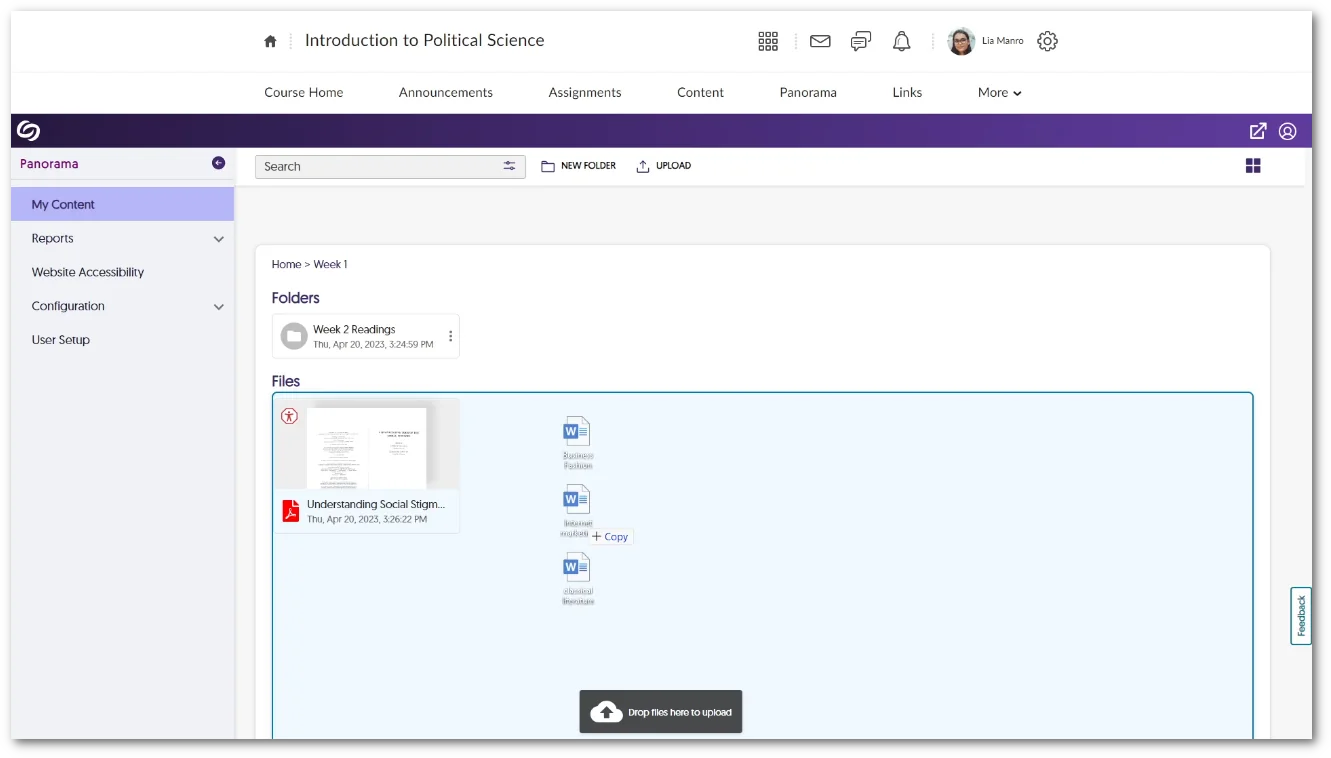
    8. My Content Tab Supports Multi-File Drag-and-Drop We’ve introduced a new drag-and-drop functionality to Panorama, allowing users to upload multiple documents into their My Content Files or created folders. Multiple documents being dragged and dropped into My Content.
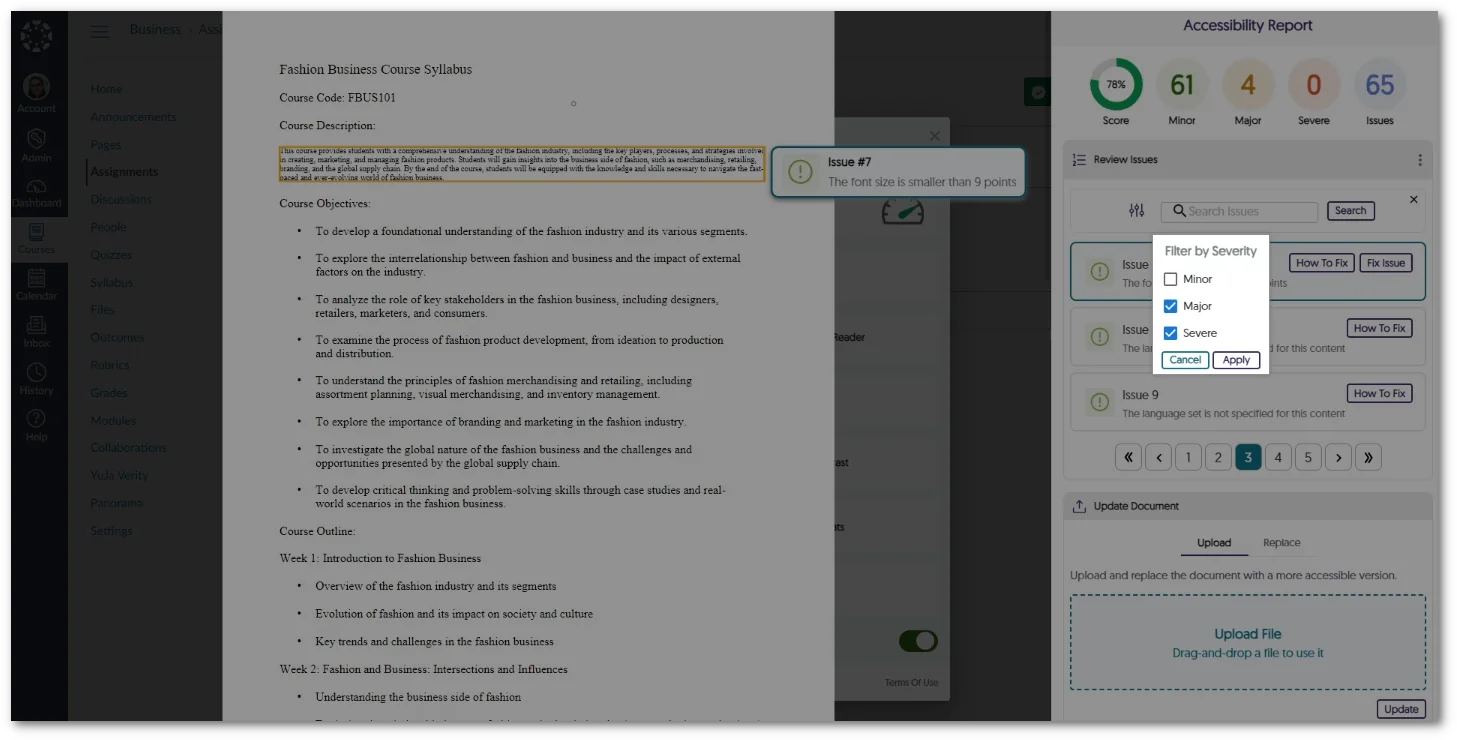
    9. Filter Issues by Severity in the Accessibility Report The Accessibility Report now allows instructors and students to organize and view identified issues based on their severity level—Severe, Major, and Minor. Option to filter issues by severity type in the Accessibility Report.
    10. Enhanced UI for Panorama’s WYSIWYG Editor To ensure a unified and modern user interface across Panorama, we’ve upgraded the WYSIWYG editor, aligning its UI with the refined aesthetic and functionality similar to that of the Accessibility Report UI. Users will now be able to view an organized list of accessibility issues, with the option to filter by severity to resolve the most concerning issues immediately. New redesign for the WYSIWYG editor.
    11. On-Demand Refresh of Institution-Level Reports For institutions utilizing the option to Pre-Generate Reports, we’ve introduced a new feature to update reports manually. A “Refresh” button is now available for each report, providing the option to initiate an update that will generate the most recent data within the hour. The option to refresh a report.
    12. Updated Support for LibreOffice Version 7.6.2 Panorama continues to align with advancements in document technology, now offering support for LibreOffice version 7.6.2. This update is crucial in ensuring the security of documents, aligning with our commitment to providing a safe and up-to-date environment for all users. Libre Office logo.
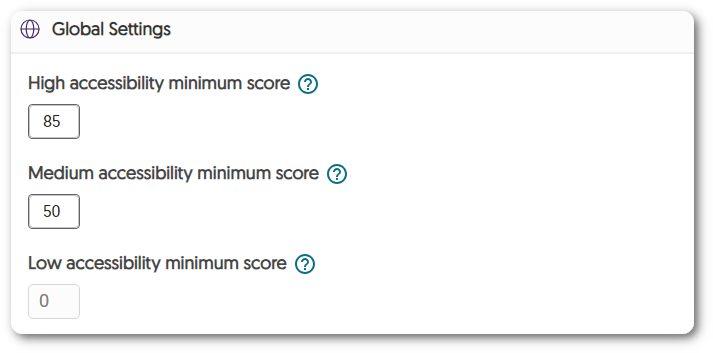
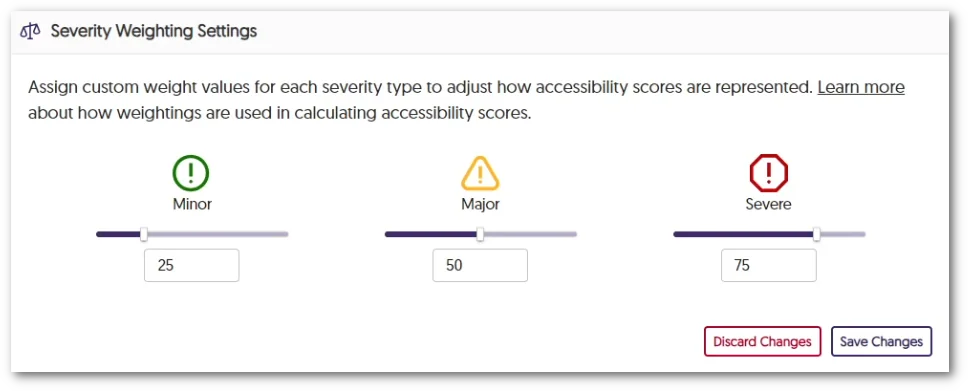
    13. Improved Interface for Performing Accessibility Weighting Adjustments We have updated the interaction for adjusting accessibility weighting for various issue types—Severe, Major, and Minor. Admins can now select their preferred weights using a sliding bar while still having the option to input precise values with the textbox. New slider for severity weighting.
    14. Panorama Expansion with a Dedicated Server for Australian Institutions As Panorama grows, we’ve introduced a dedicated server specifically for Australian institutions to take advantage of our accessibility learning features.
  • September 8, 2023

    YuJa Panorama Digital Accessibility Platform – “Jackson Peak” Version Released to US, CAN, and EU Zones

    We have successfully pushed an update to all YuJa Panorama Digital Accessibility Platform instances residing in the United States, Canada, and the European Union. This release provides our users with a new workflow for remediating accessibility issues, a Remediation Engine that fully supports Microsoft Word issues, a refreshed Accessibility Report, custom weighting for severity types, the option to replace the original document with a generated alternative format, localization support for Dutch and Finnish languages, and so much more.
     
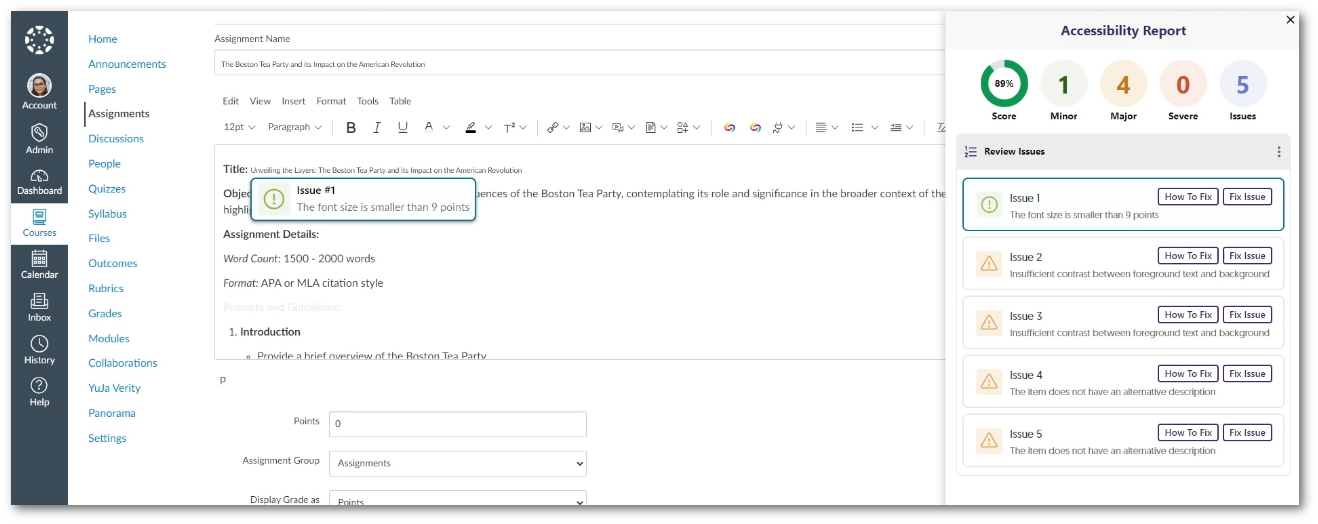
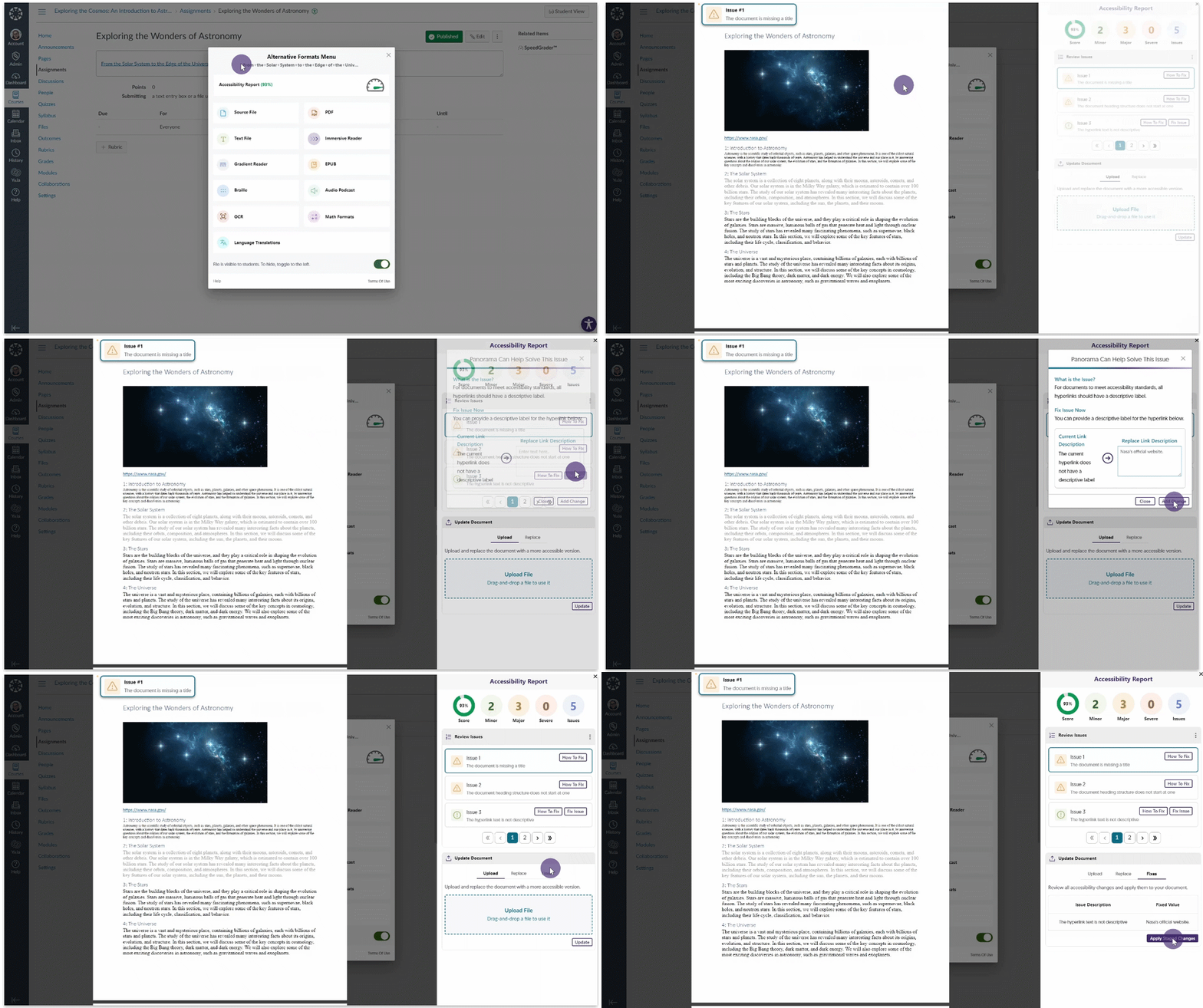
    1. Streamlined Workflow for Remediating Accessibility Issues As part of our development for Panorama’s Remediation Engine, we have taken a deep dive into how users can easily resolve issues in real time within the Accessibility Report. As a result, we are introducing a dedicated ‘Fix Issue’ feature that offers immediate insights into the current problem and practical suggestions for a resolution. After adding the necessary changes, a comprehensive list of all fixes can be reviewed before applying the changes to update the document. Remediating an issue.
    2. Expanded Support for Microsoft Word Remediation Engine for Inline Remediation Within the LMS Our previous release introduced our new Microsoft Word Remediation Engine, designed to address font-size issues in real-time within Microsoft Word documents. Building upon this, we’re expanding our remediation capabilities by allowing users to resolve more WCAG 2.1 Microsoft Word issues:
      • Contrast issues
      • Alternative text for images
      • Non-descriptive hyperlink text
    3. Refreshed Accessibility Report Interface We have updated the Accessibility Report with a modernized UI showcasing an organized display of issues. To accomplish this, we have made the following changes: 1) issue can be seen within the new list-style view; 2) The number of issues have been categorized by their severity; 3) Filtering options to allow users to view specific issues in each severity.
      Accessibility Report
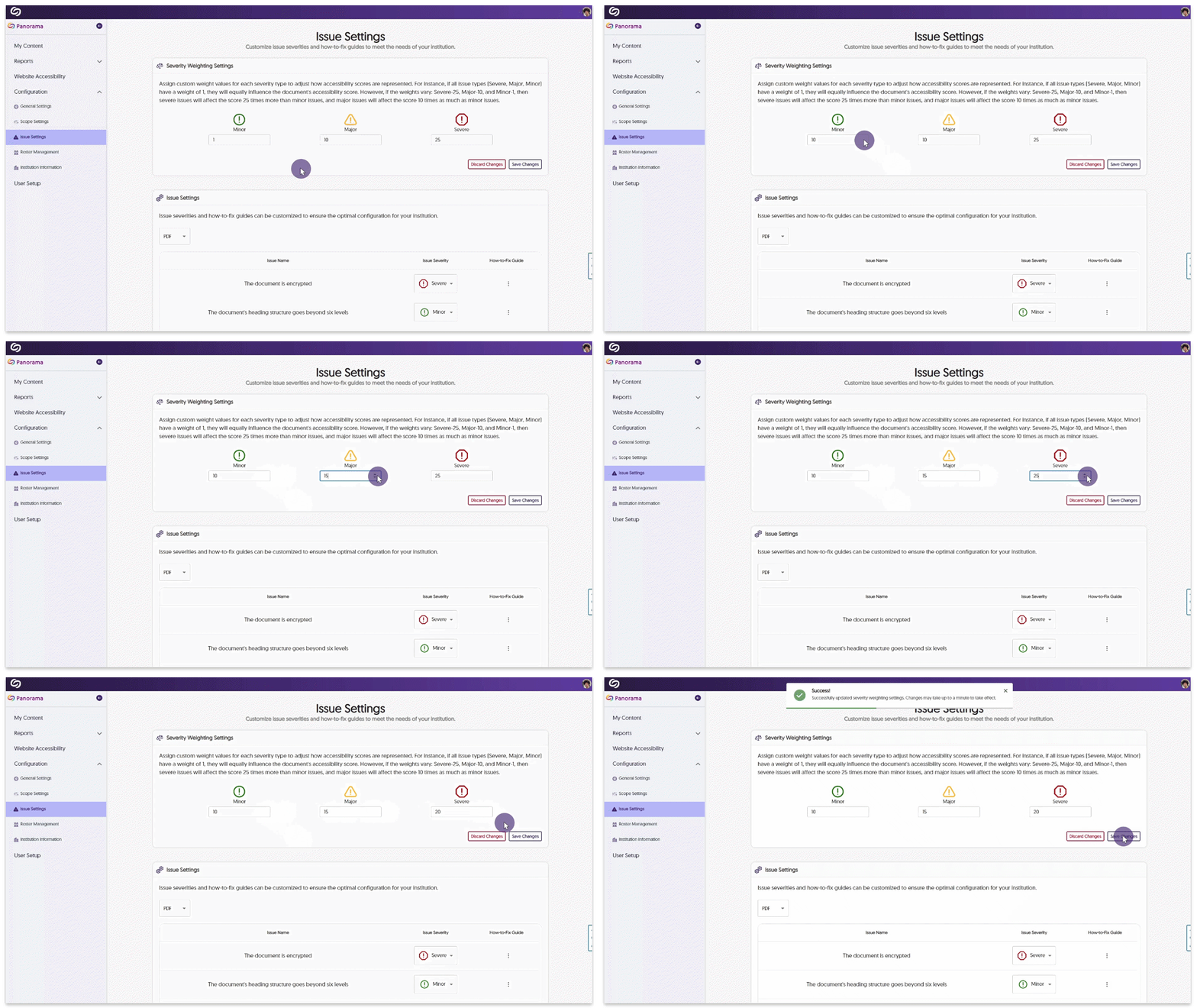
    4. Create a Custom Weighted Scale for Severity Types Panorama has consistently assessed accessibility issues with Severe, Major, and Minor importance. We’re now providing administrators the option to fine-tune the weight of each severity, allowing institutions to create a more precise accessibility score aligning with their unique priorities.
      Each severity level will now uniquely influence the final accessibility score through its customized weight. For instance, if Major issues are assigned a weight of 10 and Minor issues a weight of 1, Major issues will affect the accessibility score ten times more than Minor issues. To learn more about this feature and how to set custom weights for the severity of issues, please visit our guide on Customizing Severity Weighting Settings for Panorama Adjusting the weight scores.
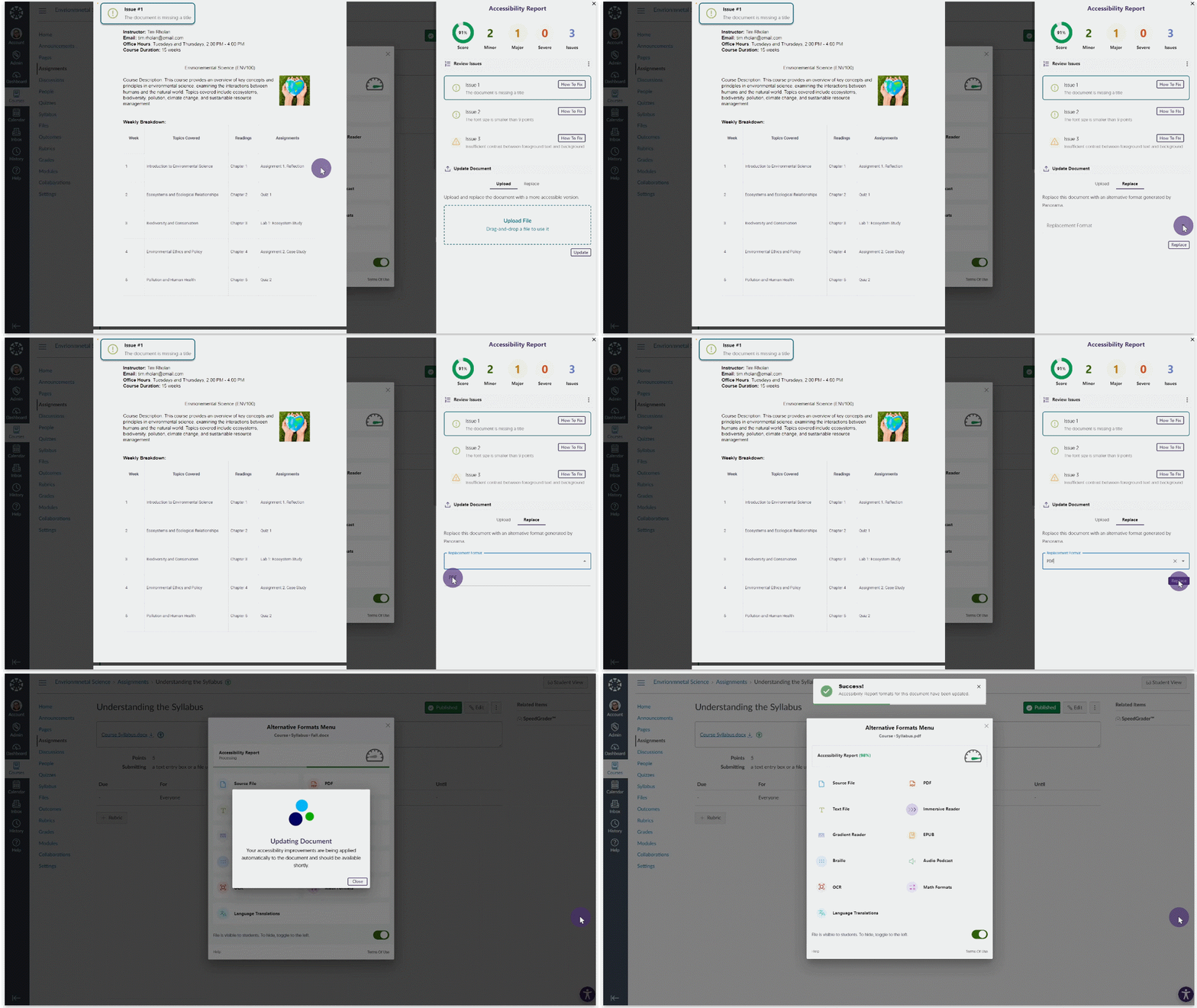
    5. Replace Original Documents with a Generated Alternative Format Instructors have the option to seamlessly replace the original document within their Learning Management System with a newly generated alternative format. Replacing a document with its alternative format.
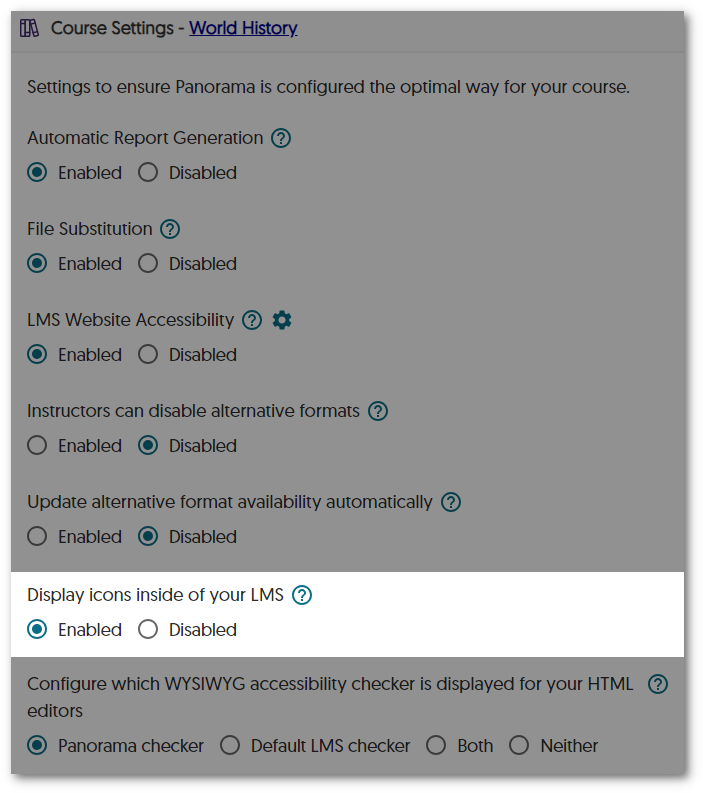
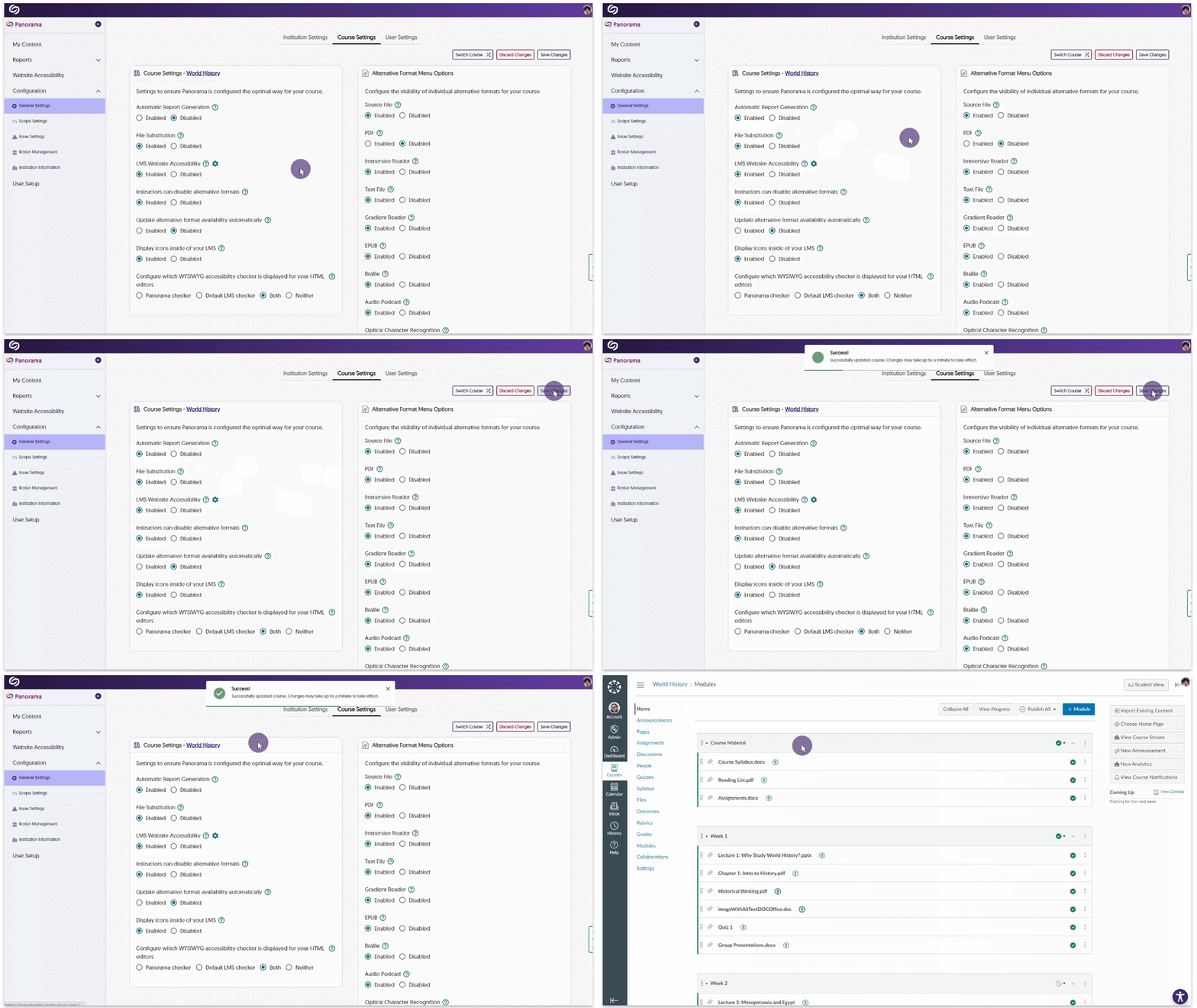
    6. Accessibility Icons Can Be Hidden at the Course Level To give instructors more control over their courses, they can now disable accessibility icons at the course level. This option will prevent students and instructors from accessing the Alternative Formats menu and Accessibility Reports within their LMS but will still provide analytical tracking for the course. Disable icon setting at the course level.
    7. Integrate Panorama into Specific LMS Sub-Accounts for LTI 1.3 Panorama now offers targeted integration within specific LTI 1.3 sub-accounts to accommodate institutions utilizing hierarchical sub-accounts in their LMS. This will allow administrators to only enable Panorama for their desired accounts instead of applying it to the top-level account, which would activate Panorama for all sub-accounts.
    8. The Course Setting Page Offers Access to the LMS Course Administrators and instructors who wish to navigate back to their course after making course-setting adjustments can, with a click of a button, navigate directly to their course. Accessing a course from the Course Settings page in Panorama.
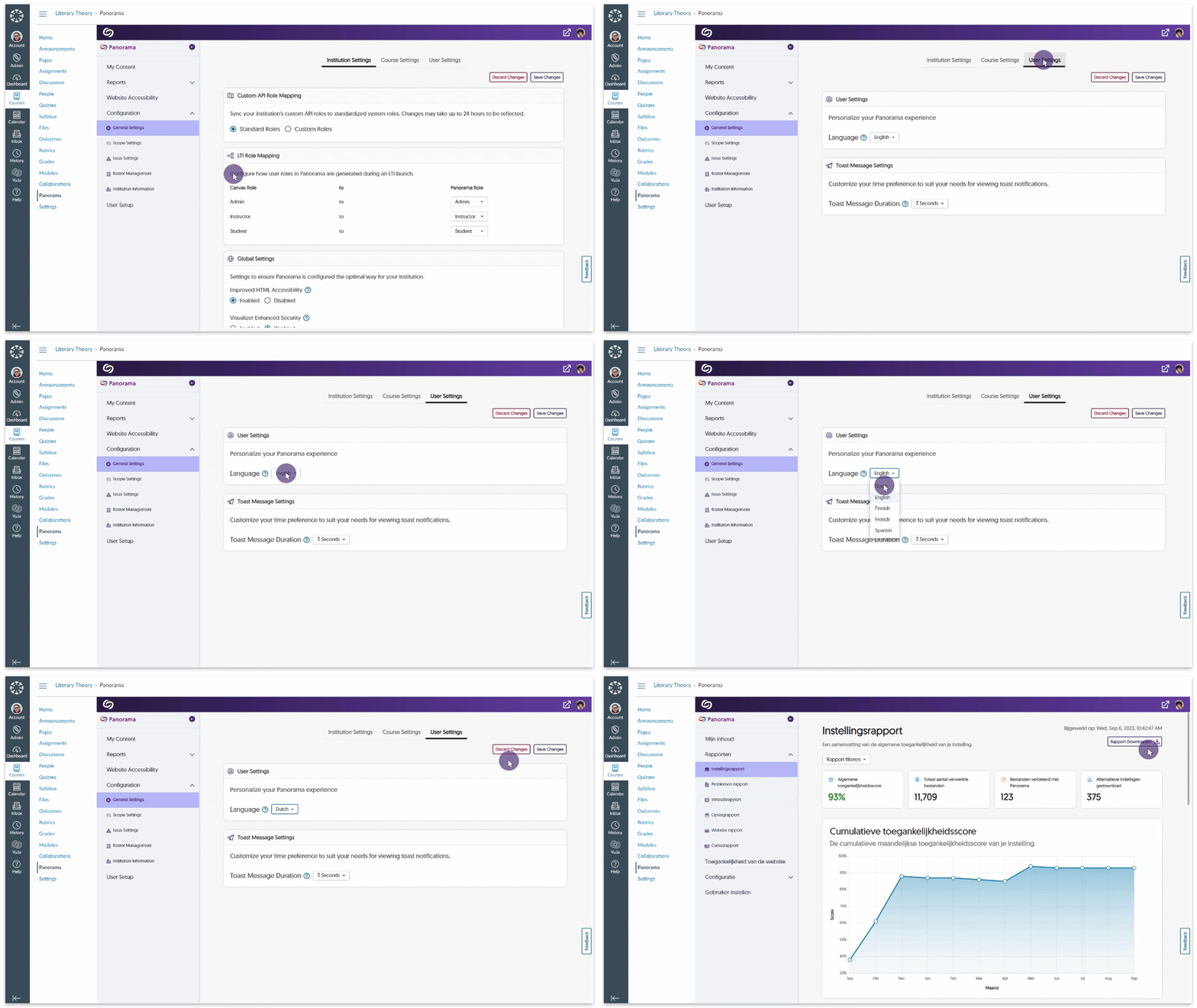
    9. Local Support for Dutch and Finnish Languages Complementing our English, French, and Spanish localization, Panorama will now fully support Dutch and Finnish languages across the entire Platform. Simply access your settings to adjust your language preferences. Adjusting language settings in Panorama.
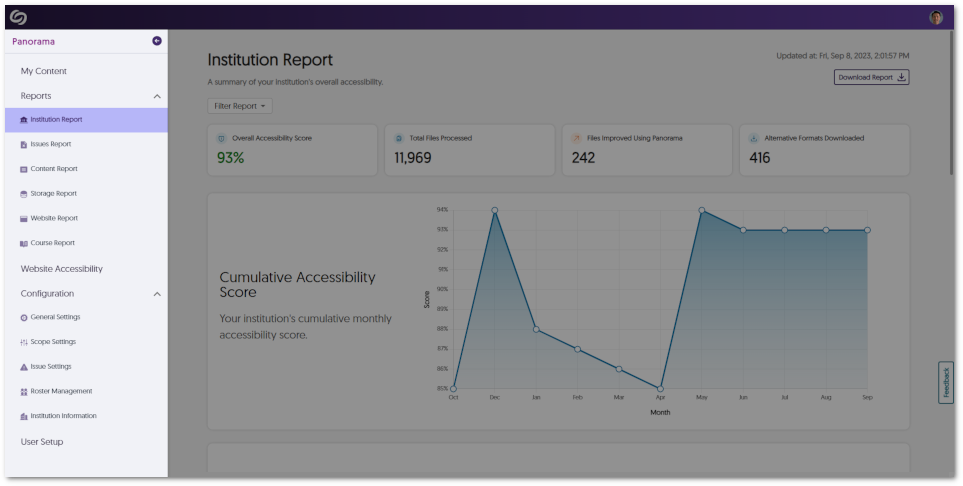
    10. Updated Colors and Icons for the Panorama Sidebar As part of our ongoing commitment to elevate the Panorama experience with our new branding, administrators can expect vibrant color enhancements and new icons that provide a refreshed look to the sidebar. Panorama sidebar.
    11. Screen Readers Can Detect When Alternative Formats Are Generated Users who navigate through Panorama with the help of accessibility tools will now be notified by their screen reader when an alternative format has been successfully generated.
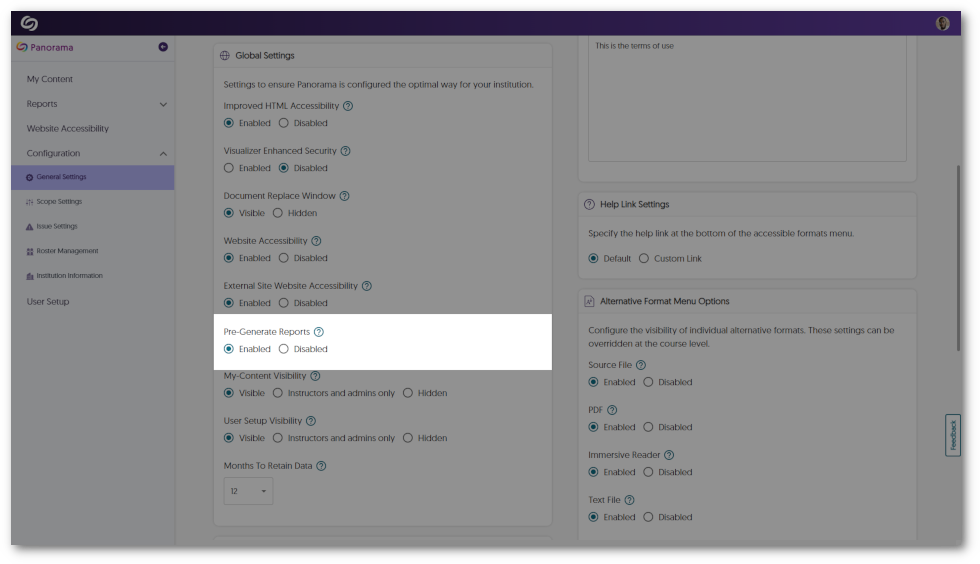
    12. Pre-Generate Course Reports to Provide Instant Viewing of Analytics Similar to pre-generating institution reports, activating this feature ensures that the Course Report stays consistently up-to-date, providing institutions with large data sets instant access to their analytics. Pre-Generate report setting.
    13. Increased Responsiveness for the Panorama LTI App on Canvas To enhance Panorama’s accessibility for users who prefer utilizing their browser’s zoom functionalities, Panorama will now dynamically adapt its interface to accommodate zoom levels exceeding 100%.
  • August 18, 2023

    YuJa Panorama Digital Accessibility Platform – “Mount Jasper” Version Released to US, CAN, and EU Zones

    We have successfully pushed an update to all YuJa Panorama Digital Accessibility Platform instances residing in the United States, Canada, and the European Union. This release provides our users with reports for webpage accessibility scanning, a new interface for Website Accessibility, the option to adjust Accessibility Icon colors, unified HTML reporting, map Canvas custom roles to Panorama, the option to scan newly added courses, and more.

    1. New WCAG 2.1-Aligned Webpage Scanning and Reporting To expand on Panorama’s Website Accessibility Widget, the Platform can now perform WCAG 2.1-aligned accessibility analysis on webpages and its linked content.

      Website Administrators can easily view low-scoring webpages within a dedicated table to identify web pages that may hinder students’ learning or compromise an institution’s commitment to website accessibility. In an upcoming release, we will be adding optional, automated domain-level website traversal to provide fully automated scanning of websites which can replace legacy website accessibility scanning tools.Websites shown in the Panorama Webpage Accessibility table.
    2. Refreshed Website Accessibility Interface The Website Accessibility Widget, designed to improve the usability and accessibility of any website, now offers an improved user interface with a tabular view organizing Color Adjustments, Content Adjustment, and Accessibility Profiles. Select any adjustment or Profile to quickly apply an accessible preset or apply custom granular adjustments for accessibility issues such as text color, background color, font sizing, letter spacing, and so much more. Website Accessibility features shown in Canvas.
    3. Adjust Branding Colors for Accessibility Icons  Recognizing the diverse branding and accessibility requirements of different institutions, Panorama now offers administrators the flexibility to adjust color preferences for icons. Simply navigate to your institution settings and add any color to the accessibility icons. Accessibility Icon colors are being adjusted.
    4. Unified Accessibility Reporting for HTML Regions and Documents In an effort to unify how we present Accessibility Reports across Learning Management Systems, HTML pages will feature only the Accessibility Icon to access Alternative Formats and Accessibility Reports when additional HTML gauges are disabled. Option to disable additional HTML pages.
    5. Map Any Custom Canvas Role to a Panorama Role Administrators have the option to align their custom Canvas roles with Panorama’s Administrator, Instructor, or Student roles. This integration will allow unique institution roles to be recognized by Panorama, ensuring controlled access to accessibility features. To learn how to align custom Canvas roles with Panorama, please visit our support guide on How to Add Custom Canvas Roles to Panorama. Adding a custom admin role in Panorama.
    6. Enhanced Scan Management Tools to Scan New Courses or Re-Scan All Courses To enhance administrators’ control over scanning and processing courses, the Scheduled Scans panel offers new tools to scan newly added courses and rescan all existing courses. This will allow administrators to exclusively scan and process newly added courses or re-scan all existing courses according to their needs.Dialogue message when scanning a new course.
    7. Self-Service Tools to Test the Correct API Access on the Institution and Course Level Administrators will be able to test Panorama’s LMS API access to ensure APIs can retrieve relevant information about the institution or course, such as a list of roles, the names of courses, files added to a course, HTML pages created, etc. Test results for course API access.
    8. The Course Report Content Search Can Filter by Dates To allow admins and instructors to locate documents efficiently within a course, we have introduced a filtering option for the Content table that organizes search results by recently added.Content table organized by upload date of files.
    9. The Accessibility Report Will Prioritize Showing Document-Wide Issues We’ve enhanced our Accessibility Report layout to prioritize listing document-wide issues at the top of the issues list, organized by severity. For instance, concerns such as malformed or untagged documents now appear before issues such as alt text or hyperlinks. This can be used to focus on and resolve critical accessibility issues that have affected the entire document. Accessibility Report showcasing document-wide issues.

Join the 1,000+ Organizations Deploying High-Impact Solutions

A collection of logos representing various organizations and institutions that use YuJa’s platform.