









Web and App Accessibility: Understanding the U.S. Justice Department’s Proposed Rulemaking
Download the PDF >
Boost Video Accessibility with the GenAI Video PowerPack!
Try Now
Supercharge Your Compliance Efforts with AutoPilot Remediation Max!
Try Now
Strengthen Your PDF Accessibility Efforts with Structural Remediation Max!
Try Now
Don't Miss Any of Our Upcoming Webinars—Save Your Spot!
Register
The YuJa Community is here! Connect, get updates, and access exclusive content.
Join Now

The YuJa Panorama Google Workspace Accessibility Module scans your Google Workspace, including Google Drive, Google Docs, Google Sheets, and Google Slides, for accessibility issues, and easily converts them into alternative formats, such as PDF, Braille, and more, to help ensure your content is accessible to every audience.
Scrolling logos of YuJa’s clients such as SUNY Corning, University of Cambridge and University of Calgary, etc.
The YuJa Panorama Google Workspace Accessibility Module reviews your Google Workspace documents, including Docs, Slides, and Sheets, for accessibility issues and provides methods for quick and easy remediation. The integration also helps convert content into alternative formats, so your materials are accessible and caters to the needs of all audiences.
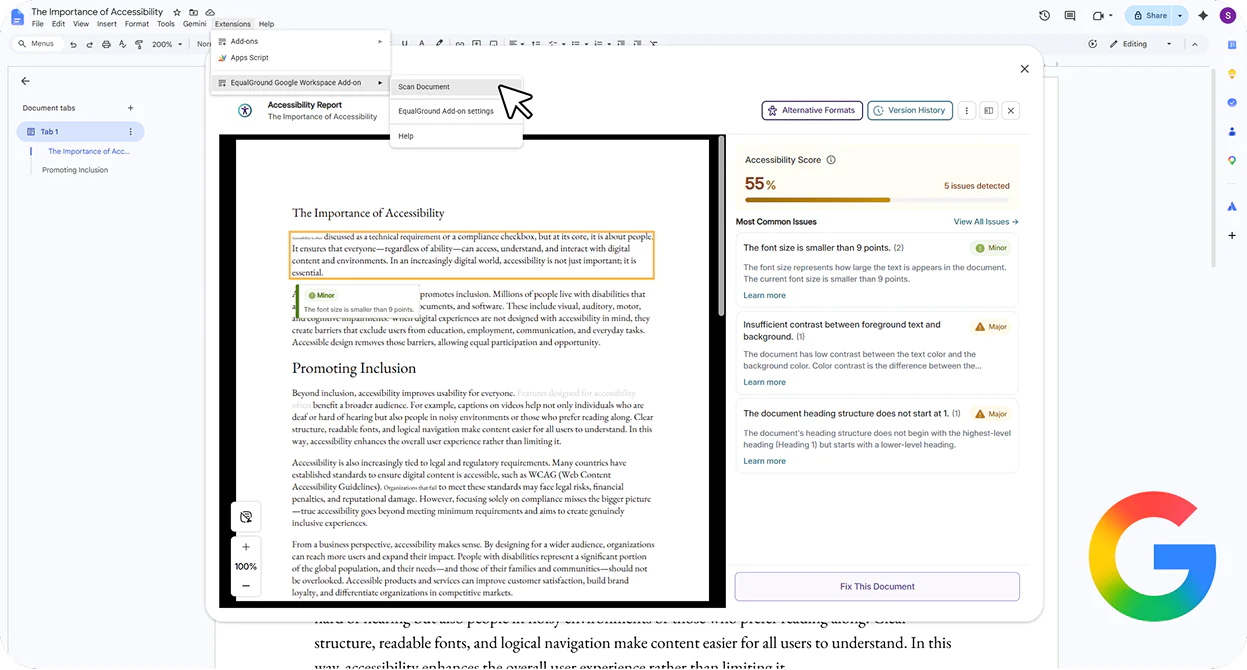

Scan and remediate Google Workspace files, including Google Docs, Slides, and Sheets, directly in YuJa Panorama. Choose from a range of automated and manual remediation options, and YuJa Panorama will automatically replace the document file with the remediated version in your Google Workspace, without the need for manual re-uploads.
Users who have YuJa AutoPilot can instantly make documents more accessible with automated remediation. YuJa AutoPilot will automatically suggest accessibility fixes that can be applied directly to your Google Workspace documents.

Users of YuJa Structural Remediation Max can use a blend of intelligent automation and human-centric review to help transform even the most complex Google Workspace PDFs into WCAG-aligned, fully structured, accessible documents.

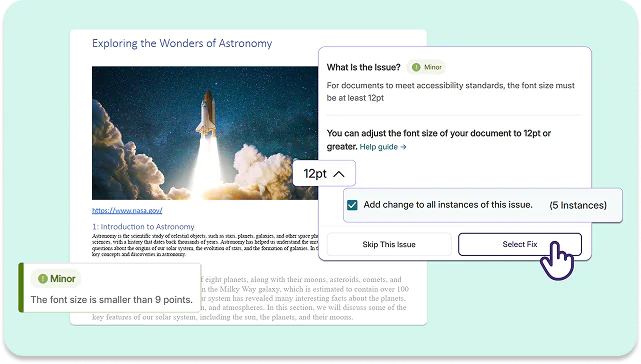
YuJa Panorama doesn’t stop at identifying accessibility issues, it helps you fix them. Get guided remediation directly within Google Workspace, with clear, actionable steps to resolve WCAG 2.2 AA issues quickly and accurately.
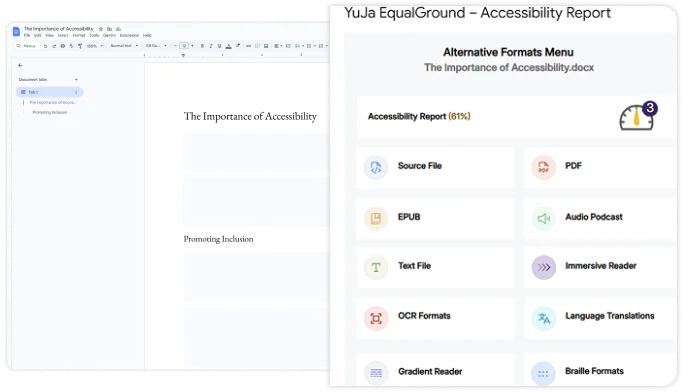
In just a few clicks, convert Google Workspace content into the format that fits your accessibility needs, such as ePub, audio, Braille, Immersive Reader, and more. Whether you rely on assistive technologies, learn on the go, or prefer a mobile-friendly experience, the Alternative Formats Menu lets you access content on your terms.
The YuJa Panorama Google Workspace Accessibility Module supports a range of learning needs by offering content in multiple accessible formats, helping create a more inclusive learning experience.

Allows customizations to text preferences, grammar options, and reading preferences with audio playback to enhance accessibility for diverse learning needs.

Displays HTML documents in a new tab with customizable appearance using the Website Accessibility Widget to improve accessibility.

Translates documents from over 100 languages for both Alternative Formats and Immersive Reader to break down language barriers.

Enables the viewing of documents in their original format to maintain document integrity and native functionality.

Converts documents to a PDF format to ensure consistent styling across devices while protecting content integrity during sharing or printing.

Converts documents to e-book format to provide flexible, mobile-optimized reading experiences.

Converts documents to plain text without formatting styles to ensure maximum compatibility with assistive technologies.

Configures audio conversions to support auditory learners and provide hands-free content consumption.

Converts documents containing mathematical content into various accessible formats to ensure proper rendering for STEM learners.

Converts documents to braille format to provide tactile reading access for users with visual impairments.

Provides guiding color gradients to help with word recognition and improve reading flow and comprehension.

Provides optical character recognition to convert images and scanned documents into searchable, accessible text.

Convert scanned and untagged PDF documents into accessible Microsoft Word DOCX documents to directly make edits from the previous uneditable format.


With YuJa, each institution of the NDUS has the toolset and flexibility to brand and create its own unique space according to need. Since adoption and particularly after the pandemic struck in early 2020, YuJa has become an integral part of teaching and learning across the NDUS.
Read the case studyJoin the 1,000+ Organizations Deploying High-Impact Solutions