Product Updates

Get the latest platform updates, features, and announcements—all in one place.
  • May 26, 2025

    How AI-Powered Audio Descriptions Are Changing Higher Education

    While captions and transcripts have become standard practice, audio descriptions for learners with visual impairments often remain overlooked, despite visual impairments being among the top 10 disabilities among adults, according to the CDC.

    What are Audio Descriptions? 

    Audio descriptions provide verbal narrations of essential visual elements within educational videos. These descriptions work alongside dialogue to communicate actions, on-screen text, visual demonstrations, gestures, and other details to students who are blind or have low vision. For example, consider an instructional video where an instructor points to a specific section of a diagram. An effective audio description might state: “The instructor highlights the mitochondria section in the cellular diagram, located in the upper right quadrant.” This level of detail helps ensure all students receive the same information, which supports both compliance with accessibility standards like WCAG 2.1 and ADA Title II, while providing equitable learning experiences.

    Barriers to Implementation 

    Despite their value, audio descriptions remain underused across higher education, primarily because the traditional creation process is time and resource-intensive. Creating high-quality descriptions typically requires:
    • Writing a script based on the visual content
    • Recording the narration
    • Editing the video to fit the descriptions without interrupting the original audio
    For instructors managing multiple courses or institutions with limited accessibility resources, these requirements often make comprehensive audio description implementation seem unattainable.

    How AI is Improving Audio Descriptions

    Artificial intelligence technology is addressing these traditional barriers by changing how institutions approach creating audio descriptions. AI can now analyze a video’s visual content, identify key elements, and generate descriptive narration quickly and at scale.  Some ed-tech solutions, like the YuJa Enterprise Video Platform, have introduced tools that allow users to generate enhanced, pause-and-play audio descriptions using AI. Instead of layering narration over the original video, this approach pauses the video, plays the description, and then resumes. This helps ensure nothing is missed and avoids overlapping or confusing audio.  While human review is still important, AI can provide a strong starting point, simplifying offering accessible videos across entire libraries.

    Using AI to Scale Accessibility

    As educational technology continues to evolve, accessibility features will become more sophisticated and integrated into teaching and learning. Putting new technologies to use will help institutions shift from reactive accommodation to proactive inclusive design, as they embed capabilities into content creation workflows.  By staying informed about new tools and best practices, institutions can take meaningful steps toward more inclusive learning environments while keeping pace with changing expectations around digital equity and compliance.
  • May 20, 2025

    A Q&A on DOJ Web App and Accessibility Requirements

    When institutions and organizations comply with these rules, people with disabilities will have much more reliable access to critical services like registration, accessing information, applying for benefits, and participating in activities. This compliance also positions organizations to better serve all members of their community, including people with visual, auditory, physical, speech, cognitive, and neurological disabilities. We’ve rounded up some frequently asked questions and a helpful resource to help educational institutions and organizations as they work to come into compliance ahead of the April 2026 and 2027 deadlines.

    Q: What does the DOJ’s web accessibility rule require?

    A: The rule requires all public educational institutions, state and local government organizations to make their web content and mobile apps accessible using WCAG 2.1 Level AA standards. This includes websites, mobile apps, PDFs, videos, and other digital content used to provide services, programs, and activities to the public.

    Q: What content must be accessible on our website? 

    A: All web content and mobile apps that provide services, programs or activities to the public. This includes: 
    • Student information systems and portals
    • Learning management systems and online classrooms
    • Government service websites and applications
    • Online enrollment and registration systems
    • Library resources and catalogs
    • Maps and directories
    • Event calendars and schedules
    • Public service information
    • Video content (requires captions)
    • PDFs and downloadable documents
    • Citizen portals and communication systems

    Q: When are the compliance deadlines? 

    A: Compliance deadlines are based on the population your organization serves: 
    • Large institutions and organizations serving populations of 50,000 or more have until April 24, 2026 to comply
    • Smaller institutions and organizations serving populations under 50,000 and special districts have until April 26, 2027
    After coming into compliance, institutions and organizations must maintain ongoing compliance.

    Q: Are there any exemptions to the requirements?

    A: Yes, there are limited exemptions for: 
    • Archived web content (meeting strict criteria)
    • Pre-existing conventional electronic documents
    • Third-party content posted on government websites
    • Password-protected individualized documents
    • Pre-existing social media posts
    It’s important to note that even exempt content may need to be provided in accessible formats upon request.

    Q: What about other accessibility laws we’re already following?

    A: The DOJ rule complements existing requirements but doesn’t replace them. Public institutions and organizations must continue to comply with Section 504 of the Rehabilitation Act, Individuals with Disabilities Education Act, Section 508, and others. 

    Q: Where can I find more information?

    A: There are a number of resources to help guide you:  YuJa – DOJ Web Accessibility Rule YuJa Whitepaper – Understanding the DOJ’s New Rule ADA.gov – DOJ’s Web Accessibility Rule Section508.gov – Federal Accessibility Standards DOJ Federal Register Entry  First Steps Toward Complying with the Accessibility Rule
  • April 2, 2025

    The Power of Alternative Formats in Digital Learning

    Learn about various alternative formats and how they benefit learners: 

    Text-Based Alternatives

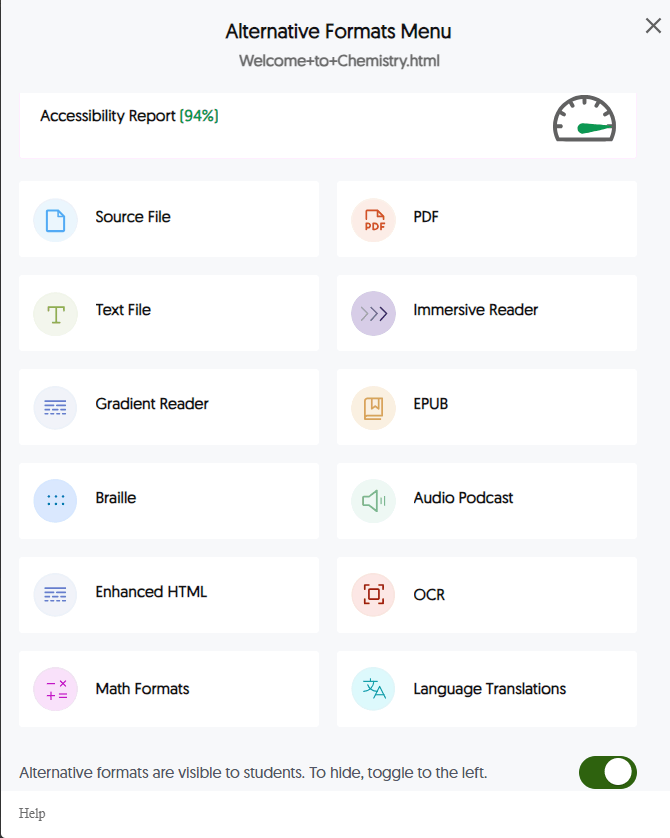
    YuJa Panorama's alternative formats menuSource File, the original document with its native formatting, allows users with specific software tools to manipulate the content according to their needs, such as adjusting formatting, extracting text for use with assistive technologies, or converting to other formats. For students who use screen readers or require specialized navigation, having access to the source file enables the most comprehensive access to educational content. PDF (Portable Document Format) is a standardized format that preserves layout across devices. It often includes built-in accessibility features like tags and reading order structures. Well-structured PDFs with proper tagging and optical character recognition (OCR) ensure that text is machine-readable, making them compatible with assistive technologies while maintaining the original document’s appearance. Text File, a plain text version without complex formatting, delivers clean, simplified text that works well with screen readers and assistive technologies. This format removes formatting distractions for students with visual processing difficulties or those who prefer distraction-free reading. Enhanced HTML, a web-optimized version with improved accessibility features, offers better navigation, responsive design, and compatibility with assistive technologies. This format maintains visual elements while ensuring screen reader compatibility and keyboard navigation.
    Audio and Visual Alternatives

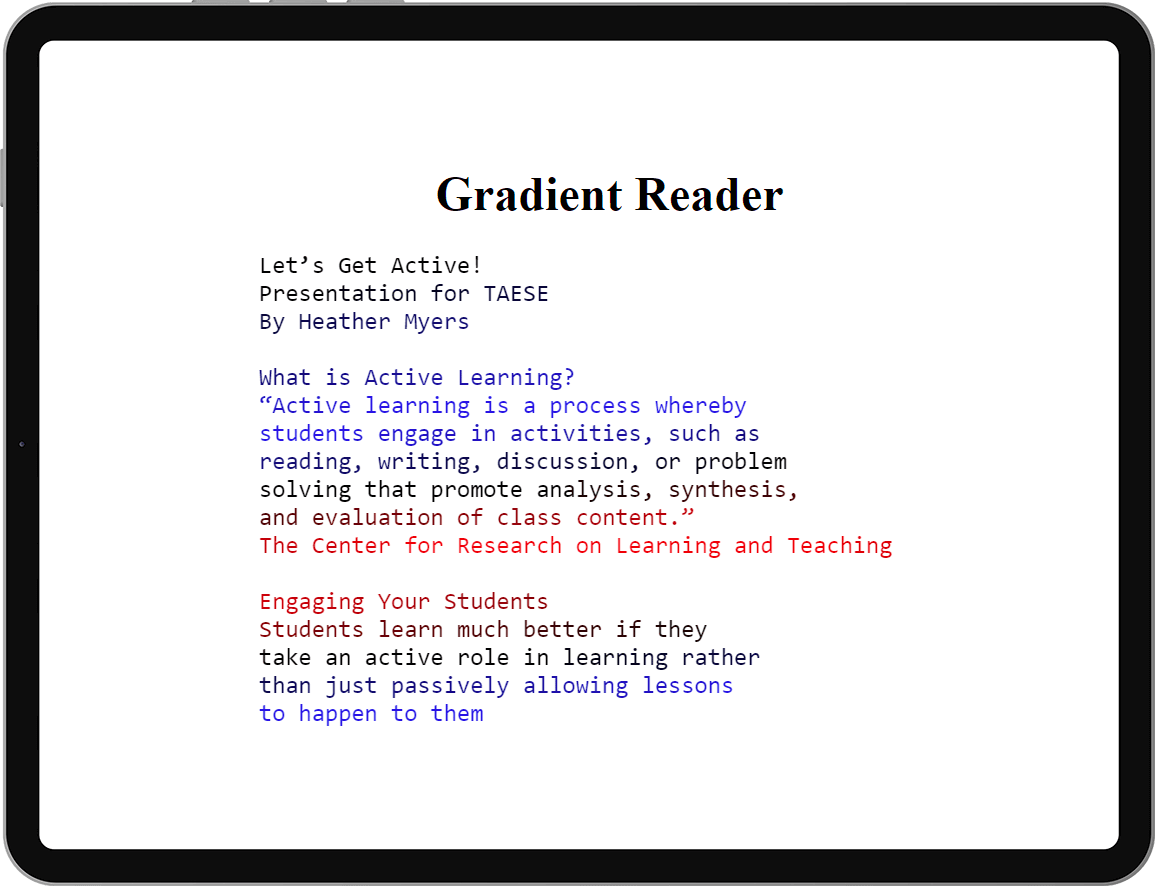
    Audio Podcast, or a spoken version of written content, transforms text into speech. This benefits auditory learners, students with visual impairments, and those with reading difficulties or learning English. Text shown in a gradient reader with lines in different colors.Immersive Reader enhances the reading experience with customizable text display. The reader combines a simplified visual presentation with text-to-speech capabilities. Features like syllable highlighting and grammar identification make it especially valuable for students with dyslexia or other reading challenges. Gradient Reader provides text with color gradients to improve readability and applies color transitions to make it easier to track lines of text and maintain focus. This format helps students with attention difficulties, visual tracking issues, or dyslexia.

    Specialized Format Options

    Braille, a tactile format for blind and visually impaired users, renders content for reading through touch, essential for students who use braille as their primary reading method. Math Formats, specialized rendering of mathematical content, properly display equations and formulas in accessible ways. These are critical for STEM education, where complex notation might otherwise create barriers. Language Translations, which converts content into different languages, support international students and multilingual learners in accessing materials in their preferred language. EPUB, a digital book format with adjustable text flow, offers reflowable text, customizable font sizes, and compatibility with screen readers, making it ideal for digital textbooks and lengthy reading materials. OCR (Optical Character Recognition) converts image-based text into machine-readable format, enabling scanned documents and image-based PDFs to be accessible to screen readers and text-to-speech technologies.

    POUR Guidelines

    Alternative formats address the core accessibility principles outlined in the Web Content Accessibility Guidelines (WCAG), known as the POUR principles:
    • Perceivable: Content becomes available through different sensory channels (vision, hearing, touch), ensuring information is presentable to users in ways they can perceive regardless of their abilities.
    • Operable: Users can navigate and interact with content regardless of physical capabilities, with interfaces that can be operated by all.
    • Understandable: Information is presented in ways that match different cognitive and language preferences, making content intuitive and simple for all learners.
    • Robust: Content works reliably across different technologies and assistive devices, ensuring compatibility with current and future user agents.
    These principles form the foundation of digital accessibility standards worldwide and align with legal requirements such as the Americans with Disabilities Act (ADA) and Section 508 compliance.

    Alternative Formats Benefit Students and Educators

    Alternative formats benefit all students and instructors, regardless of whether they have accommodations.  Alternative formats remove traditional learning barriers and allow students to independently access content that matches their needs and preferences.  For instructors and staff, alternative formats reduce the time spent creating individual accommodations. Rather than retrofitting materials for specific student requests, instructors can provide one version that automatically converts to multiple formats. Learn more about alternative formats, or read some of our case studies where institutional leaders share their experiences with YuJa Panorama’s alternative formats. 
  • March 17, 2025

    The Importance of Structural Remediation in PDF Accessibility

    Their popularity stems from good reasons, as PDFs preserve formatting across different devices, maintain document integrity, support digital signatures, and offer robust security features. Despite their benefits, PDFs present significant accessibility challenges that many organizations are only beginning to address.
    The need for accessible PDFs extends beyond good practice — it’s a legal requirement.
    While general web accessibility has improved in recent years, PDF accessibility presents unique challenges due to the complex nature of document structure and the prevalence of untagged documents in circulation. In fact, studies show that over 90 percent of PDFs opens in a new tab in circulation today are at least partially inaccessible, appearing as blank pages, garbled text, or incomprehensible code to those using assistive technologies. One of the key accessibility issues with PDFs is the lack of proper structure. PDF tags are metadata elements that define the structure of a document, making it navigable for assistive technologies. While an untagged PDF may contain all the necessary information, it’s nearly impossible to navigate effectively, resulting in a poor user experience and failure to meet accessibility compliance standards like WCAG 2.1 and Section 508 opens in a new tab . When a PDF lacks proper structure:

    • Screen readers cannot determine reading order or distinguish between headings, paragraphs, lists and tables
    • Users cannot navigate between sections or find specific information
    • Tables lose their structured format, making them unintelligible
    • Images are meaningless without alternative descriptions
    • Forms are unusable with keyboard navigation and are impossible for users with disabilities to fill out independently

    The Core Challenge of PDF Accessibility

    True PDF accessibility requires more than surface-level fixes. Structural remediation opens in a new tab addresses the fundamental organization of a document to ensure it can be properly interpreted by assistive technologies. Key elements include document tagging, logical reading order, proper table structure, alternative text for images, language identification, and accessible form fields. Making PDFs accessible has traditionally been a labor-intensive process with limitations like heavy volumes of documents, limited staff expertise and time to address issues, and an inability to keep up with accessibility as new PDFs are created.  Today, tools like the YuJa  Structural  Remediation Max Module opens in a new tab help institutions overcome these challenges by automating the remediation process, enabling organizations to make their document libraries accessible while freeing up staff resources for other accessibility needs. The module can automatically detect and tag document structure, identify and correct reading order issues, generate descriptive alt text for images, structure tables, and convert scanned documents to accessible, tagged PDFs. 

    Best Practices and Benefits of Making PDFs More Accessible 

    To address PDF accessibility, start with these best practices: 
    • Create accessible documents from the start: Train content creators to build accessibility into documents from the outset
    • Prioritize remediation efforts: Focus first on high-impact, frequently accessed documents
    • Leverage technology: Use AI-powered tools to improve the remediation process
    • Establish clear workflows: Create consistent processes for evaluating and improving document accessibility
    The need for accessible PDFs extends beyond good practice — it’s a legal requirement opens in a new tab . A report from UsableNet found that ADA digital accessibility lawsuits reached over 4,000 in 2024 opens in a new tab , with educational institutions among those facing scrutiny for inaccessible digital content, including PDFs.  Making PDFs accessible isn’t just about avoiding legal issues though. Accessible content can be used by everyone, expanding your audience reach and ensuring no potential users are excluded. Properly tagged PDFs are more easily indexed by search engines and internal search tools, enhancing the searchability and discoverability of your content, and accessible PDFs are better prepared for use with emerging technologies, effectively future-proofing your content as digital platforms continue to evolve. By implementing best practices and modern remediation tools, institutions can create inclusive digital environments that serve all users.
  • February 24, 2025

    Implementing Small Changes to Drive Digital Accessibility

    Whether you’re designing a website, developing an e-learning platform, or sharing content online, making small changes can have a profound impact on creating an inclusive digital environment for all users. Universal design principles advocate for creating content and technology that can be accessed, understood, and used by the widest possible range of people, regardless of their abilities. This approach includes considerations such as clear typography, sufficient color contrast, and alternative learning formats to accommodate different learning styles and preferences. Organizations often assume digital accessibility requires a complex infrastructure overhaul. However, minor tweaks can make a significant impact. Adding alternative text to images, providing transcripts for videos, and ensuring content is easily navigable with a keyboard all help improve accessibility for people with disabilities. Even small adjustments in applying these principles can significantly improve accessibility. Simple choices like increasing text size, selecting clearer fonts, or adding headings to structure content can transform how users interact with digital materials.

    Breaking Down Accessibility Barriers

    Technology has become a powerful tool in breaking down accessibility barriers. AI-driven solutions, automated captioning, screen readers, and assistive technologies are all transforming the way people interact with digital content. Organizations that invest in accessibility tools not only comply with legal standards but show their learning community a strong commitment to diversity and inclusion.A student looking at computer screen and typing For example, platforms like the YuJa Panorama LMS Accessibility Platform and YuJa Equalground Accessibility Governance Platform provide AI-powered tools to enhance digital accessibility. With features such as alternative formats, document remediation, accessibility gauges, reports, and more, solutions like these help bridge the gap and make content more accessible to a diverse audience.  Building an inclusive digital space is an ongoing process. As technology evolves, so do users’ needs and expectations. Regularly auditing digital content, gathering feedback from your audiences, and staying informed on accessibility best practices can help organizations adapt and improve. The shift toward greater inclusivity benefits everyone. By making small yet meaningful changes, businesses, educators, course and content creators can work to ensure that their digital spaces welcome and support all users.

Join the 1,000+ Organizations Deploying High-Impact Solutions

A collection of logos representing various organizations and institutions that use YuJa’s platform.







