Product Updates

Get the latest platform updates, features, and announcements—all in one place.

  • November 7, 2023

    YuJa GenAI Video Power Pack Update – November 2023

    We have successfully pushed an update to all Enterprise Video Platform instances residing in Canada, Australia, and the European Union.
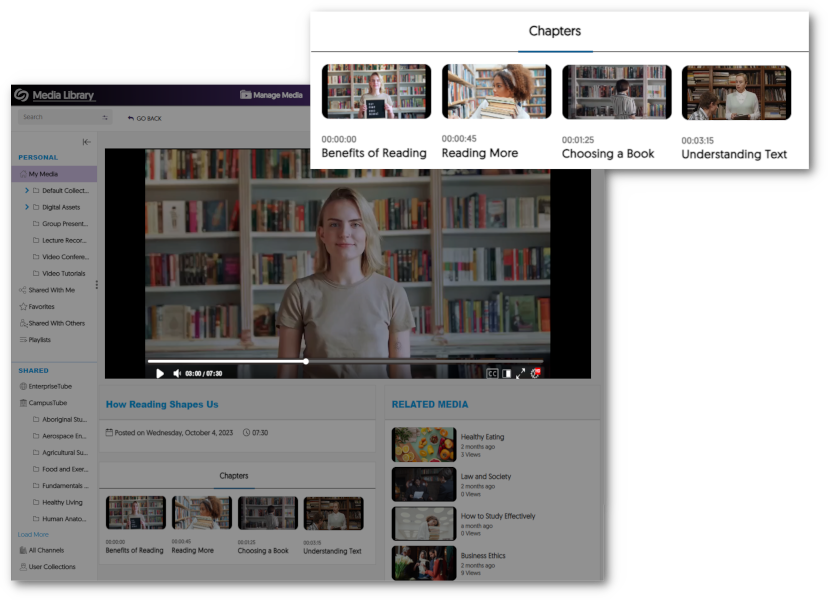
    1. New Generative AI to Detect Video Chapters (Moments of Impact) With the use of new Generative AI capabilities, Video Chapters allow viewers to automatically select key moments of impact within a video or audio recording. A Chapters tab is shown under the Video Player with thumbnails for each chapter within the video.
  • October 20, 2023

    YuJa Website Accessibility Widget Update – October 2023

    We have successfully pushed an update to the YuJa Website Accessibility Widget for those residing in the United States, Canada, European Union, and Australia.
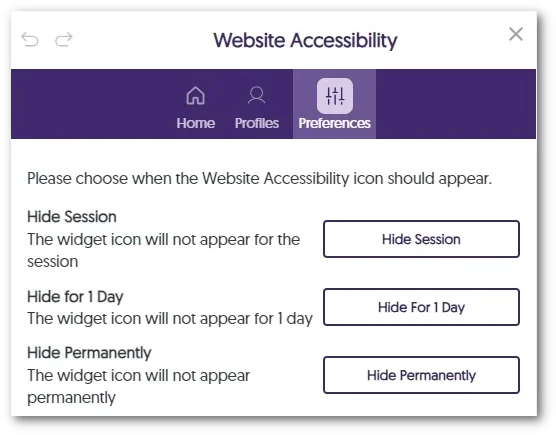
    1. Option to Hide the Website Accessibility Icon With an approach to optimizing viewability on smaller screens, such as mobile devices, instructors and students can conceal the Website Accessibility icon until they navigate to a new page or for a specified duration of one day. For those who prefer a consistently minimal interface, the option to hide the icon permanently is also available. Visibility options for the Accessibility icon.
  • October 20, 2023

    YuJa LMS Accessible Design Add-On Platform – October 2023

    We have successfully launched a new add-on to all YuJa Panorama Digital Accessibility Platform instances residing in the US, Canada, Australia, Singapore, the Middle East, and the European Union.
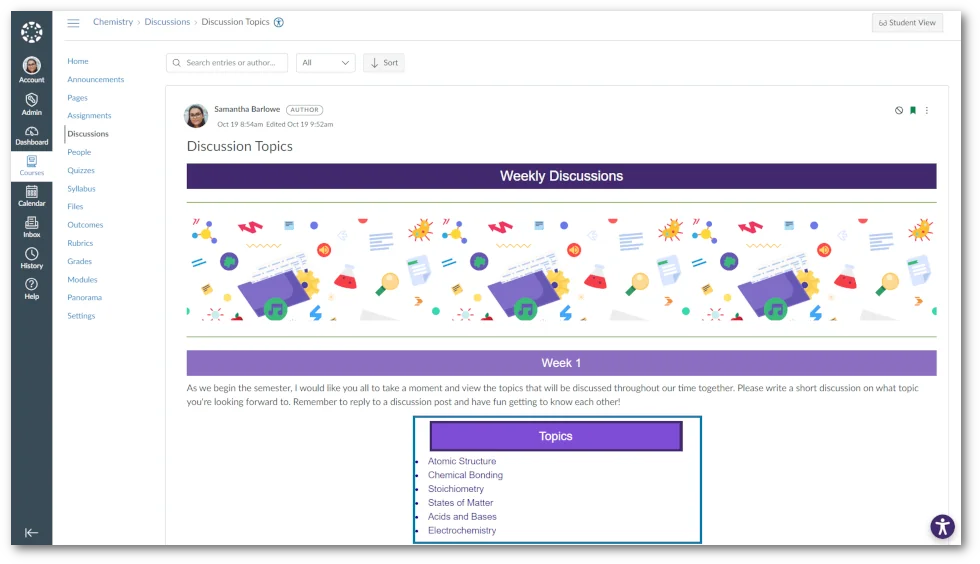
    1. New, Modern Accessibility Design Tools to Replace Need for YouDoIt Design Tools Our goal with Panorama is to provide a one-stop-shop solution for Accessibility. Part of that vision is to provide a more modern and capable WYSIWYG design interface to ensure that more accessible content is being created right from the start. Creating content within editable HTML areas of LMSs can be challenging, often resulting in content lacking visual appeal and accessible organization. To address these concerns, we’re introducing the Accessibility Design Tool to enhance the structuring, aesthetic, and usability of content in editable HTML areas. This will be a multi-cycle release, starting with three crucial areas for enhancement. Firstly, the tool will allow instructors to craft Banner Titles, allowing them to select custom colors and text alignment to suit their needs. Secondly, it provides the option to create containers of varying sizes, each adaptable with individual padding for flexible content spacing. Finally, the Text element grants instructors the option to position their content within containers with an array of formatting options, including headers, alignment, spacing, and so much more.A featured design using the Accessible Design Tool.
  • October 20, 2023

    YuJa Panorama Digital Accessibility Platform – “King’s Peak” Version Released to US, CAN, AU, and EU Zones

    We have successfully pushed an update to all YuJa Panorama Digital Accessibility Platform instances residing in the United States, Canada, European Union and Australia. This release provides our users with remediation capabilities for PowerPoint issues, an Accessible Design Tool to replace YouDoIt design tools, enhanced website scanning to support linked pages and documents, removed the need for third-party cookies, new faster processing queues for Alternative Formats, the option to hide the Website Accessibility Icon, enhanced UI designs, and so much more.
     
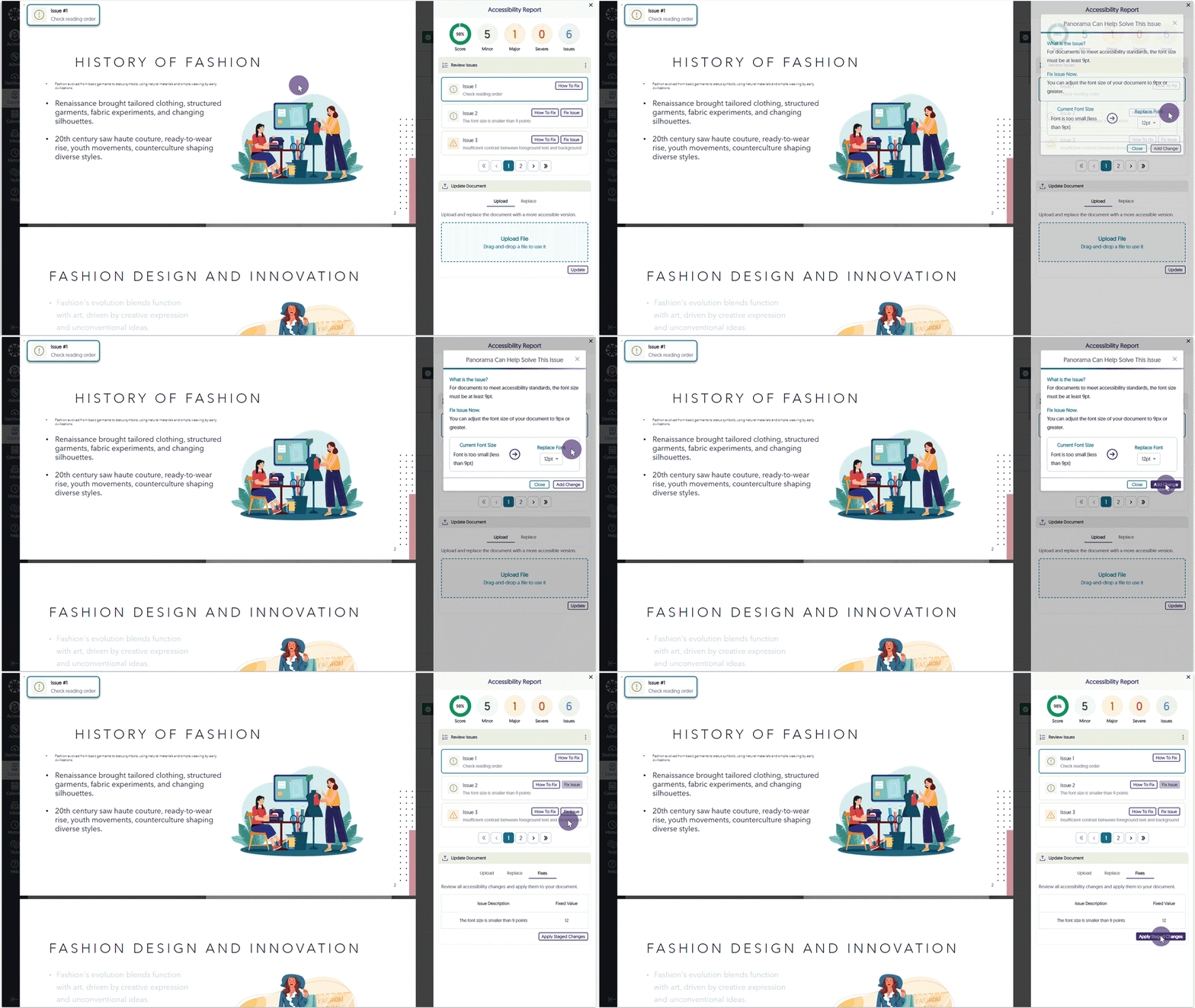
    1. New Remediation Engine – WCAG 2.1 Aligned Microsoft PowerPoint Issues To recap, we offer Accessibility Engines to identify accessibility issues across all major document types. Remediation Engines take things to the next level by actually fixing the document all while inside your LMS. With the introduction of our Remediation Engine tailored for real-time resolution of Microsoft Word documents, we now extend these capabilities to Microsoft PowerPoint. The new Microsoft PowerPoint Remediation Engine enables users to address PowerPoint-related WCAG 2.1 compliance issues directly within the LMS, including issues such as contrast, font size adjustments, provision of alternative text for images, and dozens more.Remediating PowerPoint font size issue.
    2. Gamify and Celebrate Your Accessibility Improvements (a Newly Architected Processing Pipeline Makes It Possible) Improving the accessibility of documents is important work, and here at YuJa, we believe such efforts should be celebrated. Enjoy your success in using the Remediation Engine effectively with cheerful streamers and confetti animating your screen. We encourage and appreciate your ongoing efforts to impact student learning positively. For those more technically inclined, to provide ultra-fast inline remediation and gamification-ready response times, we rebuilt the processing pipelines to have multiple “swim-lanes”, each with independently scaling infrastructure. This updated architecture was purpose-built to accelerate Accessibility Engine processing. Document updated animation.
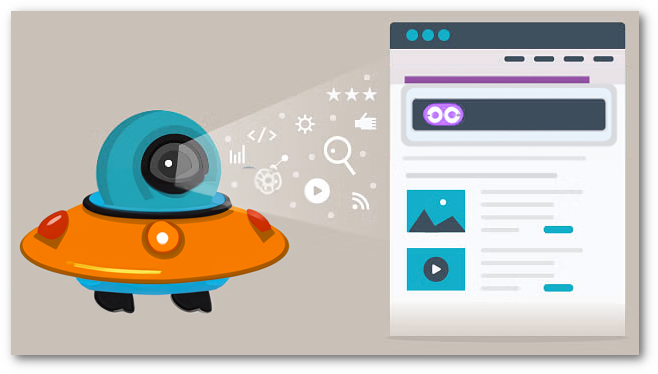
    3. WCAG 2.1-Aligned Website Scanning Tool Enhanced to Offer Accessibility Insights for Linked Pages and Documents To provide accessibility assistance outside of integrated LMS domains, Panorama offers Website Accessibility scanning designed to extend accessibility checks and support beyond integrated LMS domains. The scanning tool operates in three phases, starting by identifying content and linked pages within a specified domain. It then performs a scan to generate Accessibility Reports for the domain, documents, and linked pages. Finally, it enables users to create Alternative Formats for discovered documents. A comprehensive list of all scanned domains can then be viewed within the Website Report, offering the overall accessibility score, individualized scores for content found within the domain, and access to generate Alternative Formats. Robotic space alien scanning a web page.
    4. No More Third-Party Cookies! Panorama’s LMS integration, with its established and IMS-certified implementation of LTI 1.3/LTI Advantage protocols, has traditionally utilized third-party cookies to ensure secure data transfer between integrated tools. Now, thanks to the adoption of new enhanced protocols, the necessity for third-party cookies is no longer required. This development enables users to benefit from a more secure connection and straightforward product integration, especially with browsers that might default to having cookies turned off. A no cookies symbol.
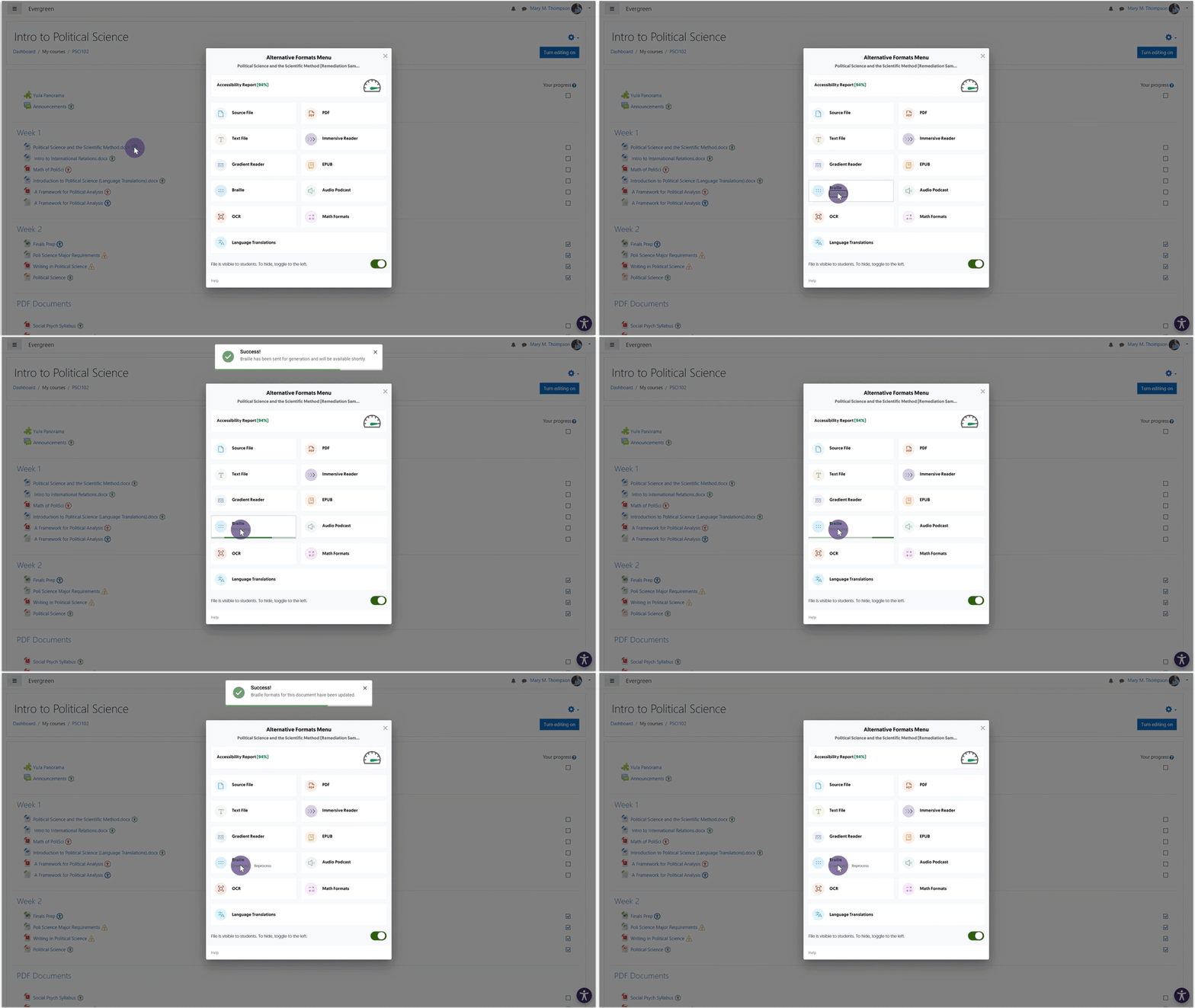
    5. On-Demand Processing Queue for Faster Accessibility Report and Alternative Formats Generation As Panorama continues to expand, we have built an Elastic Media Cloud (EMC) that can process institutions and courses with hundreds and thousands of files within an hour. We’re now introducing an extension to the EMC, On-Demand Processing, to help manage processing requests for Alternative Formats and updates to documents made through our Remediation Engine. With a workload that is 99.9% lighter than the traditional general processing workload, the On-Demand queue assures the completion of these immediate processing tasks in two minutes or less. An Alternative Format being generated.
    6. Option to Hide the Website Accessibility Icon With an approach to optimizing viewability on smaller screens, such as mobile devices, instructors and students can conceal the Website Accessibility icon until they navigate to a new page or for a specified duration of one day. For those who prefer a consistently minimal interface, the option to hide the icon permanently is also available. Visibility options for the Accessibility icon.
    7. Customize the Institution Name on the Institution Information Page Panorama offers the option to customize the institution name displayed on the Institution Information page to provide a custom viewing experience. Administrators wishing to modify the name to align with specific branding or internal naming conventions can do so by contacting their Customer Success Manager.
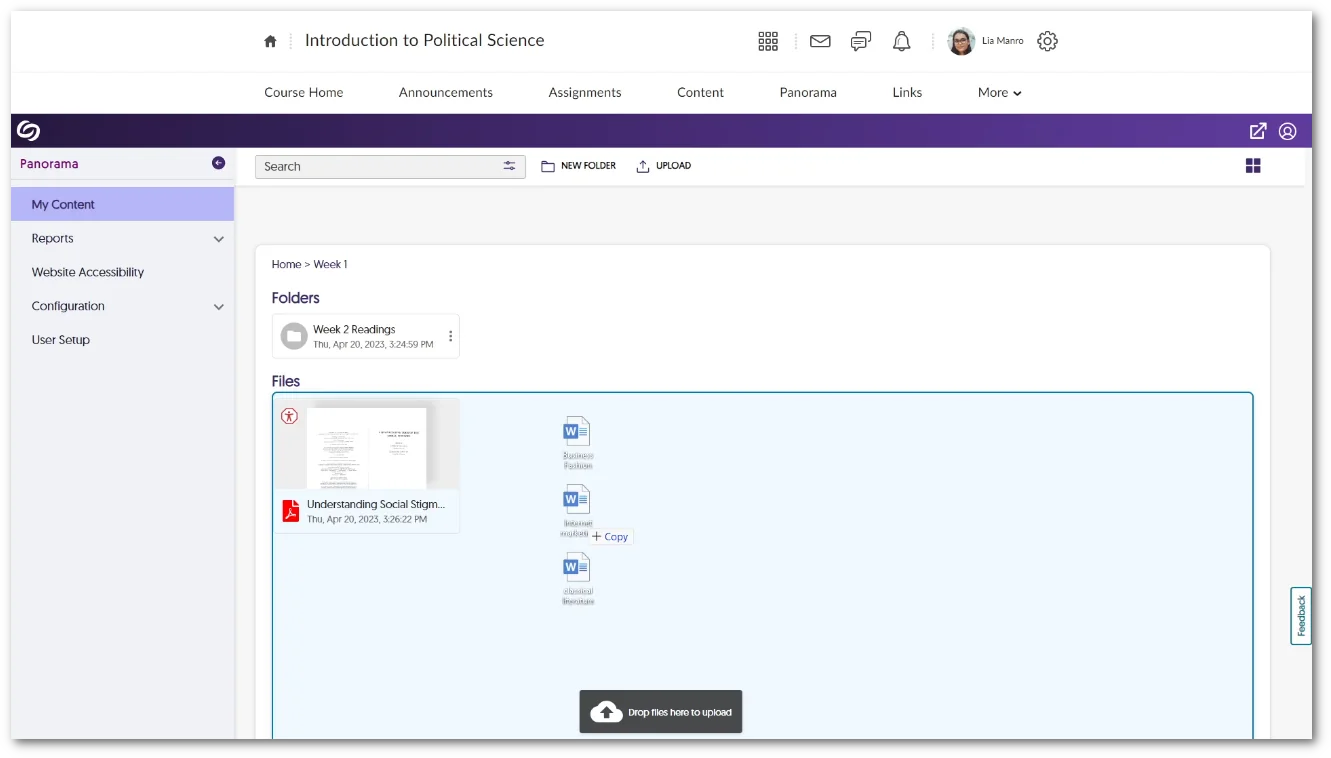
    8. My Content Tab Supports Multi-File Drag-and-Drop We’ve introduced a new drag-and-drop functionality to Panorama, allowing users to upload multiple documents into their My Content Files or created folders. Multiple documents being dragged and dropped into My Content.
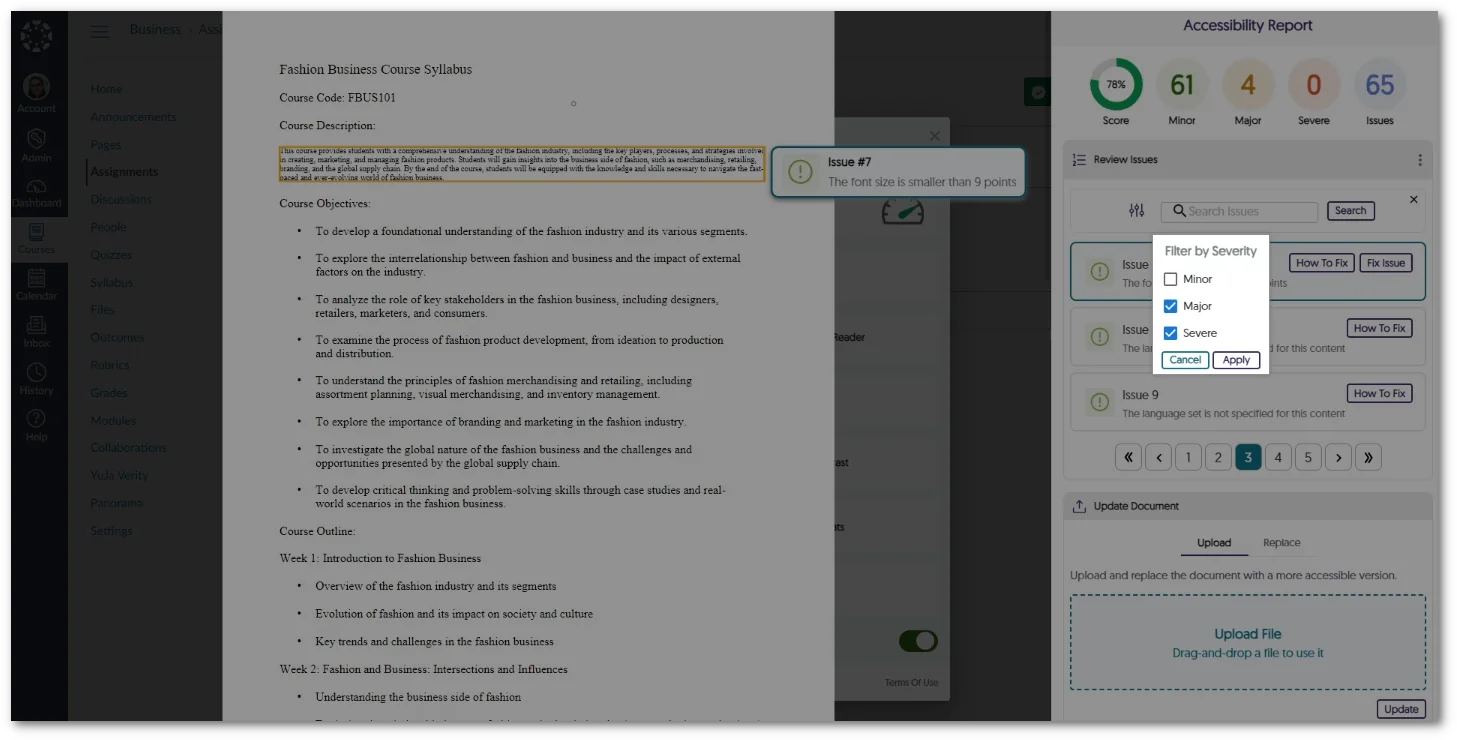
    9. Filter Issues by Severity in the Accessibility Report The Accessibility Report now allows instructors and students to organize and view identified issues based on their severity level—Severe, Major, and Minor. Option to filter issues by severity type in the Accessibility Report.
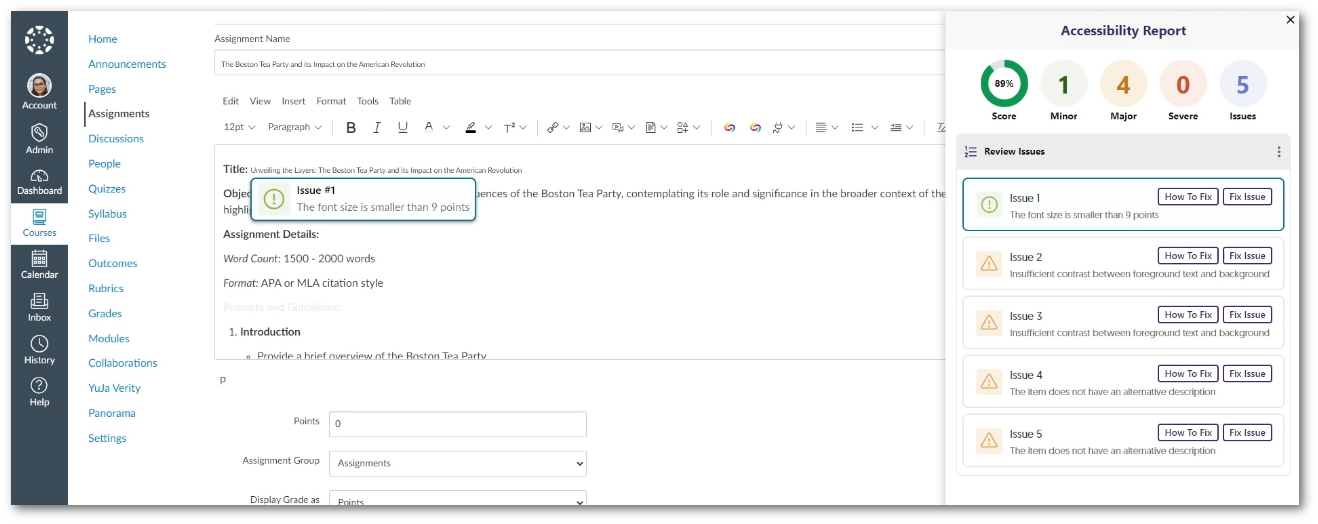
    10. Enhanced UI for Panorama’s WYSIWYG Editor To ensure a unified and modern user interface across Panorama, we’ve upgraded the WYSIWYG editor, aligning its UI with the refined aesthetic and functionality similar to that of the Accessibility Report UI. Users will now be able to view an organized list of accessibility issues, with the option to filter by severity to resolve the most concerning issues immediately. New redesign for the WYSIWYG editor.
    11. On-Demand Refresh of Institution-Level Reports For institutions utilizing the option to Pre-Generate Reports, we’ve introduced a new feature to update reports manually. A “Refresh” button is now available for each report, providing the option to initiate an update that will generate the most recent data within the hour. The option to refresh a report.
    12. Updated Support for LibreOffice Version 7.6.2 Panorama continues to align with advancements in document technology, now offering support for LibreOffice version 7.6.2. This update is crucial in ensuring the security of documents, aligning with our commitment to providing a safe and up-to-date environment for all users. Libre Office logo.
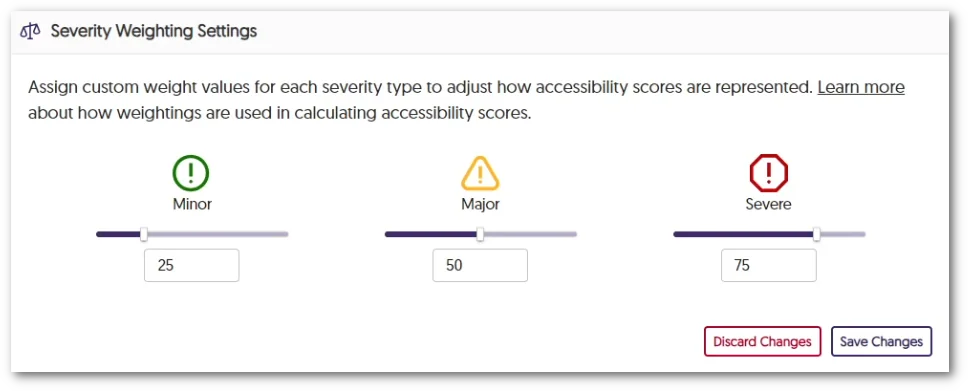
    13. Improved Interface for Performing Accessibility Weighting Adjustments We have updated the interaction for adjusting accessibility weighting for various issue types—Severe, Major, and Minor. Admins can now select their preferred weights using a sliding bar while still having the option to input precise values with the textbox. New slider for severity weighting.
    14. Panorama Expansion with a Dedicated Server for Australian Institutions As Panorama grows, we’ve introduced a dedicated server specifically for Australian institutions to take advantage of our accessibility learning features.
  • October 6, 2023

    YuJa Enterprise Video Platform Update – “Zelkova” Released to CAN, AU and EU Zones

    We have successfully pushed an update to all Enterprise Video Platform instances residing in Canada, Australia, and the European Union. Release highlights include: a refreshed Media Player theme, option to edit Platform emails, publish playlists across the Video Platform, transform folders into Playlists, dynamically select layout preferences, custom embed sizes for the Media Chooser, enhancements to the Video Editor, manage Rosters for individual campuses within the Umbrella System, and so much more.

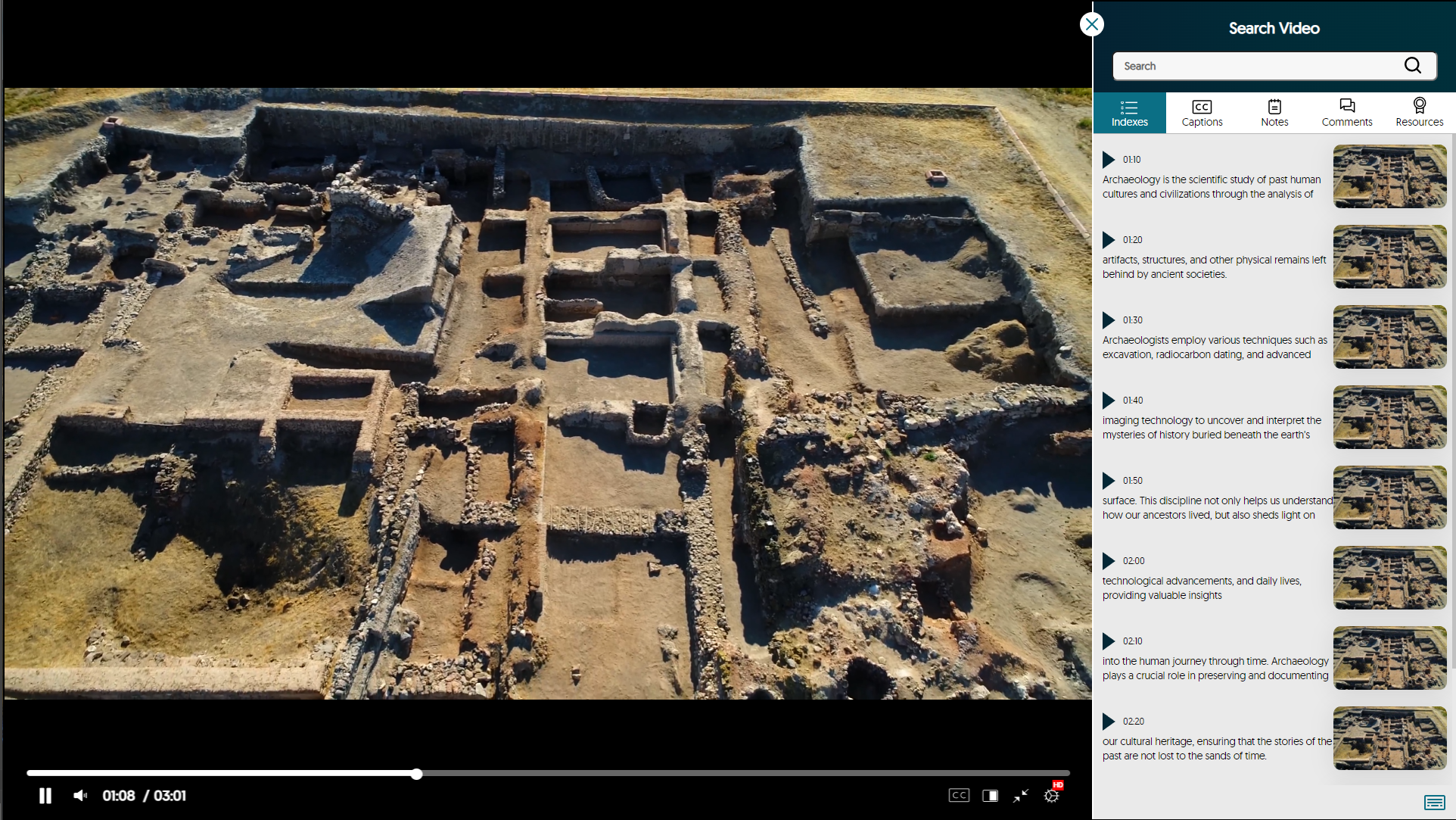
    1. Refreshed Media Player with Enhanced Search Video Sidebar As part of our multi-release commitment to refining the Media Player, we’re introducing a new interface with redesigned icons and color adjustments. You can now view labeled timestamps for the Index, Captions, and Notes to ensure seamless navigation. Redesigned Media Player.
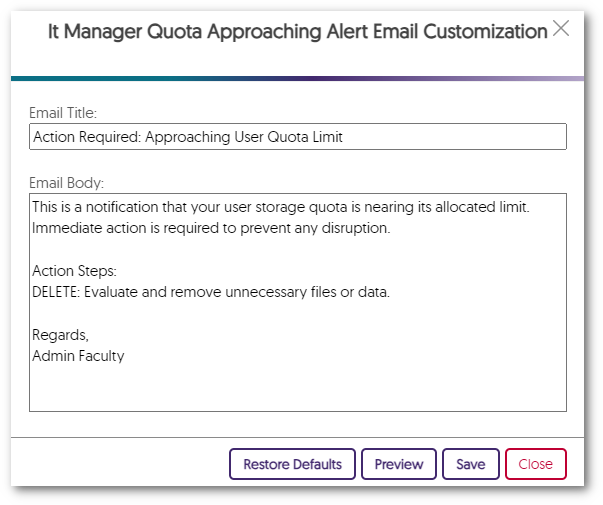
    2. Edit All Platform Emails to Align with Brand and Communication Preferences Administrators can tailor their email notifications to meet their specific preferences. Simply choose the Edit option next to any email notification in the Platform tab to customize the email’s content to align with school-specific branding. A customized email in the Email Editor.
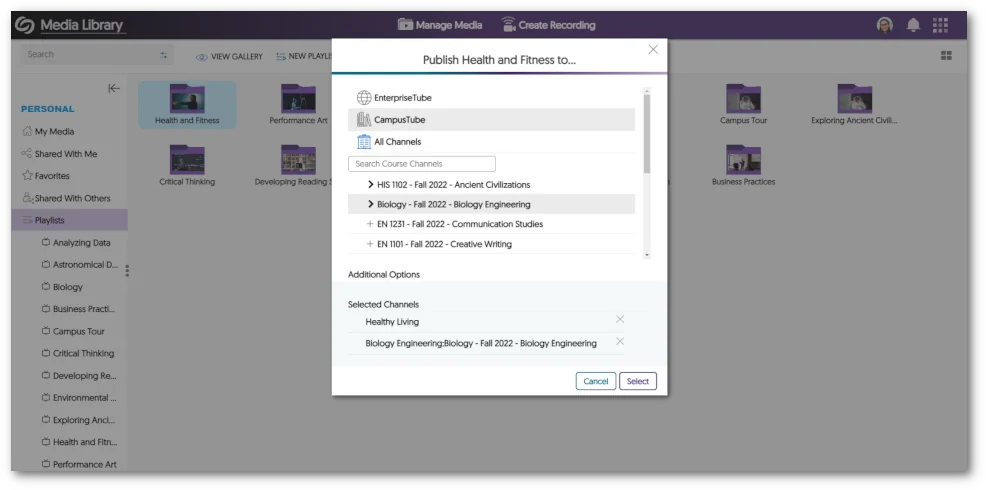
    3. Publish Playlists to the EnterpriseTube, CampusTube, and Course Channels with Real-Time Updating Playlists now offer the flexibility to be published across EnterpriseTube, CampusTube, and Course Channels. After publication, Content Creators can continue to modify Playlists, with the changes instantly reflected across all published locations. A Playlist being published into multiple areas.
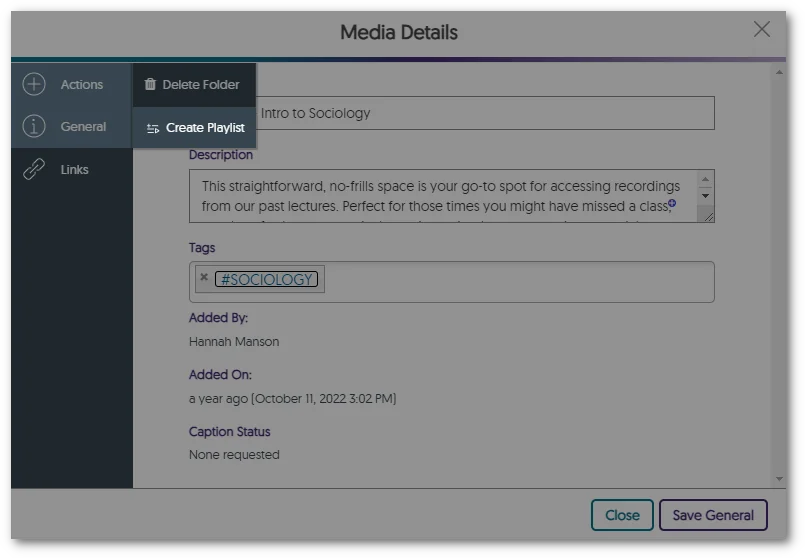
    4. Transform Folders into Playlists Users with curated content within folders can seamlessly transform folders of video content into sharable Playlists, enabling them to share and dynamically update their content across the Video Platform. To recap, Playlists will eventually be the preferred way to distribute lists of videos, and Folders will remain the preferred way to organize content. Option to turn folder into Playlist in the Media Details panel.
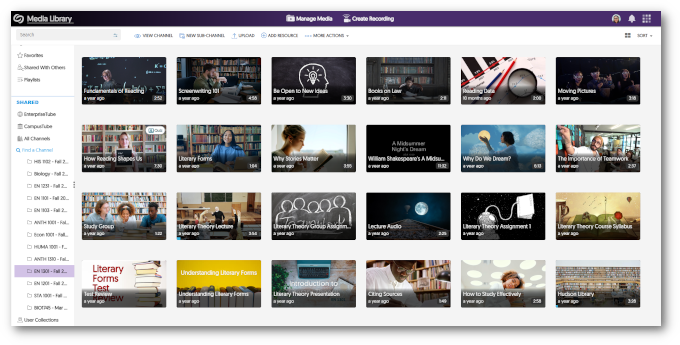
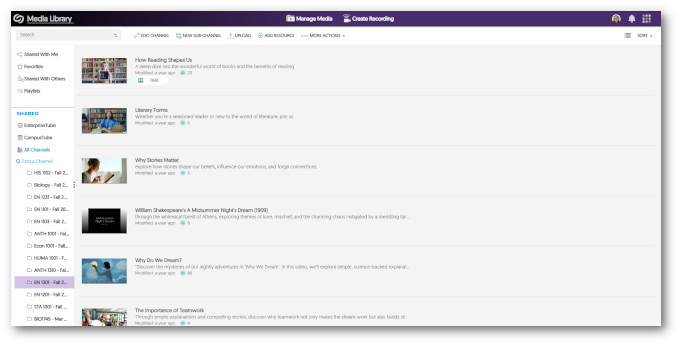
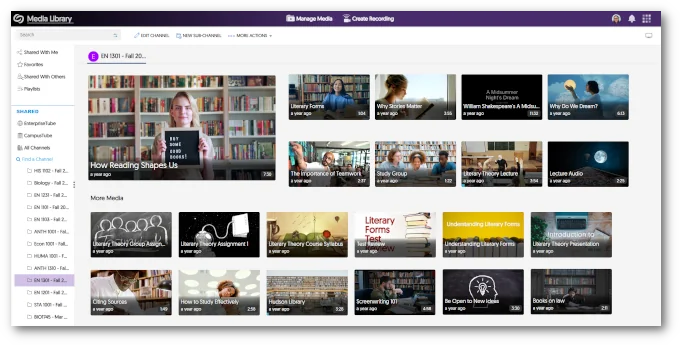
    5. Viewers Can Dynamically Select Layout Preference Between Grid, List, and Gallery with Default View Options To establish a default viewing experience for each Channel on the Video Platform, administrators and Channel Owners have the option to configure the default view for a given Course Channel.
      • Grid Grid view of a course channel.
      • List List view of a course channel.
      • Gallery Gallery view of a course channel.
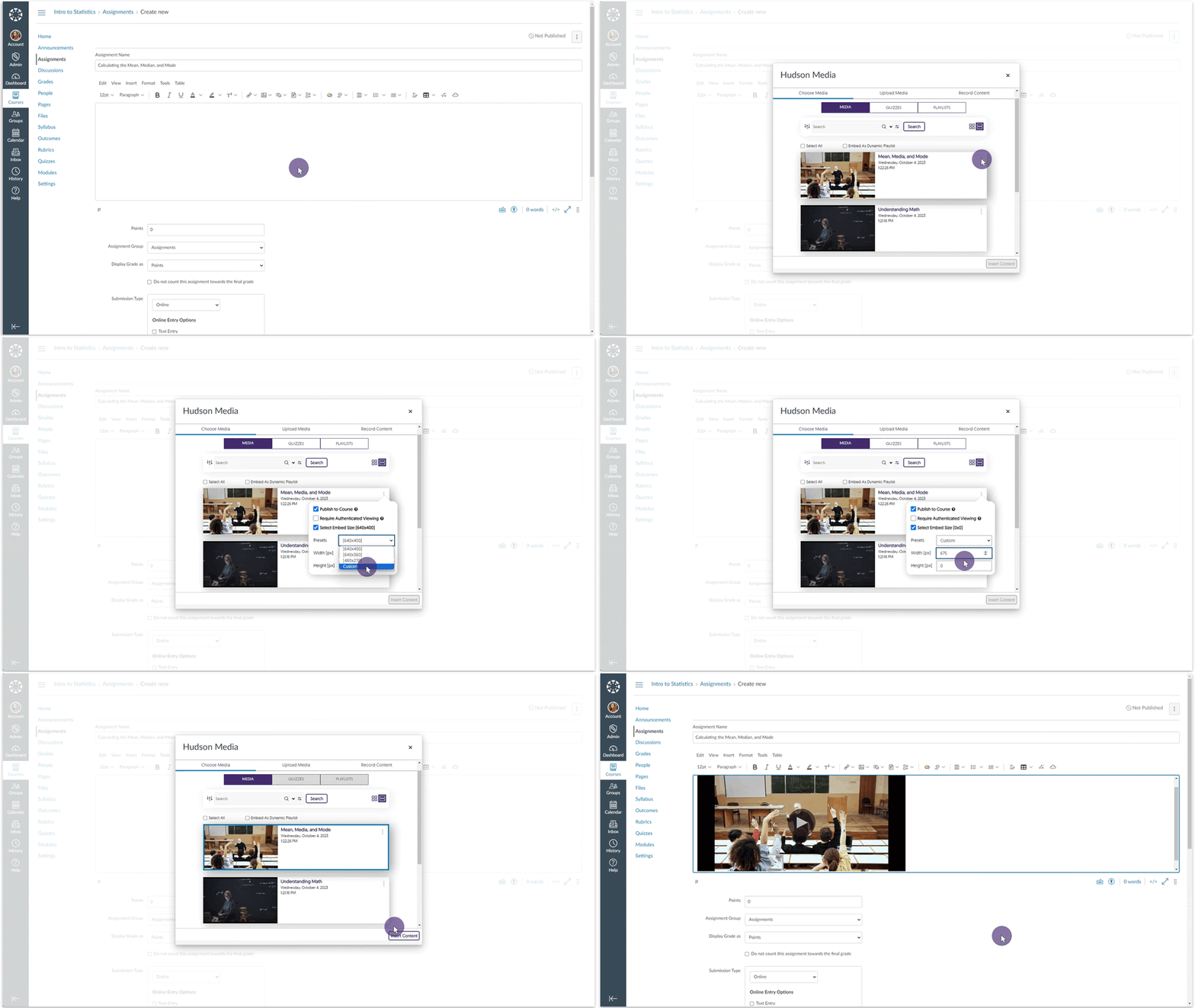
    6. Set Custom Embed Sizes for the Media Chooser Content Creators can select a default standardized embed size for their media content when selecting to embed videos through the Media Chooser. Furthermore, Creators can customize the embed sizes.
    7. Video Editor – “Undo” Function Now Works with Recently Introduced Split Tool In the previous release, we introduced a Split tool to complement the existing Cut tool. We have now added compatibility with the Video Editor’s “Undo” capability and the Split tool. Undoing a split in the Video Editor.
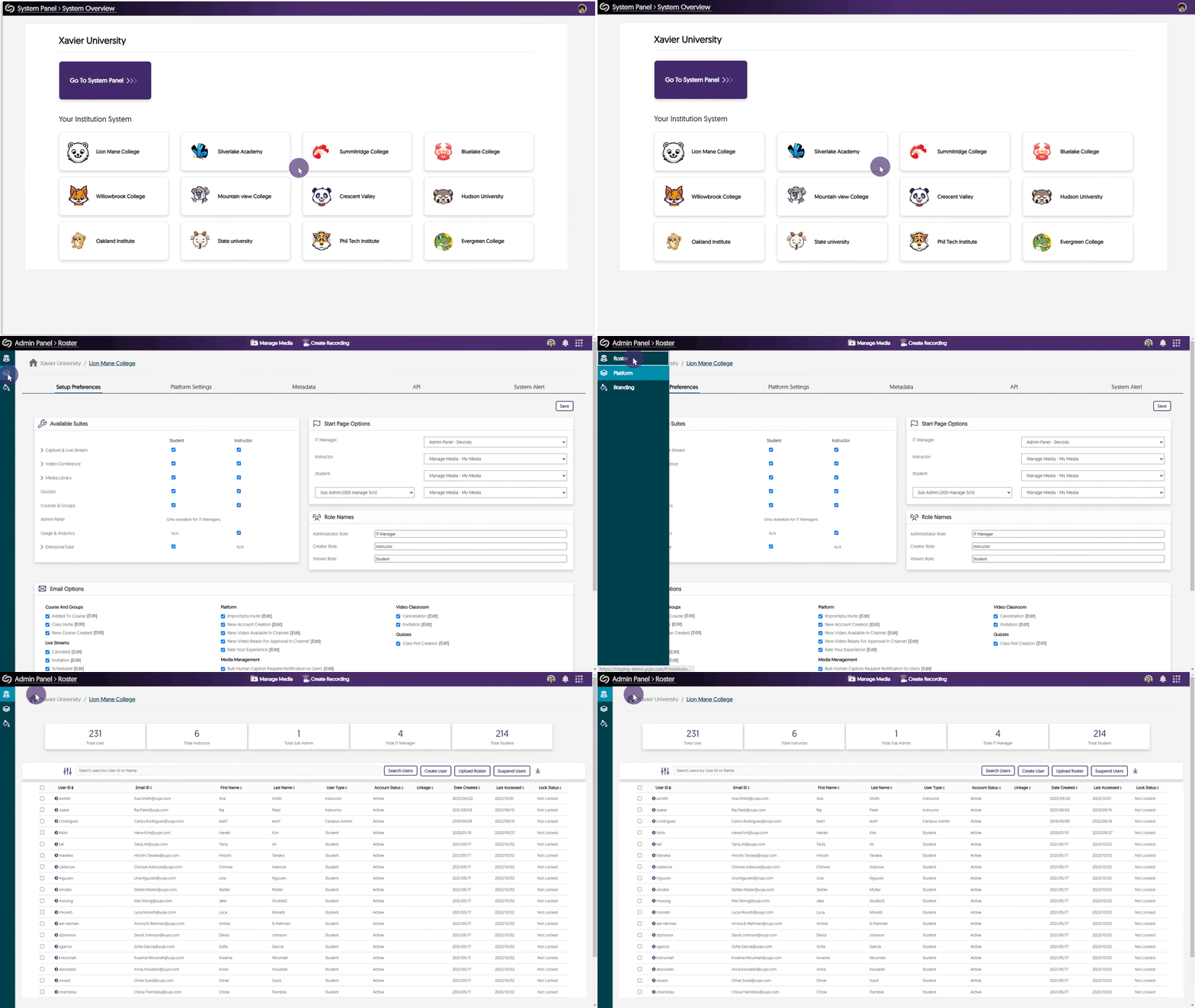
    8. Umbrella System – Manage Dedicated Rosters for Campuses With the introduction of our Umbrella System Panel designed for Super Admins overseeing multi-campus institutions, our attention now turns to the distribution of Admin Panel settings to the System Panel, commencing with the Roster panel. Super Admins and Campus Admins will be able to oversee lists of provisioned users within each campus, enabling precise user role adjustments that exclusively impact individuals within their designated campus. In addition, we’re actively exploring how aspects of the Umbrella System could help large organizations, such as research institutions, to provide hierarchical distribution of administration and permission management for Campus and Sub-Admin roles to better support single-campus entities. Accessing the Roster tab from the System Panel.
    9. Mirror Single Sign-on ID Names in the Video Platform With Existing YuJa IDs In our previous update, we allowed Single Sign-on (SSO) ID names to be mirrored on the Video Platform when creating a new user. We have updated this feature to allow the YuJa IDs of existing users to be mirrored based on their SSO ID names.
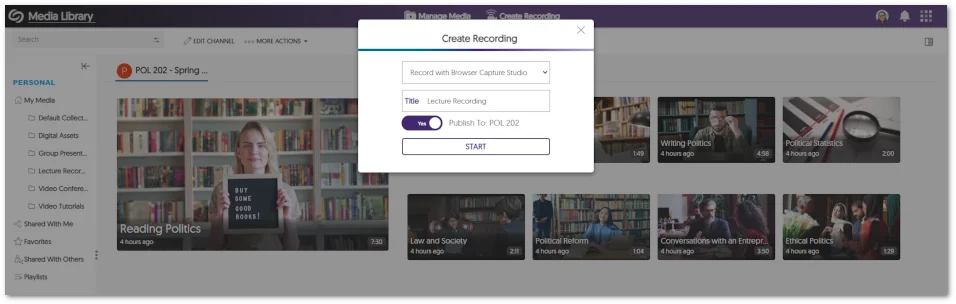
    10. Pre-Select the Course Channel for Browser Capture Publication When launching the Browser Capture Studio from within a course channel, Content Creators now have the option to publish recordings to the course. The option to publish recording into the Course Channel from the Create Recording panel.
    11. Copied LMS Courses Will Have Their Published Videos and Quizzes Migrated to Pre-Existing Courses In our last update, while we allowed LMS-copied courses to be connected with pre-existing courses on the Video Platform, the migration of published videos and Video Quizzes associated with these courses needed to be supported. We’ve now updated this functionality to allow associated videos and quizzes to migrate into courses previously established on the Video Platform.
    12. API to Schedule Events and Publish Them to CampusTube We’ve introduced an API (4.2.8) that enables administrators to schedule live streams and media for direct publication to their CampusTube folder. To learn how to use this and any of our other APIs, please visit our API Support guide.

Join the 1,000+ Organizations Deploying High-Impact Solutions

A collection of logos representing various organizations and institutions that use YuJa’s platform.