Product Updates

Get the latest platform updates, features, and announcements—all in one place.

  • August 30, 2023

    YuJa Hardware Hub – “Everest” Firmware Update Now Available

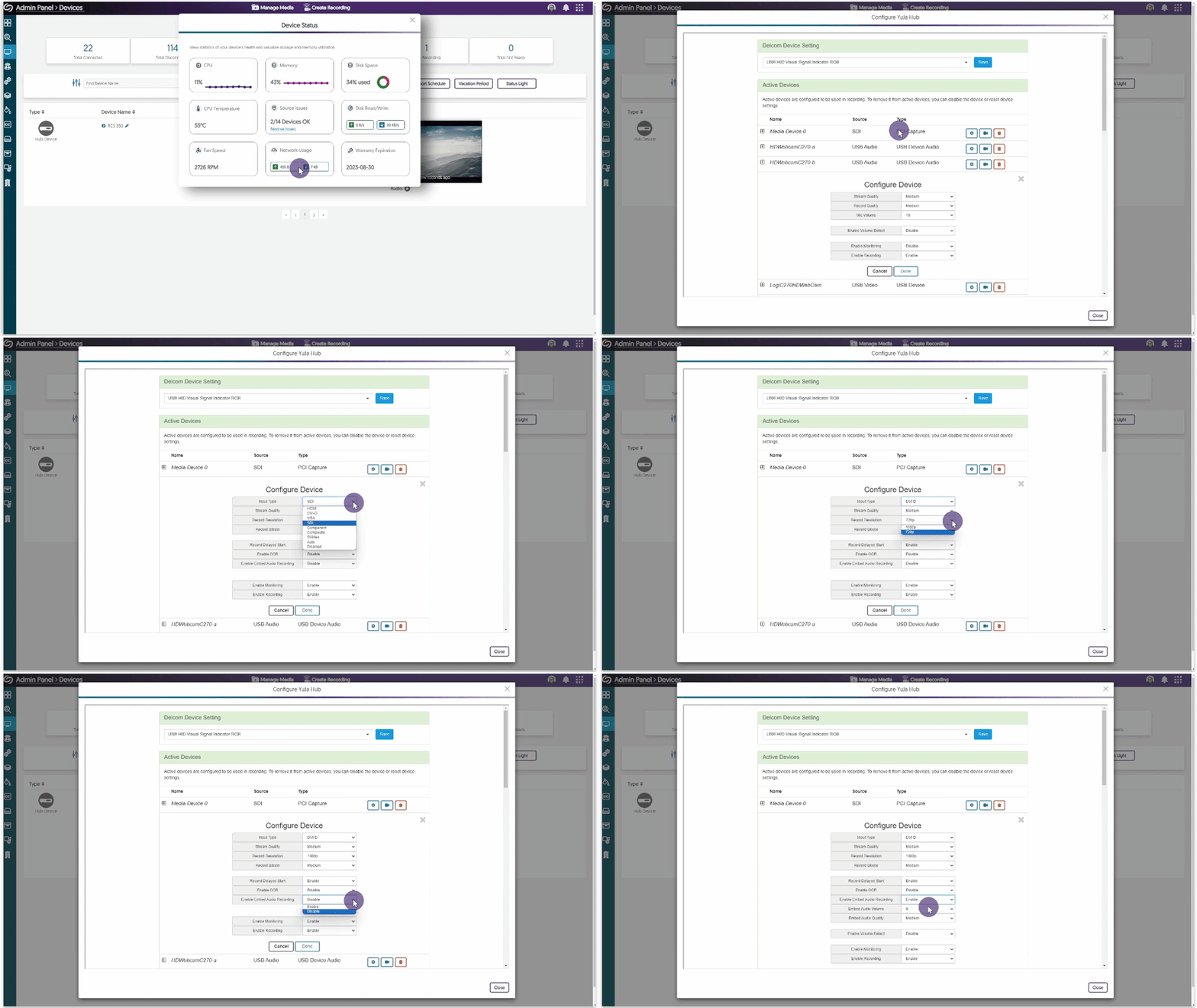
    We have released a new Hardware Hub RCS 550 firmware that is available for update within the Devices Panel. This update provides our users with real-time health and performance monitoring and the option to publish and live stream to EnterpriseTube and CampusTube folders. 

    1. Real-Time Health and Performance Monitoring for the Hardware Hub The Hardware Hub is trusted for seamless, end-to-end video capture and distribution. To ensure the reliability of your device during sessions, we now offer live tracking for the performance of the Hardware Hub. View analytics such as:
      • CPU Temperature reading
      • Video streaming quality
      • Storage management
      • Hardware issues
      By monitoring the performance of the Hub, administrators will be able to take note of crucial readings to better manage their recordings. Device status modal for the Hardware Hub.
    2. Manage and Resolve Issues for Configured Devices We have added a check for source issues within the Device Status report by providing instant viewing of how many devices are experiencing issues. If any device is experiencing problems, simply click ‘Resolve Issues’ to be directed to the device configuration page, where adjustments can be made or seen for pressing issues such as connecting a device to the correct source or viewing which device has disconnected. Configuring an active camera connected to the Hardware Hub.
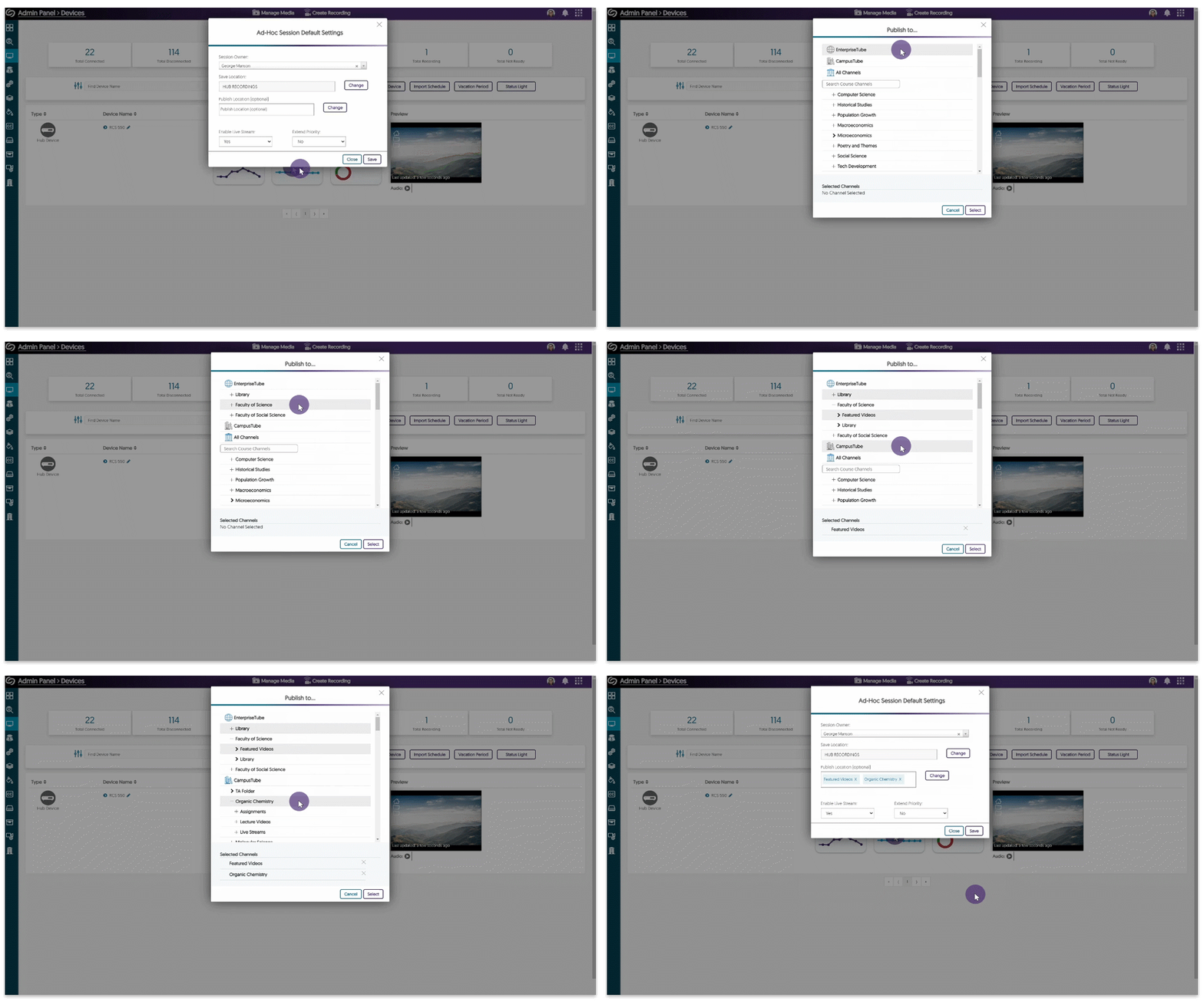
    3. Live Stream and Publish to the EnterpriseTube and CampusTube The Hardware Hub has previously been able to live stream and publish to Channels inside the Video Platform. We are now expanding this capability to allow users to publish to any location within their EnterpriseTube or CampusTube folders. Adjusting the publish location to the EnterpriseTube and CampusTube.
  • August 29, 2023

    YuJa Engage Student Response System Update – “Oxford” Released to US, CAN, AUS, and EU Zones

    We have successfully pushed an update to all YuJa Engage Student Response System instances residing in the United States, Canada, Australia, and the European Union. This release provides our users with a new matching question type, a YuJa Engage desktop app for Mac Keynote presentations, and enhancements to the Engage mobile app.
     
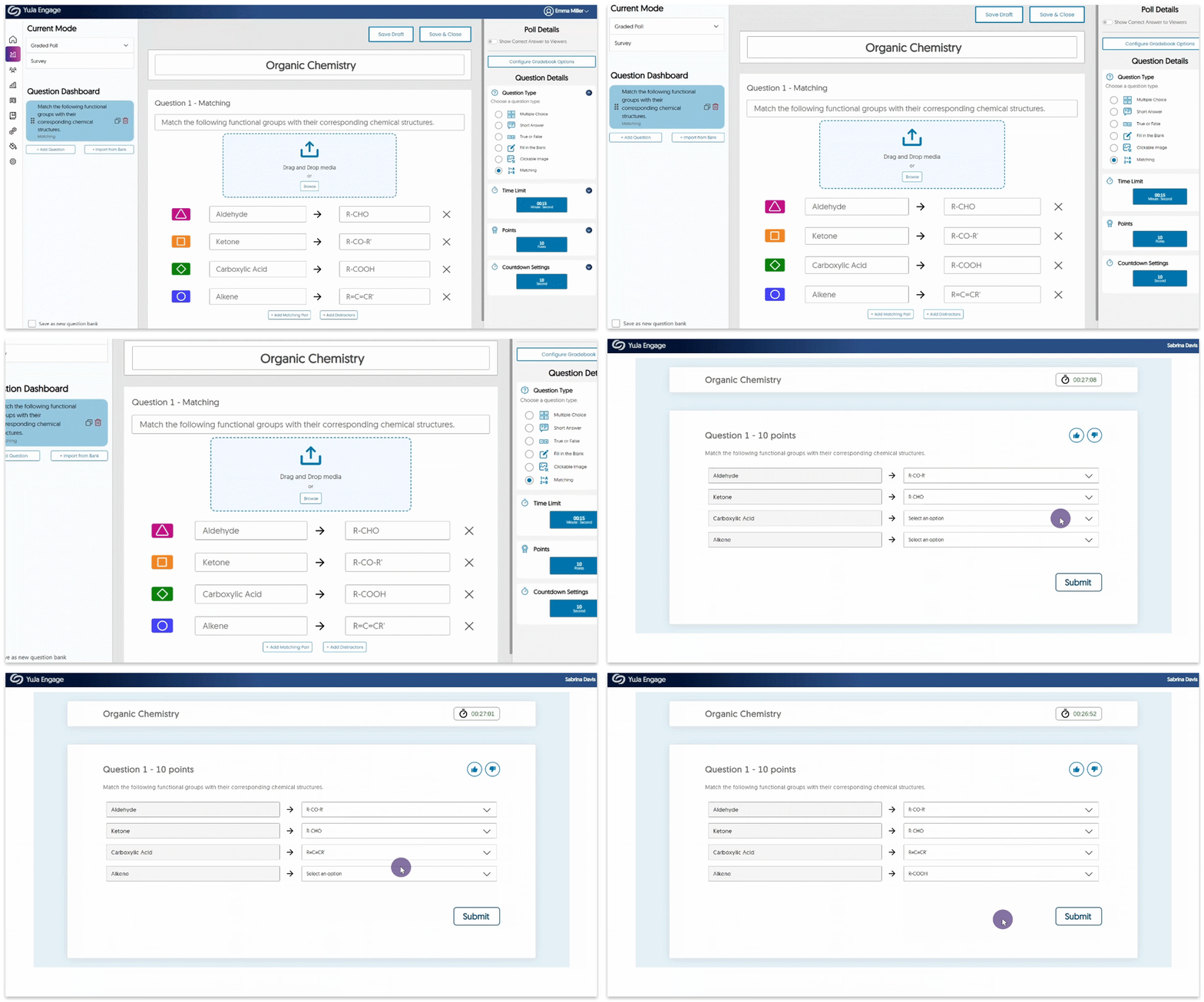
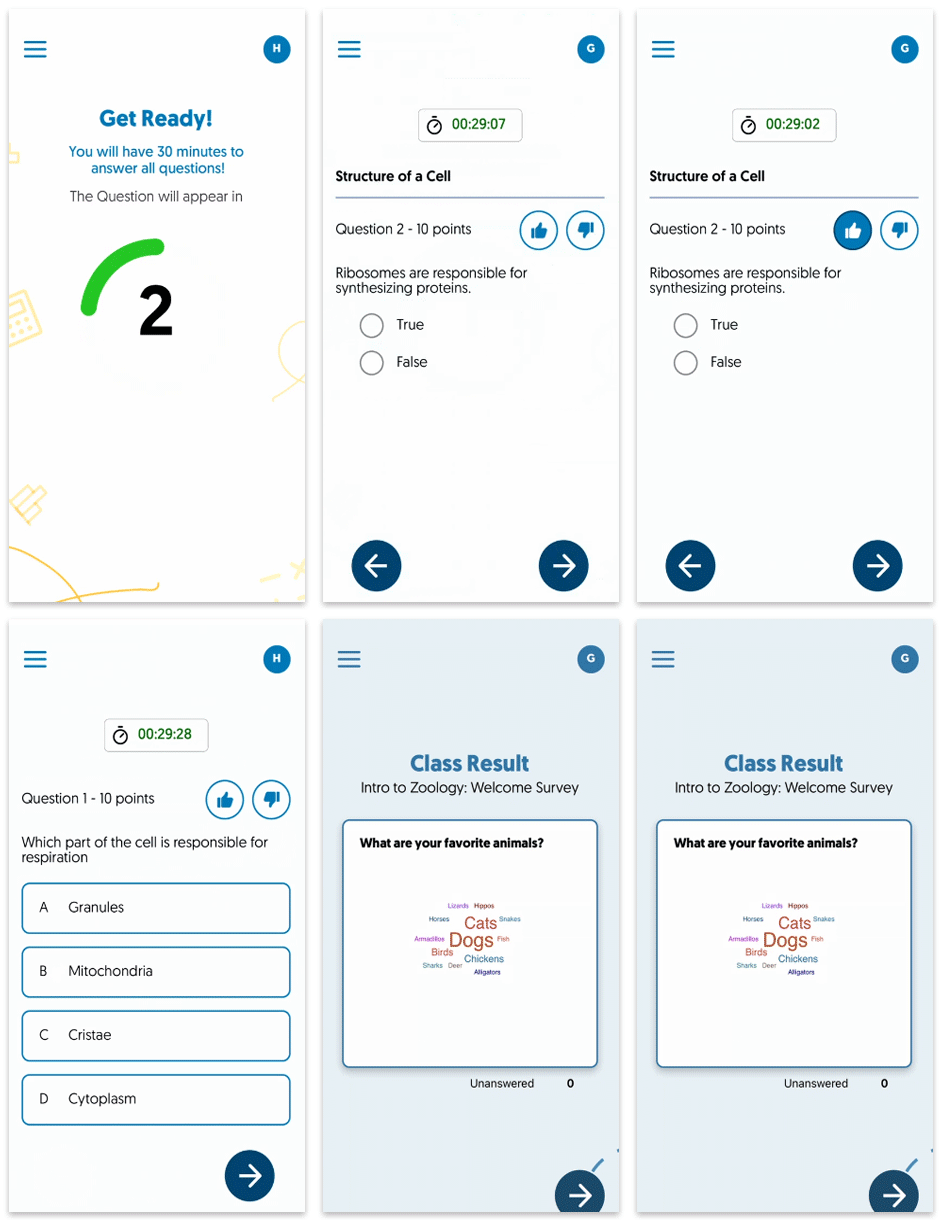
    1. New Matching Question Type To further expand on our growing list of question types, Engage now offers Creators the option to include matching questions. This new question type prompts Poll Participants to pair items with predetermined options, contributing to a more engaging interactive experience. Matching question type being created and aswered.
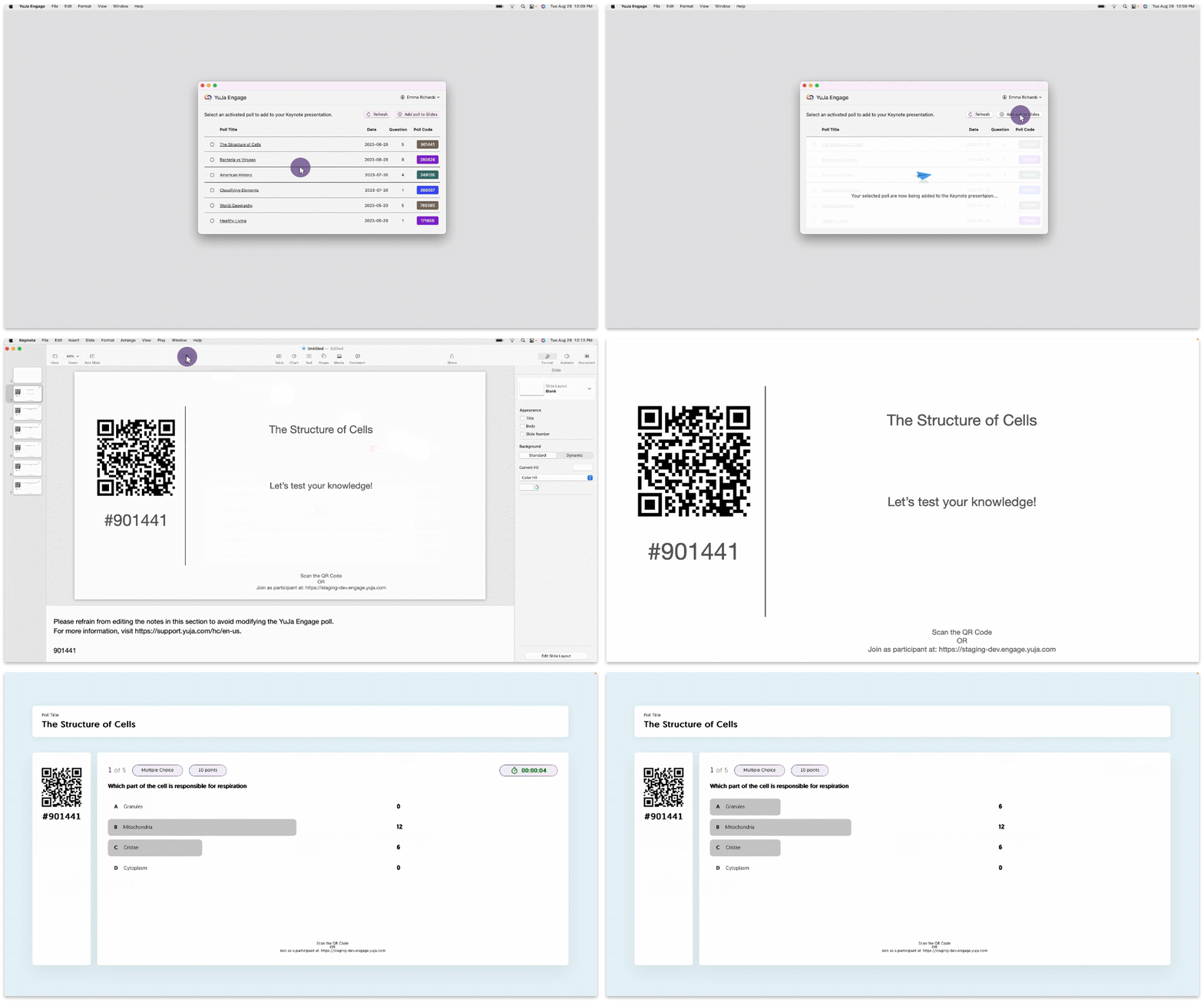
    2. YuJa Engage Desktop App for Poll Integration with Apple Keynote The YuJa Engage desktop app is now accessible for Mac Keynote to provide users with a seamless Student Response System during live presentations. The app will allow users to integrate individual questions within their Keynote presentations while providing a comprehensive view of corresponding results. The Engage desktop app will be available for download on the App Store in the coming week. We hope you enjoy creating interactive and engaging presentations. The Engage desktop app.
    3. Features for the YuJa Engage Mobile App Are Now Aligned with the Web App To provide consistent and reliable features to the mobile app comparable to the web app, we have added and resolved many issues to enhance the overall user experience. Highlighting some of these features are: Word Cloud question type support, Hide correct answers, Thumbs up and thumbs down reactions, as well as resolved issues to allow reattempts. Mobile app showing rating feature and word cloud.
  • August 25, 2023

    YuJa Enterprise Video Platform Update – “Yoshino” Released to CAN, AU and EU Zones

    We have successfully pushed an update to all Enterprise Video Platform instances residing in Canada, Australia, and the European Union. Release highlights include: real-time device health status info, refined capabilities to split and cut recordings in the Video Editor, a new System Panel to manage affiliated campuses, a new Admin Campus role, the option to bulk suspend users, delegate schedule Hardware Hub recordings for activation, generate role-specific API tokens, and so much more.
     
    1. Devices Panel Now Offers Real-Time Device Health Status Information The Health Status overview provides real-time statistical data on the current CPU, memory, and disk space usage of devices running the Software Capture application or the Hardware Hub. With this information, administrators will be able to monitor these critical areas of concern to ensure the classroom podium computer or Hardware Hub is performing well when under heavy use. To take advantage of this feature, please update your Software Capture Application to the Eclair release. The Hardware Hub version of this feature will be available in the coming week for all devices on the Everest release. In future releases, we’ll focus on bringing this feature to Software Capture for Apple. Device tab in the Admin Panel.
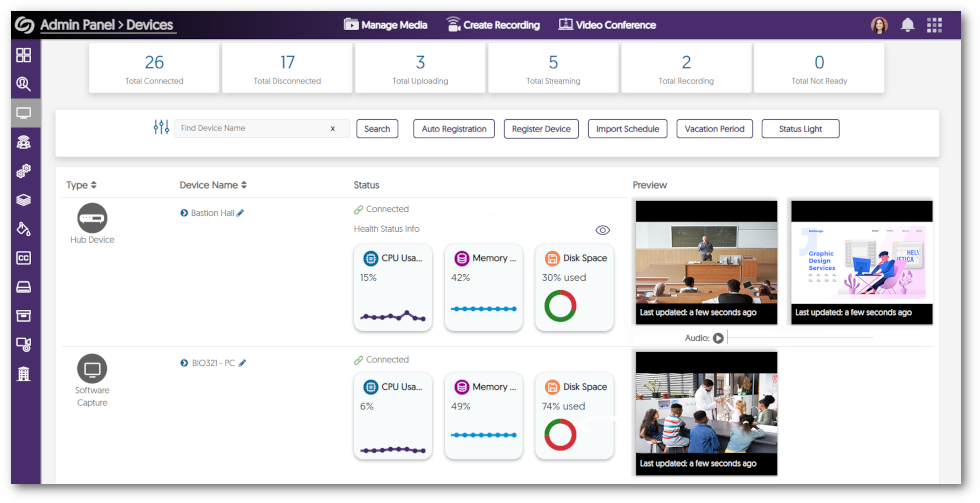
    2. More In-Depth Hardware Hub Device Health Status Panel The Hardware Hub features advanced analytics to monitor the performance of the device in real time. View key analytics for the device, such as fan speed, memory, CPU, disk, and network usage, to determine areas of improvement for:
      • Video Streaming quality
      • Storage Management
      • Hardware Issues
        We are actively engaged in the R&D work to provide the same In-Depth Health Score Panel for Software Capture applications to match the Hardware Hub’s capabilities. This feature will be available in the coming week for all Hub devices on the Everest release. Device status modal for the Hardware Hub.
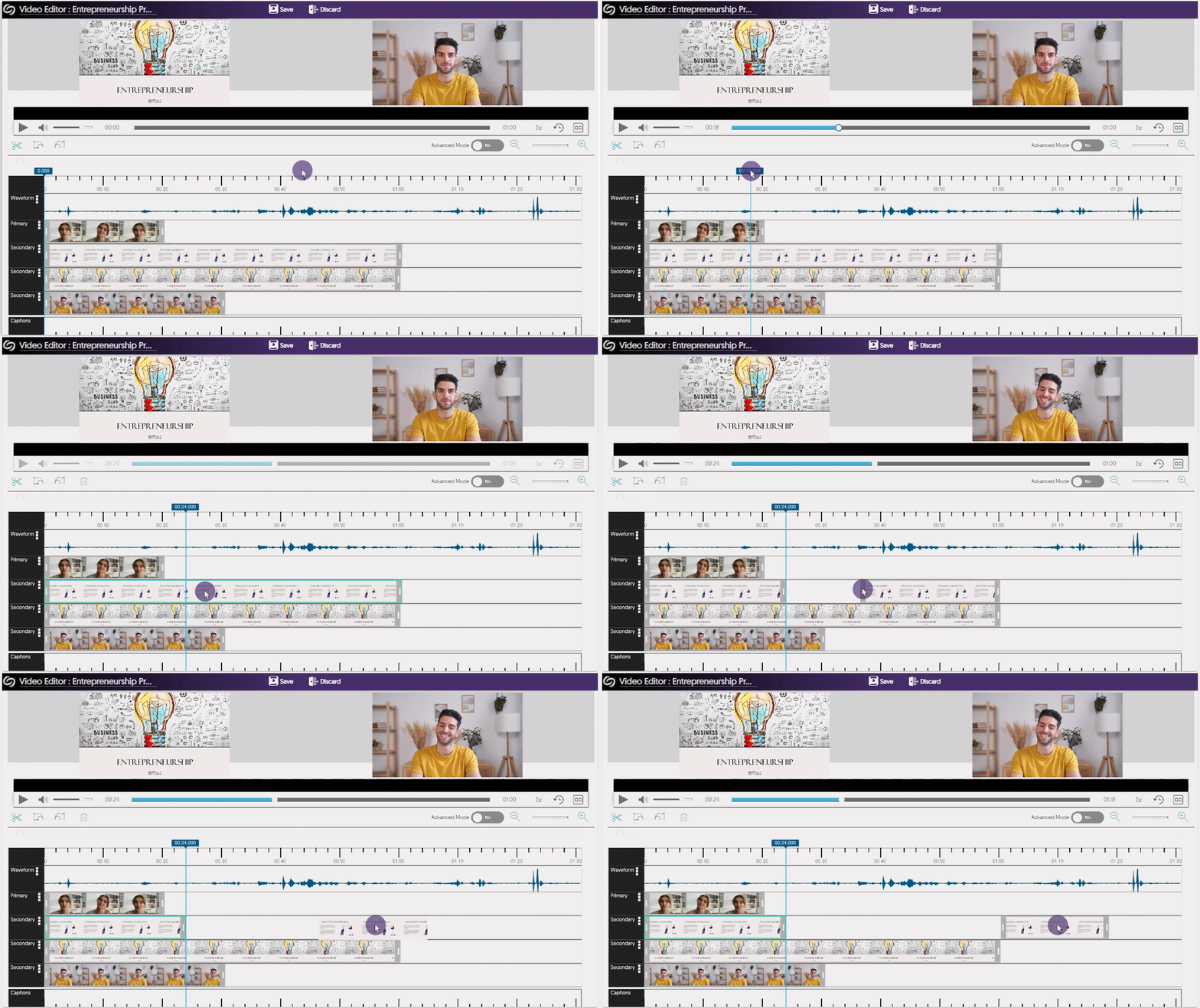
    3. Independently Split and Trim Multi-Stream Videos Multi-Stream in the Video Editor As part of a multi-quarter commitment to refine workflows in the Video Editor, we’ve introduced a much-anticipated workflow: a more intuitive method for cutting videos that aligns with editing tools familiar to end-users who use popular purpose-built video editors and social video tools alike. By selecting any timeline segment in the Video Editor, Content Creators can effortlessly create two distinct videos on their track by utilizing the ‘Split’ button. Refine the video further by clicking and dragging on its edges, allowing Creators to easily trim unwanted footage. For a complete list of features available in the Video Editor, please visit our guide on the Video Editor Overview. Split tool being used in the video editor.
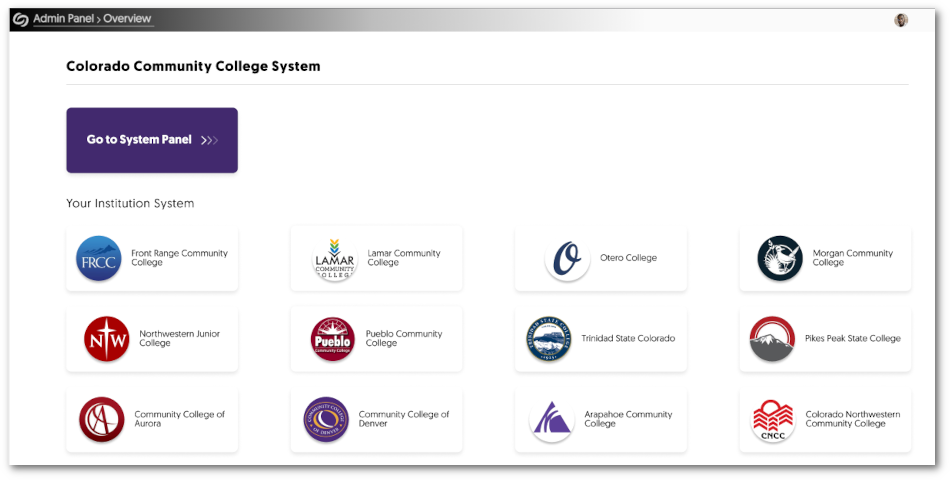
    4. Umbrella System – New System Panel to Manage Physical Campuses Quick recap, the Umbrella System is a strategy to better support multi-campus systems with both central administration of a Video Platform instance alongside distributed sub-administration of individual campus nodes by Campus Admins. As part of the third phase of our Umbrella System plan, institution administrators, also known as ‘Super Admins,’ will have access to a new System Panel. This panel will seamlessly present a comprehensive list of registered Campuses affiliated with the institution. Within this framework, Super Admins can access the Admin Panel for individual campuses or apply global settings to all campuses by accessing the System Panel. The next phase of our work involves distributing the various settings between the System Panel and Admin Panel and finally providing roll-up System-level statistics to Super Admins. We are exploring ways, in 2024, of making aspects of the Umbrella System available to large individual institutions to offer better distributed administration and permission management of a single campus entity. System Panel view of campuses.
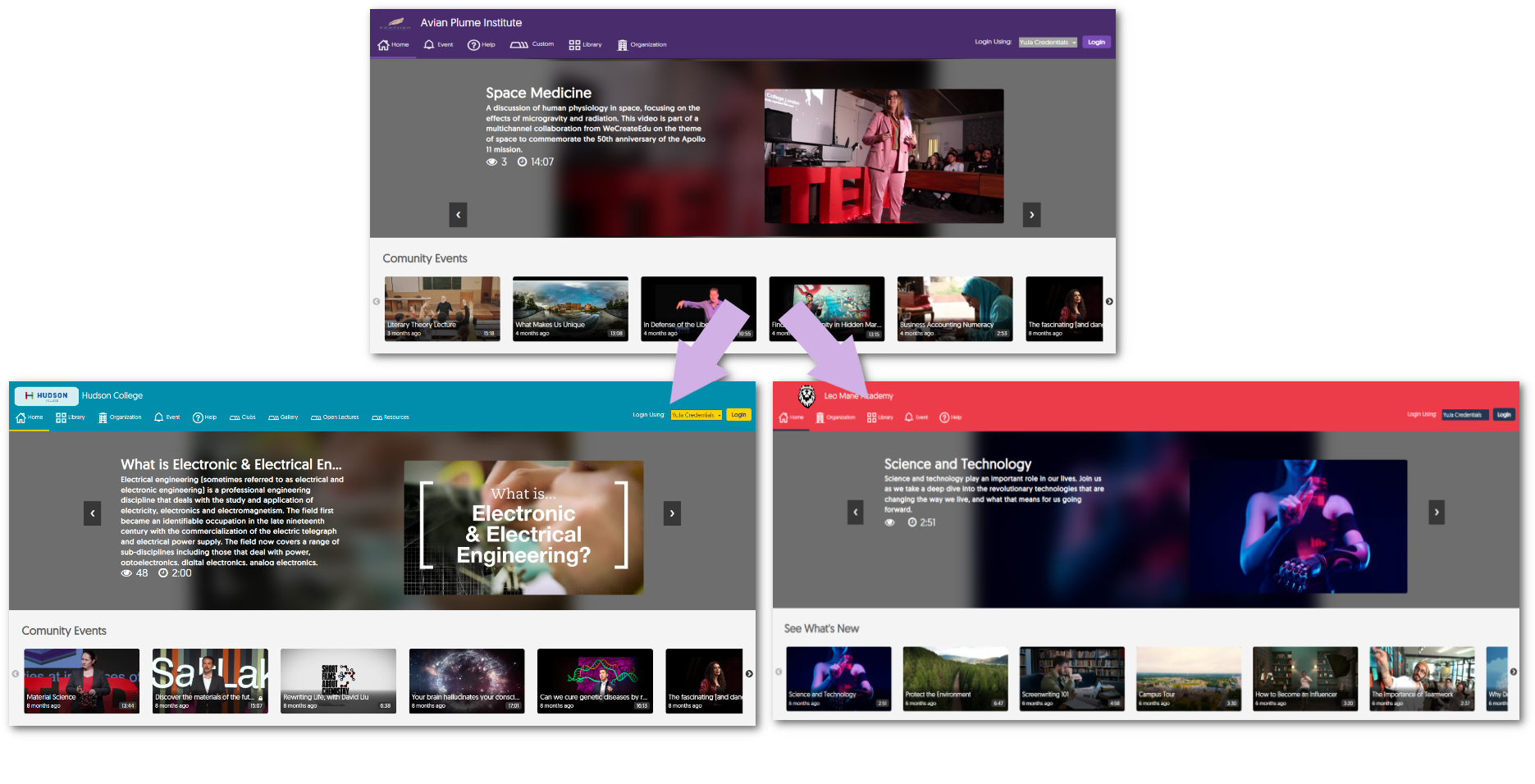
    5. Umbrella System – Customize the URL Sub-Domain Name for Campuses to Access their Dedicated EnterpriseTube Institution-affiliated campuses can have their URL sub-domain customized. These URLs serve as direct access points to individualized EnterpriseTube environments, allowing personalized content viewing for each campus. Simply access the Edit Insitute page for your desired campus and customize the sub-domain name. Three custom EnterpriseTube domains.
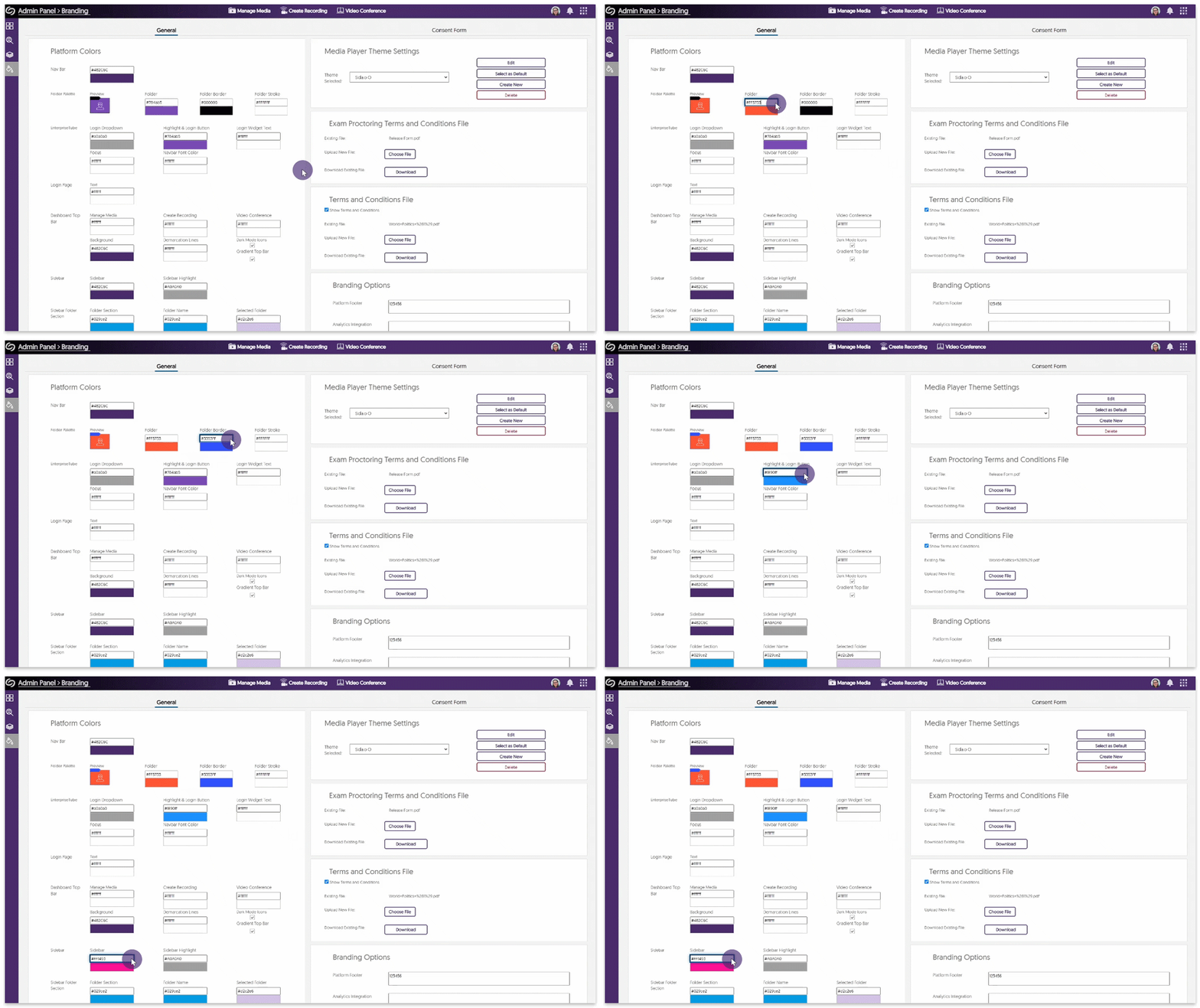
    6. Umbrella System – New ‘Campus Admin’ Role for Managing Individual Campuses Complementing our Super Admin role for managing all campuses under an institution, Campus Admins can be assigned to manage their respective campuses to create custom branding and adjust platform settings based on the individual needs of their campus. Adjusting the branding of the campus.
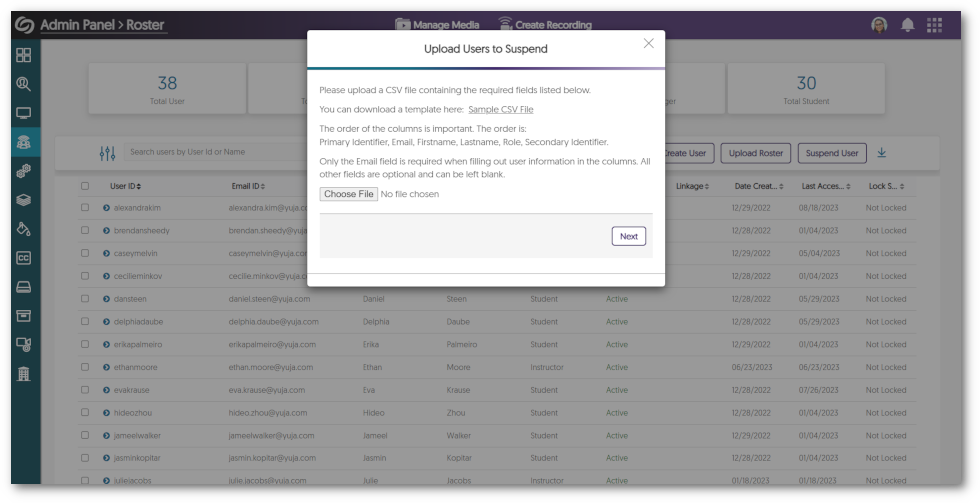
    7. Bulk Suspend Users on the Roster List The Roster panel will allow administrators to suspend multiple users simultaneously by uploading a CSV file. Simply download our template, fill out the relevant information for each user, and upload the document. For detailed instructions on suspending users, please visit our guide on Bulk Suspending Users on the Video Platform. Dialogue box showing the option to suspend user.
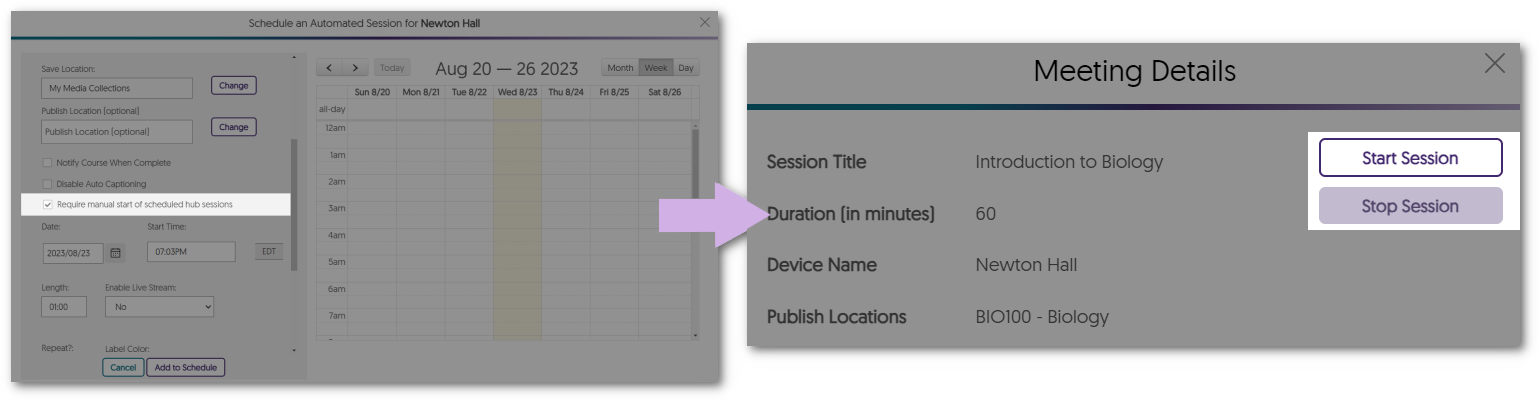
    8. Delegate and Activate Scheduled Hardware Hub Sessions Scheduled Hardware Hub sessions can now serve solely as placeholders, enabling session owners and delegated users the option to activate recordings at their preferred times during the scheduled event. This provides enhanced recording control for cases where sessions may begin later than initially scheduled. Please note that this capability does not extend to version 6 Hardware Hub devices. Meeting details panel showing Start Session and Stop Session options.
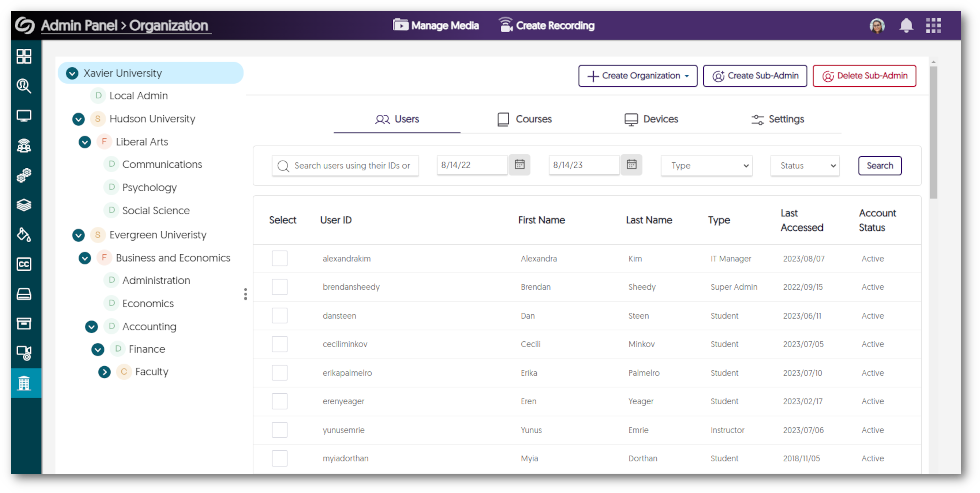
    9. Visual Refresh for the Organization Tab As we build out the Umbrella System architecture, we have also enhanced the UI Of the Organization tab to our modern design system that seamlessly blends functionality with aesthetic appeal. We hope you love our new interface, and stay tuned for more visual improvements coming soon. The Organization tab in the Admin Panel.
    10. Generate Role-Scoped API Tokens Users across the Video Platform now have the capability to generate API tokens tailored to their roles, simplifying access to role-specific API features. Administrators will still have access to manage these tokens, including the option to revoke API access for specific users if required. If you would like to enable this feature for your institution, please contact your Customer Success Manager. Navigating to my account to access API tokens.
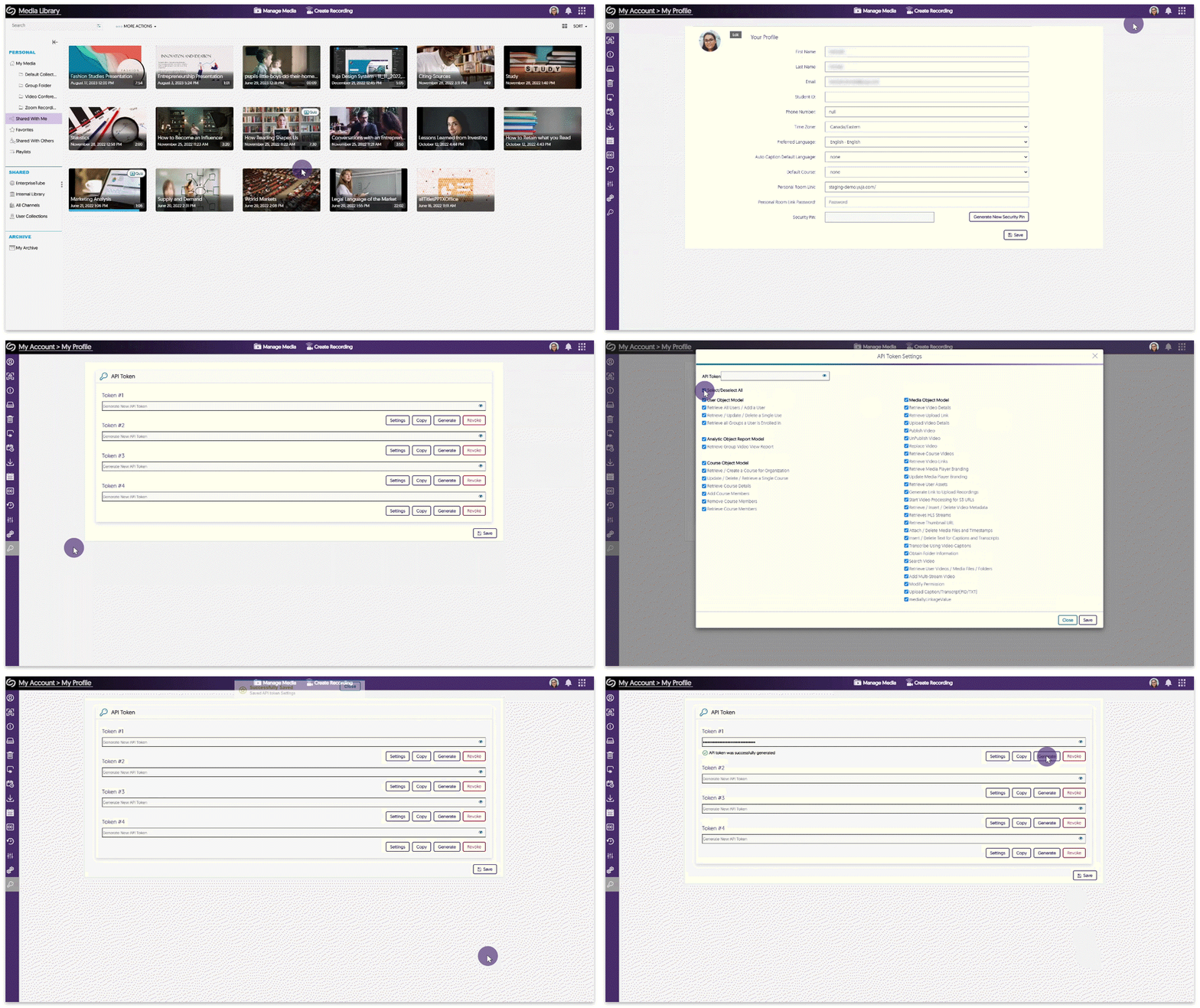
    11. Mirror Single Sign-on ID Names in the Video Platform When Generating YuJa IDs Similar to how Canvas user IDs can replace existing ID numbers on the Video Platform, we have expanded this feature to encompass Single Sign-on (SSO) ID names as well. Simply configure your SSO integration to allow the Video Platform to generate matching IDs.
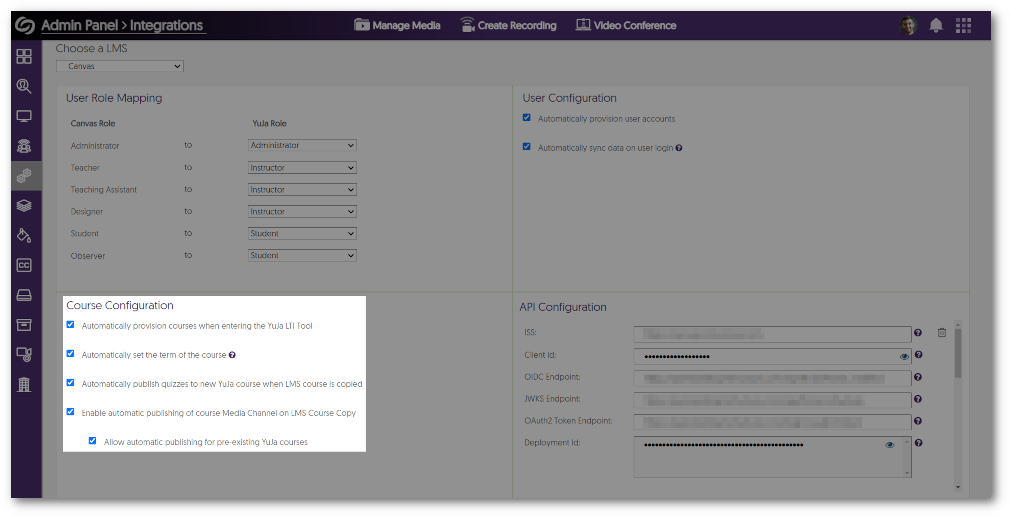
    12. Link Copied Courses in the LMS with Pre-Existing Courses on the Video Platform Previously, an LMS-copied course would automatically create a new course within the Video Platform and have its associated media content added immediately. We have now expanded this functionality to allow the option for copied courses to be linked with a pre-existing course on the Video Platform as well. To learn how to enable this optional feature, please visit our guide on Using Course Copy for Media Channels, Video Quizzes, and Embedded Videos. Course configuration settings.
    13. SSO Integrated Groups Will Have Their Names Auto-Updated on the Video Platform Administrators integrating SSO-provisioned groups into the Video Platform can update group names, leading to immediate synchronization of these changes across the Video Platform.
    14. New API for Adding Transcripts or Caption Files to Videos We are introducing a new API to allow users to add caption srt files and transcript txt or pdf files to a video. Please visit our API Support guide to learn how to use this and any of our other APIs.
    15. New APIs for Creating Folders in EnterpriseTube and CampusTube We’re introducing two new APIs to help users create folders within their EnterpriseTube and CampusTube libraries. Please visit our API Support guide to learn how to use these and any of our other APIs.
  • August 25, 2023

    YuJa Himalayas Data Archiving Platform Update – “Yoshino” Released to CAN, AU and EU Zones

    We have successfully pushed an update to all YuJa Himalayas Data Archiving Platform instances residing in Canada, Australia, and the European Union. This update provides a new recurring policy action to move files to the owner’s recycling bin,  the option to bulk restore archived media, and improved naming conventions for rules in the Policy Creator.
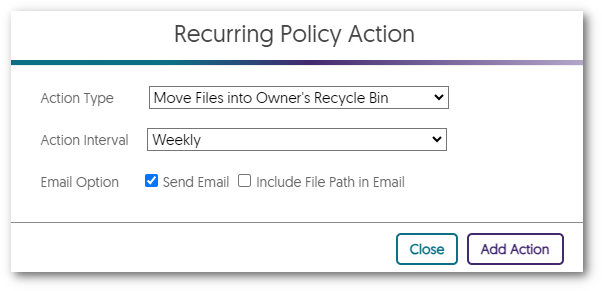
    1. New Recurring Policy Action – Move Files into Owner’s Recycle Bin Administrators can now establish a recurring policy action designed to remove content from users based on custom-set rules for the policy. Following the policy’s execution, designated content will be cleared from all locations and moved to the Content Owner’s recycling bin. Should Content Owners opt to restore their media, they will be visible across all previously published locations. Policy action to move files into owner's recycle bin.
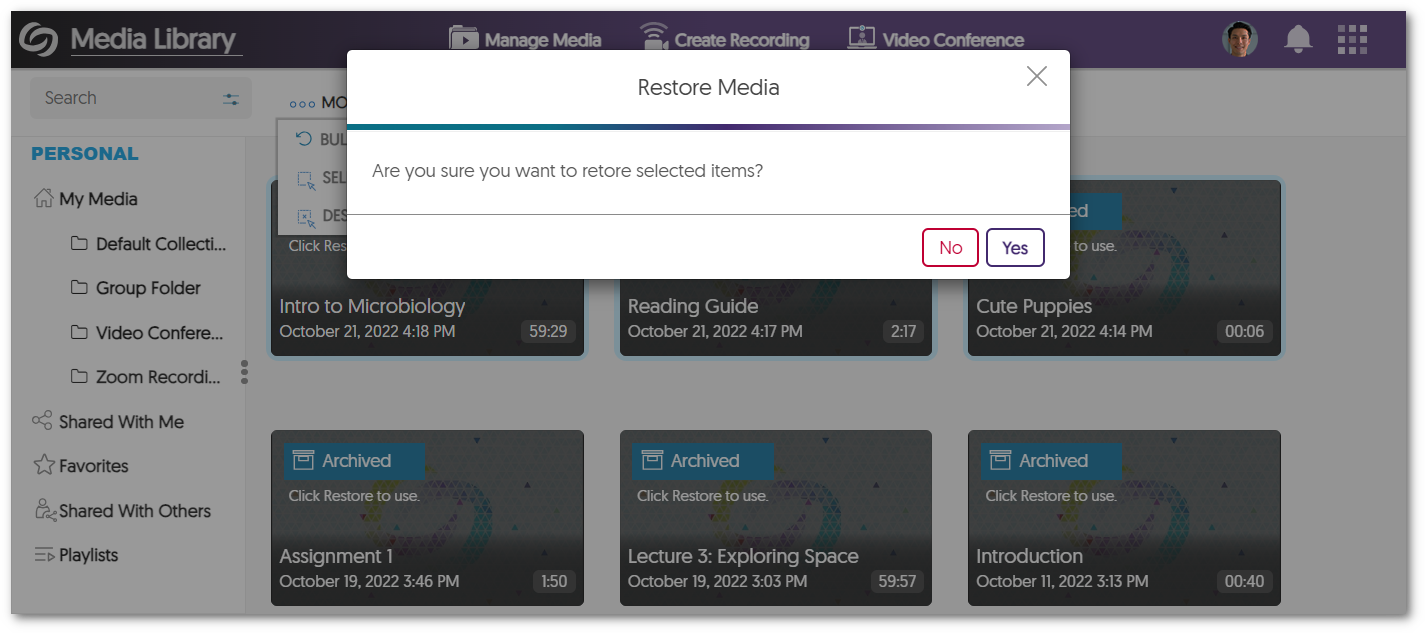
    2. Bulk Restore Archived Media We now provide an easy approach for Content Owners aiming to restore multiple archived pieces of content. Simply select your desired archived media and restore all items simultaneously with the new Bulk Restore action. The option to bulk restored archived media.
    3. Improved Naming Convention for the Content Type Rule in the Policy Creator The Policy Creator allows admins to take advantage of reccurring jobs that can securely remove or archive items within the Video Platform. Our recent refinements ensure that rules for specific content types are clearly stated, making it easy to understand the actions that will take place. List of content types in the policy creator.
  • August 23, 2023

    YuJa Verity Test Proctoring Platform – “Nepheline” Version Released to US, CAN, AUS, and EU Zones

    We have successfully pushed an update to all instances residing in the United States, Canada, Australia, and the European Union. This update includes assessment support for the standalone proctoring for students not enrolled in the LMS, AI-enhanced ID verification support for the browser extension, improved third-party integration with Pearson, live monitoring of student devices during proctored tests, and a new UI to enhance the student workflow.
     
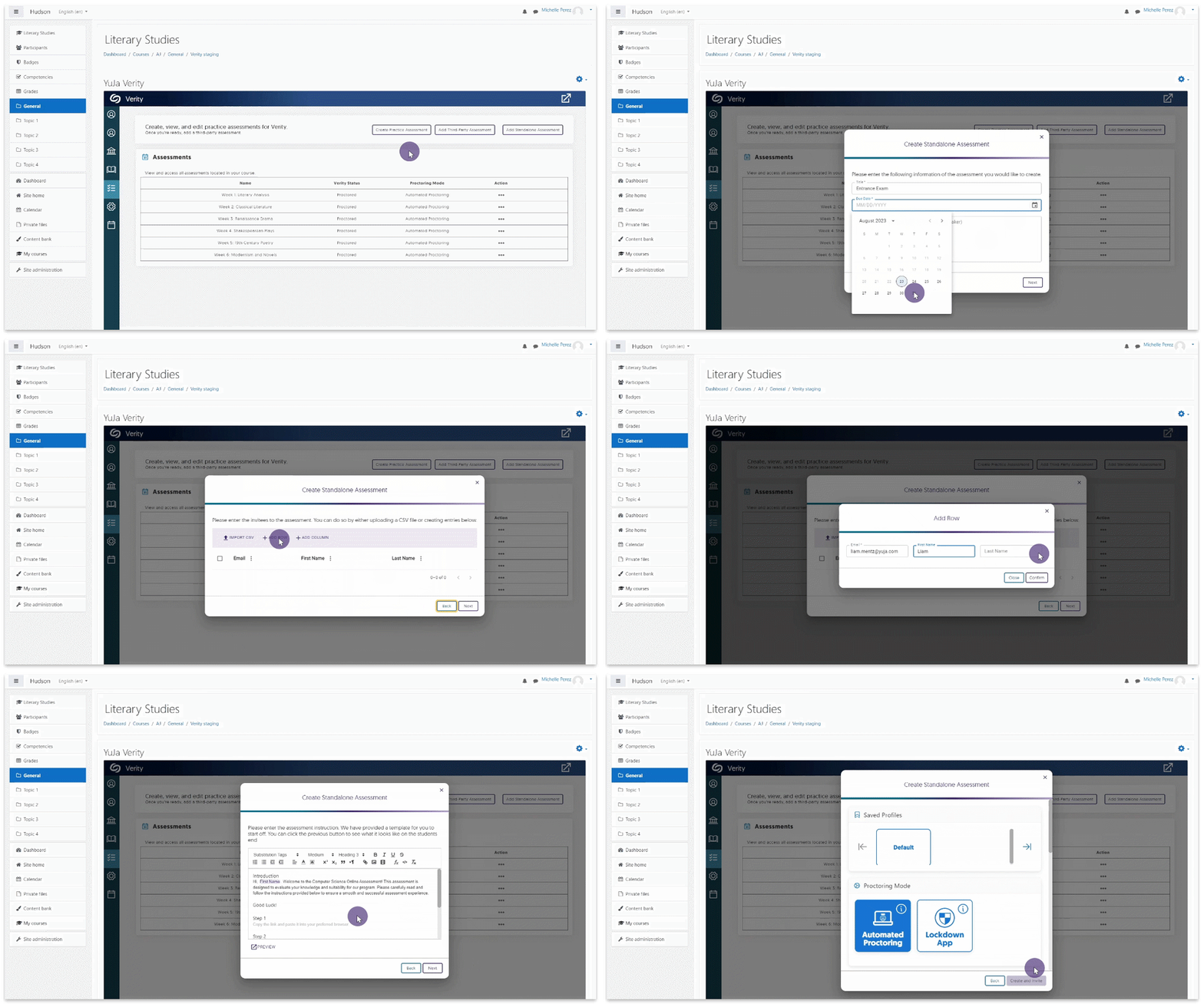
    1. Support for Proctoring Tests for Students Who Are Not Enrolled in the LMS In certain instances, institutions may require proctored assessments for individuals not enrolled in the institution’s LMS (example: an entrance examination or placement test to the institution). For these cases, instructors now have the option to create standalone proctored assessments that can be sent via email. These assessments are secured with a personalized password and require users to utilize the Lockdown App or Verity Browser Extension to create a secure testing environment. To learn more, please visit our guide on How to Create a Standalone Proctoring Session. An instructor creating a standalone assessment.
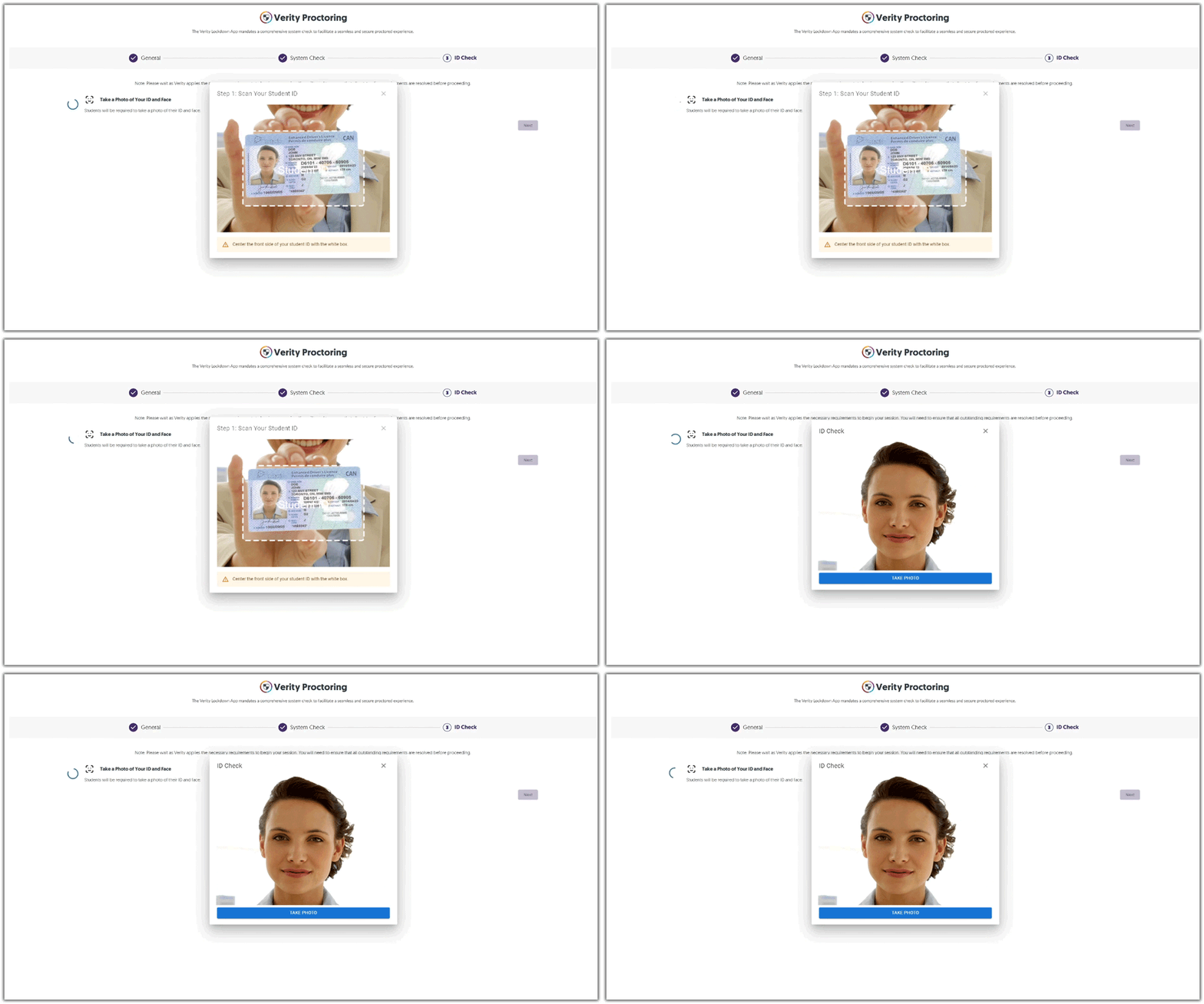
    2. Verity Browser Extension Now Supports AI-Enhanced ID Verification Our optional AI-enhanced facial recognition used for ID Verification is now available for the Verity Browser Extension. This integration allows instructors to seamlessly incorporate authentication capabilities into any proctored assessment with Verity, ensuring a secure match between the test taker and their uploaded ID. Keep in mind that the use of AI-enhanced ID verification is an optional workflow. ID Verification check.
    3. Improved Third-Party Assessment Integration with Pearson Verity has expanded its integration with Pearson Assessments with an even tighter and more streamlined third-party assessment integration. Unlike standalone third-party assessments, the improved Pearson integration streamlines the initiation process for students taking a third-party assessment in the Lockdown App. Pearson Logo
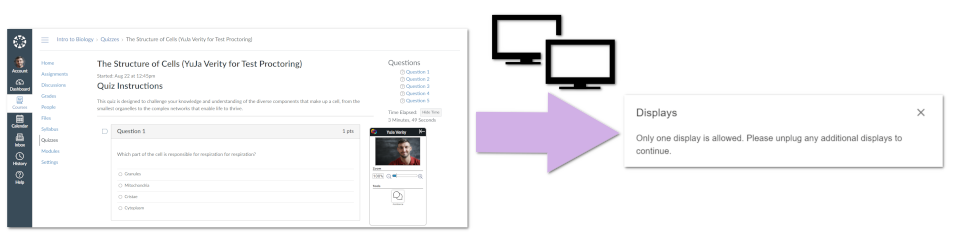
    4. Auto-Detection for Disconnected or Additional Devices Added During an assessment, Verity will monitor all external devices to ensure proctoring restrictions are adhered to. Should devices be added or removed during the assessment, Verity will pause the session and prompt the student to follow essential steps to continue with their assessment. Message indicating multiple monitors are detected.
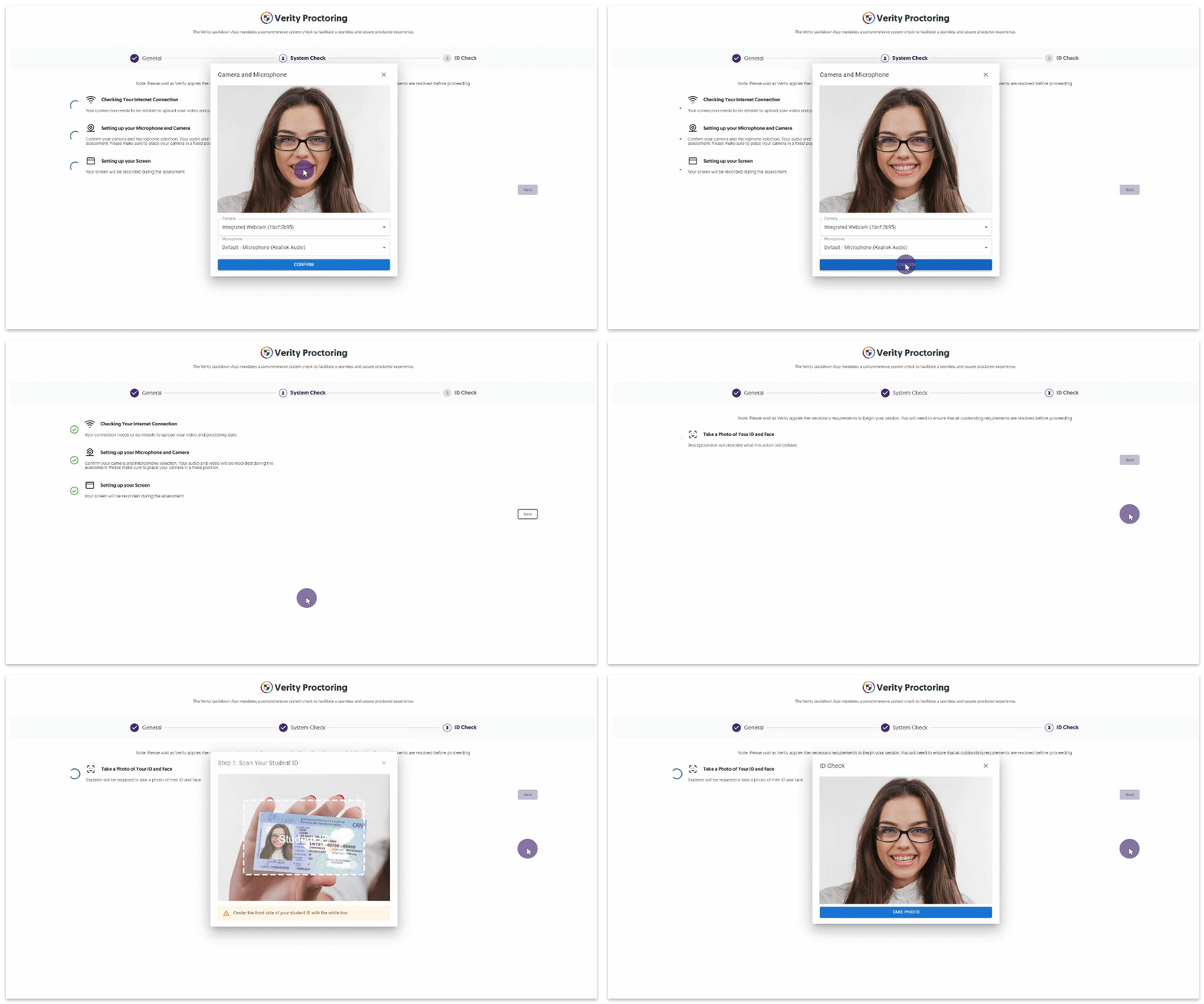
    5. Revised Student Workflow for Taking Proctored Assessments To enhance the student workflow for taking proctored assessments through the browser extension, we’ve introduced a more intuitive UI that leads students through each step of the process. By guiding students through verifying proctoring restrictions, setting up their recording devices, and using AI-enhanced ID verification, Verity is committed to ensuring a seamless process for students accessing their proctored assessments. In upcoming releases, we will also implement this UI for the Lockdown App. Student completing the Verity setup before taking their assessment.

Join the 1,000+ Organizations Deploying High-Impact Solutions

A collection of logos representing various organizations and institutions that use YuJa’s platform.