Product Updates

Get the latest platform updates, features, and announcements—all in one place.

  • March 16, 2026

    Creating Effective Videos to Boost Engagement and Performance in Diverse Classrooms

    Since the COVID-19 pandemic in 2020, videos have become a more essential tool in the classroom as the learning environment shifted online. As institutions adapted to offer alternative methods of class delivery, such as the flipped classroom or the blended classroom, videos became an integral information-delivery tool in education, allowing students to learn from a visual and auditory source. This article will outline the key principles for instructors to design effective video content to maximize student engagement and retention, as well as how instructors can leverage YuJa products to guide students towards desired learning outcomes. According to a study conducted by Cynthia J. Brame, an associate professor specializing in biological sciences in 2016, three elements contribute the most to video design:
    • Cognitive load
    • Student engagement
    • Active learning

    Cognitive Load

    Cognitive load refers to the total amount of information that can be stored in our working memory—a type of memory that holds information temporarily, and processes that information to be encoded into long-term memory, which has a considerably larger, almost-unlimited capacity to retain information. In education, cognitive load theory helps instructors create course content that will not overwhelm and disrupt a student’s ability to process and retain information in their working memory, so information becomes more likely to be stored in long-term memory. Brame outlines four major recommendations according to this theory (2016): 
    • Use keywords, color contrast, or brief out-of-video text to highlight important elements, emphasize organization or relationship of information, and provide contextual explanations for learning objectives 
    • Segment videos into digestible chunks
    • Eliminate excess elements, such as music
    • Use auditory and visual channels in a complementary fashion, such as tutorial videos that combine audible explanations with visual illustrations 

    Student Engagement

    A key aspect to the success of video learning is ensuring that students are actively watching and engaging with video content. According to various past studies, student engagement is observed to be the highest when a video is shorter than 6 minutes. Additionally, videos that are more conversational and enthusiastic often form a sense of social partnership between the student and the instructor, helping students feel more motivated to engage with course content and the instructor (Brame 2016). 

    Active Learning

    Active learning is a collaborative process that is often student-centered and encourages students to develop higher thinking skills by placing student interests, experiences, and needs first. This allows students to monitor their own learning and discover any gaps or difficulties as they engage with course material, effectively deepening their understanding as they address any problems that arise. Brame outlines the following strategies to promote active learning (2016):
    • Add interactive questions to improve student self-assessment and memory of concepts
    • Use interactive features that allow students to have a sense of control over their learning, such as adding chaptering, captions, or transcripts
    • Use guiding questions to facilitate deeper and broader thinking
    • Incorporate videos into larger assignments that ask students to apply concepts from videos to improve information retention and concept application

    How YuJa Products Enhance Video Learning Experiences

    YuJa Panorama’s new Video Compliance Player allows instructors to embed videos with automated captioning, enhanced audio descriptions, and video chaptering capabilities. With this update, students can access accessible video content directly from their learning management system (LMS) without navigating away from the platform. While captions and enhanced audio descriptions provide additional context to improve the understanding of video content, chaptering automatically breaks up long videos into digestible chunks that are easier to navigate and review, effectively reducing cognitive load.  Additionally, instructors can track student engagement with video and audio content with the YuJa Lumina Video Platform, where instructors can also identify drop-off rates and hot spots to improve their video assets in the future. YuJa Lumina also allows instructors to embed video quizzes in formats such as multiple choice, true or false, and fill-in-the-blank, offering students opportunities to improve their memory and application of learned concepts.  By crafting effective video content, instructors can integrate non-traditional methods of course delivery and diversify the learning experience for students in the classroom. 

    Citation

    Brame C. J. (2016). Effective Educational Videos: Principles and Guidelines for Maximizing Student Learning from Video Content. CBE life sciences education, 15(4), es6. https://doi.org/10.1187/cbe.16-03-0125
  • March 4, 2026

    How To Design Effective Online Quizzes

    The merging of technology and education has fundamentally changed the way learning happens in classrooms. With the creation of EdTech, traditional pen and paper learning has become less common, as a sea of new options developed, such as online lectures, discussion-based seminars, and digital lab environments, to name a few. Amidst all these changes in the educational landscape, testing and quizzing remain a key component of many classrooms, but the way we can deliver quizzes has diversified. From HyFlex to cooperative learning environments, online quizzing has become a staple in many courses. But simply creating an online quiz isn’t enough; considerations have to be made to ensure that the quiz is testing students fairly and actively engaging their knowledge. Try using some of the recommendations below when creating online tests to increase the efficacy of your assessments:

    1. Provide Feedback

    Traditional paper tests provide instructors with the opportunity to write comments wherever they deem necessary. With online testing platforms that provide automatic grading, it can be tempting to simply leave students with the answers to review, but it’s always best practice to provide specific and personal feedback where possible.

    2. Review Quiz Analytics

    Past quiz analytics can provide valuable insights into how students engage with online quizzes. By reviewing the results of past quizzes, you can get a sense of areas of success, trouble areas, and possible blocks to learning. Ask yourself: are there certain question types that are more successful than others? Could trouble areas improve if the question type and format were changed? Do supplementary materials like images and graphs need to be provided to effectively ask questions? Instructor reviewing analytics from a chart.

    3. Lockdown Browsers

    One of the main concerns with online testing is maintaining the integrity of test answers. A simple answer to this is utilising a lockdown browser, like the one provided by YuJa Verity’s Test Proctoring Platform. By preventing students from copying and pasting, navigating to other tabs, and blocking applications and extensions, instructors can rest assured that all answers come from students themselves.

    4. Accessibility Accommodations

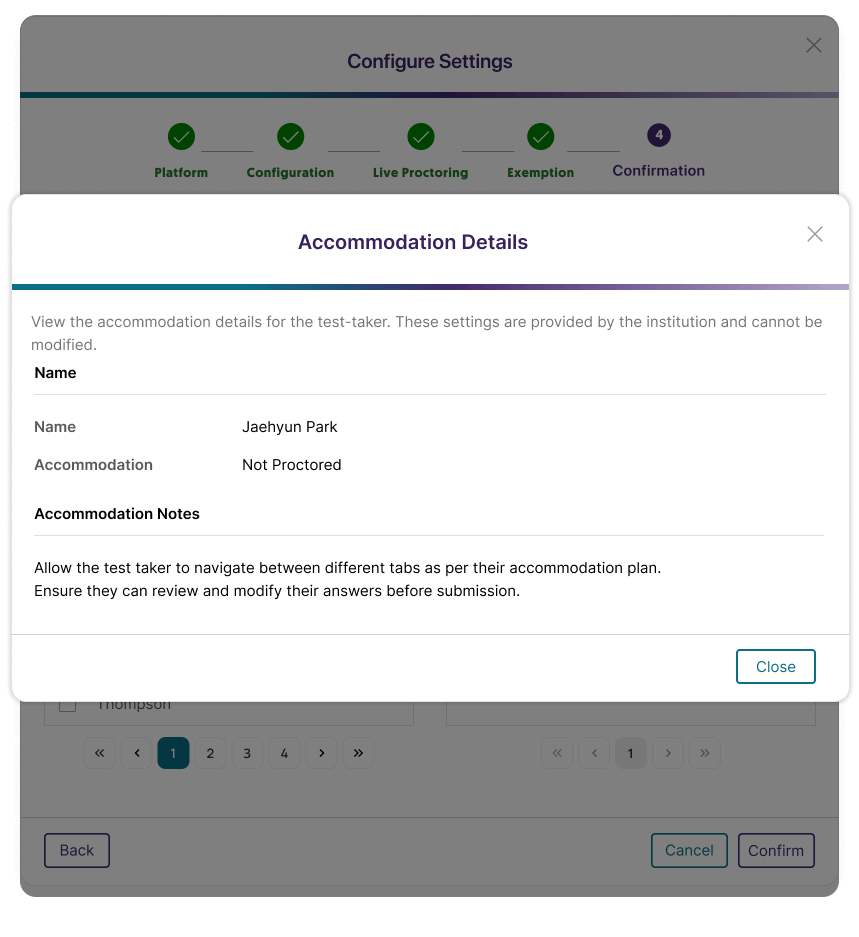
    Providing all students with the same online testing environment isn’t inherently fair. For example, a student may require extra time for an assessment, or alternative formats of allowed material to help them answer open-book assessments. Features like accommodation profiles within YuJa Verity can help ensure students’ accessibility needs are met. YuJa Verity Test Proctoring Platform accommodation profile allowing a student to take an unproctored assessment.

    5. Dialogue in Feedback

    Whether it’s within your testing platform, LMS, or simply an email, providing students with the option to respond to the online feedback you provide can significantly increase student metacognition. With open dialogue about test feedback, students are more likely to learn from their mistakes and review previous assessments to help them improve on future tasks. Instructor having an online meeting with a student.  

    6. Diverse Question Types

    Instructors can play to different students’ strengths by offering a range of question types. Long answers may be particularly successful with those who have strong linguistic intelligence, ordering questions may be suited for those with advanced logical-mathematical intelligence, and reflective questions may be best completed by those with high intra-personal intelligence. By trying to create a diverse range of questions, not only do students get the chance to show their knowledge in different ways, but it also helps students develop their weaker skills and thinking patterns.  As online quizzing becomes increasingly common, the possibilities for carrying out online assessments only continue to expand, and how we’re able to effectively teach grows. By using these suggestions when creating online quizzes, instructors can help ensure effective quizzing takes place.
  • February 9, 2026

    How Video Captioning Benefits Hearing and Non-Hearing Students

    It is clear that adding captions or subtitles to videos helps audiences with disabilities or hearing difficulties understand and process video content. However, video captions are proven to be helpful for those who are both hearing and non-hearing, with specialists citing benefits such as improvements in reading comprehension and language learning in children and adults (Gernsbacher 2015).

    Captions vs. Closed Captions vs. Subtitles

    Before we explore the benefits of video captions, it is important for us to distinguish between captions, closed captions, and subtitles, which are three separate entities.
    • Captions refer to the general textual representations that convey a wide range of audio components in a piece of video media, such as descriptions of sound effects, descriptions of emotions that characters are experiencing, character identification, and information about any background music or noise that may be playing in addition to spoken dialogue.
    • Closed captions are a specific type of captions that can be toggled on or off by the user. The term is often used interchangeably with captions, and it is the standard type of captioning that is utilized for television, film, and online video platforms like YouTube. For the sake of simplicity, we will refer to closed captions as captions for the remainder of this article.
    • Subtitles are transcriptions of spoken dialogue in a piece of video content. They do not contain any additional information aside from what is being actively said in dialogue, narration, or commentary.
    The image below illustrates an example of captions in a film. Environmental sounds, background music, and character emotions are typically marked in square brackets or in italics to differentiate from character dialogue. Closed captions on a scene of a woman walking through a city street in the rain holding an umbrella containing descriptions of the rain, music, and character dialogue.

    Benefits of Video Captions

    In the study compiled by Gernsbacher, it was argued that captions are especially useful for language acquisition and reading comprehension in children, adults learning to read, and persons who are deaf or hard of hearing (2015). In addition to helping audiences draw the link between a spoken word and its written counterpart, captions help audiences identify emotions and draw inferences as they provide additional contextual information crucial to understanding an event. From the results of over 100 empirical studies conducted over the span of decades, researchers saw captions lead to higher comprehension skills, higher reading and literacy skills, better memory recall, and higher test scores in auditory and listening evaluations (Gernsbacher 2015). With the v26.1.0 release of the YuJa Lumina Video Platform, instructors are now able to review, validate, and refine translated captions in a side-by-side view, eliminating the need to switch back and forth, which may lead to inconsistencies or inaccuracies. The enhanced workflow and interface simplifies translation verification and improves overall efficiency when managing multilingual captions, allowing instructors to provide translated captions that convey information in a more precise and faithful manner. As improvements continue to be released, YuJa Lumina seeks to facilitate equitable digital learning via video content for all students.

    Citations

    Gernsbacher M. A. (2015). Video Captions Benefit Everyone. Policy insights from the behavioral and brain sciences, 2(1), 195–202. https://doi.org/10.1177/2372732215602130.
  • February 4, 2026

    A Comprehensive Guide to Enhance Visual Accessibility

    Did you know that February is Low Vision Awareness Month in North America? Every year in February, researchers, optometrists, and ophthalmologists across the continent advocate for resources and rehabilitation services for people with low vision.

    What is Low Vision?

    Low vision refers to vision-related conditions that are incurable with glasses, contacts, medicine, or surgery. These conditions impair daily activities such as reading, driving, and recognizing faces, and significantly impact not just the quality of life, but the safety and comfort of patients. Some common causes of low vision include:
    • Inherited diseases or conditions
    • Glaucoma
    • Cataracts
    • Brain or eye-related injury or trauma
    For those affected by low vision symptoms, it is crucial for us to provide resources and services that can help them maximize their remaining sight and help them lead more comfortable lives. In the modern age where we migrate to paperless, digital methods to distribute information, there are many principal considerations to keep in mind.

    Accessibility Considerations

    When we think of digital accessibility, visual accessibility is often the first thing we think of. However, what does it actually mean to be visually accessible? We compiled a list of key points and strategies to implement when designing digital products such as websites and mobile apps in order to help low-vision individuals navigate, process, and interact with visual information.
    • Alt Text: Alt text, or alternative text, is a brief sentence that describes a non-textual piece of content, such as an image. If an individual with vision impairments uses a screen reader, alt text will be read aloud, effectively conveying the meaning and context of multimedia content on the screen. You can read more about how alt text improves digital accessibility in our blog post here.
    • Color Contrast: Color contrast refers to the difference in brightness between two colors. If two colors have low color contrast, it means that they look very similar and may be hard to distinguish for those with visual impairments or color blindness. High color contrast should be used, such as darker colored text on a light background. However, contrast that is too high, such as between two complementary neon colors, should also be avoided as it is hard on the eyes and causes readability issues. We’ve included an example of low color contrast and high color contrast below for comparison:

      contrast samples

    • Font: Font size may be the most intuitive component of digital accessibility, and the easiest to implement or change. For a regular body of text, a font size of at least 12pt (16px) is generally recommended. However, there are other aspects to consider as well. For instance, you should pick a font that is clean and easy to read, and you should make sure that your typography is consistent throughout your web or mobile application. In addition, you should be mindful of inline spacing and letter-spacing to prevent words and lines of text from looking too cramped, though these spacing settings are often configured automatically to prevent these issues.
    • HTML Structure: One detail that is most likely to be overlooked is the overall semantic structure of your digital application. For non-technical designers, this may be a challenge as they may be unfamiliar with proper HTML syntax, and the versatility of HTML may cause improper tags and attributes to be used or omitted altogether. For example, a heading may be coded as a regular box of text with a large font. However, HTML has built-in heading elements, such as H1, H2, and H3, that should be used as they will be differentiated from the text body when being read by a screen reader, and they have default sizes that are typically used in most webpages. Moreover, since the alt text attribute is optional, developers may forget to include alt text when building the webpage, causing users who rely on screen readers to miss out on important information.

    How YuJa Products Enhance Visual Accessibility

    There are many aspects in addition to the ones mentioned above that may impact the accessibility and usability of a digital application. Several of YuJa’s core products, such as the YuJa Panorama LMS Accessibility Platform and the YuJa EqualGround Accessibility Governance Platform use vigorous scanning capabilities to compare the contents of a webpage to established standards like the Web Content Accessibility Guidelines (WCAG). Not only do these tools notify users when their content needs improvement, they make real-time remediation suggestions that can be applied with a simple click. As technology continues to advance, digital accessibility remains a key consideration in the design and development process.

    Protect Your Eyes!

    Eye health is pivotal to our overall wellbeing and provides us access to see many wonders. In order to protect our vision, we cannot solely rely on technological strategies. Having routine eye exams, maintaining a healthy diet, and wearing protective eye equipment are all methods to prevent vision loss and eye-related injuries. Don’t forget to rest your eyes and take a break from the screen after reading this blog!
  • January 23, 2026

    Understanding the Impact of Participation Points on Student Engagement

    In the modern age of technological advancement, we are constantly seeking and inventing new methods of learning and teaching. Following the COVID-19 pandemic, the need for accessible and efficient educational platforms and learning management systems (LMS) has increased as instructors seek alternative, virtual course delivery methods that will engage and motivate students in a non-traditional learning environment.  A student’s engagement is considerably linked to their success in their academic journey, and is often affected by multiple factors. For instance, fostering an environment that encourages students to create meaningful relationships with peers, faculty, and the larger campus community will allow students to build stronger social networks and develop necessary communication skills.  In a recent UK university case study conducted by O. Raphael Oseghale et al, it was discovered that, among postgraduate business students, class participation points significantly enhance student engagement in three aspects: behavioral, cognitive, and emotional (2025). 

    Behavioral Engagement

    Behavioral engagement refers to a student’s overall ability to engage in academic activities, such as attending classes, participating in class discussions, and completing assignments. The results of the experiment indicate that students who were informed that they would receive participation grades for attending tutorials had a higher attendance rate of 97% that persisted throughout the observation period (Oseghale et al., 2025). 

    Cognitive Engagement 

    When institutions and instructors cultivate a learning environment that offers students opportunities to think critically, students demonstrate higher cognitive engagement as they are more invested in their studies, take on more challenges, and facilitate deeper thinking. Observations of the experiment show that students who were awarded participation points studied preparatory materials before they attended tutorials (Oseghale et al., 2025). In addition, most students admitted during interviews that they would not complete pre-tutorial activities without participation marks (Oseghale et al., 2025).

    Emotional Engagement

    Higher emotional engagement suggests that students are more committed to their academics because they feel valued, supported, and heard by the institution and faculty. By offering participation marks for engaging in open tutorial discussions, the experiment found that students felt stimulated and motivated to speak more often (Oseghale et al., 2025). In the case of students who were shy, the experiment found that they engaged with peers when the TA created a supportive environment and provided clear instructions (Oseghale et al., 2025). Following these observations, it is undoubted that students’ overall engagement is pivotal to their success. From the results of this study, as well as of other studies mentioned by the authors, we can see that participation points can boost student engagement and enrich a student’s learning journey. With the recent YuJa Engage v26.1.0 release, instructors are now able to split scores on poll questions, allocating a certain percentage of the question score to participation and the rest to correctness. With this new feature in the YuJa Engage Student Response system, students can become more motivated to prepare for tests and examinations, and instructors can award students for their efforts and perseverance.  Citation Oseghale, O. R., Ochie, C., Oyelere, M., & Nyantakyiwaa, A. (2025). Class participation points and postgraduate business students’ engagement: The case of a UK university. Innovations in Education and Teaching International, 62(1), 86–101. https://doi.org/10.1080/14703297.2023.2279576

Join the 1,000+ Organizations Deploying High-Impact Solutions

A collection of logos representing various organizations and institutions that use YuJa’s platform.