Product Updates

Get the latest platform updates, features, and announcements—all in one place.
  • November 25, 2024

    How Color-Blind Filters Can Help Create a More Inclusive Learning Environment

    While it’s among the most prevalent vision conditions, it’s often overlooked in web accessibility discussions in higher-education settings.   For students with CVD, traditional digital content can present significant challenges:
    • Difficulty distinguishing between color-coded charts and graphs in learning materials
    • Challenges with color-based highlighting in digital textbooks
    • Issues identifying elements in online course materials
    These challenges can impact learning effectiveness and student engagement, making it critical for institutions to implement accessible solutions.

    Understanding Color Vision Deficiency

    There are three primary types of color blindness, each of which affects students in different ways:
    1. Protanopia: Students struggle to distinguish reds, affecting their ability
    2.  to see highlighted text or important notifications.
    3. Deuteranopia: Impacts green perception, making it difficult to interpret certain charts, graphs, and visual learning materials.
    4. Tritanopia: Affects blue-yellow discrimination, challenging students’ ability to work with certain color-coded learning resources.
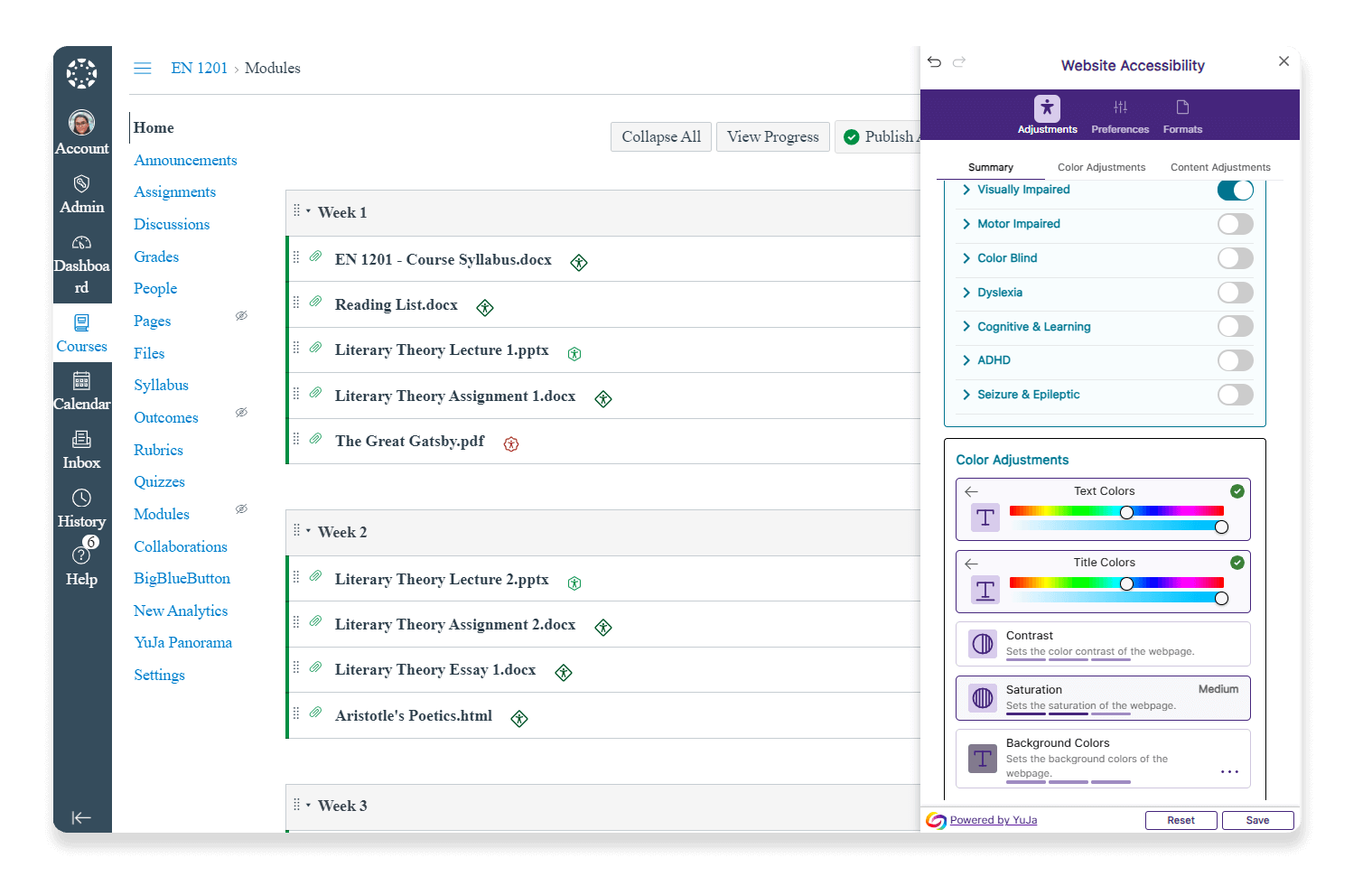
    Today, learning management systems (LMSs) integrate with accessibility tools that can help transform how color-blind students interact with digital content. When integrated within the LMS, accessibility widgets allow students to:A screen shot of a learning management system
    • Select from different color-blind filters tailored to their specific type of CVD
    • Customize their viewing experience without changing the original content
    • Seamlessly switch between different visibility modes as needed
    • Access all course materials with their preferred settings

    The Impact of Color on Learning

    Studies show that personal applications of color can improve academic performance. “Color has the ability to impact student attention, behavior, and achievement. The proper application of color in the classroom has become more important due to the move toward inclusion in the public schools of the United States,” states The Inclusive Classroom: The Effects of Color on Learning in Behavior. Color-blind filters in learning environments can help provide:
    • Increased student engagement with visual learning materials
    • Improved comprehension of color-coded information
    • Enhanced student confidence in accessing digital content
    • Reduced need for individual accommodation requests
    Ensuring accessibility for color-blind students can be achieved with tools like YuJa’s Website Accessibility Widget, which allows users to adjust the content and color of web pages to improve accessibility. By integrating color-blind filters within the learning environment, institutions can create an inclusive experience for students.
  • October 16, 2024

    Upcoming Webinars: Navigate YuJa’s Platforms and Learn Best Practices

    These solutions include the Panorama LMS Accessibility Platform, Enterprise Video Platform, Verity Test Proctoring Platform, and Engage Student Response System Guided by Yennhu Nguyen, Director of Client Success, these sessions will explore the innovative features and best practices across YuJa’s suite of platforms. From enhancing digital accessibility and boosting student engagement to safeguarding academic integrity, these webinars will offer insights for educators and administrators as they work to create accessible, inclusive digital learning environments.

    Introduction to YuJa Panorama: Transform Digital Learning

    Discover how the Panorama LMS Accessibility Platform can enhance the accessibility of your institution’s digital media and course content in our upcoming webinar, “Introduction to Panorama.” This session will provide an overview of how YuJa Panorama’s powerful tools streamline accessibility, ensuring an inclusive learning environment for all students. Date: October 21, 2024 Time: 9:00 AM PT This webinar is limited to the current community. Register.

    Introduction to the YuJa Enterprise Video Platform

    In our upcoming webinar, “Introduction to Video Platform,” learn how to boost engagement and streamline your workflows with the YuJa Enterprise Video Platform. This session will explore how to get started with YuJa’s powerful video management tools to create more interactive and engaging content. Date: October 23, 2024 Time: 3:00 PM PT This webinar is limited to the current community. Register.

    Unlocking the Full Potential of the YuJa Video Platform

    Take your video content to the next level with the “Unlocking the Full Potential of the YuJa Video Platform” webinar. This session will dive deeper into the advanced features and capabilities of the Video Platform. Learn how to leverage advanced tools and techniques to create even more impactful and engaging video content for your learners. Date: Wednesday, October 30, 2024 Time: 3:00 PM PT This webinar is limited to the current community. Register.

    Introduction to YuJa Verity: Enhancing Academic Integrity

    Join us for an insightful webinar, “Introduction to Verity,” to discover how the YuJa Verity Test Proctoring Platform strengthens your institution’s academic integrity initiatives. This session will introduce the platform’s robust proctoring and security features, which help maintain fairness and trust in online assessments. Participants will learn how YuJa Verity can support your institution’s commitment to academic excellence. Date: November 4, 2024 Time: 2:00 PM PT This webinar is limited to the current community. Register.

    Introduction to YuJa Engage: Boosting Student Participation

    Explore how to increase student engagement and participation with our “Introduction to Engage” webinar. This session will showcase the features of YuJa Engage and how it can be used to create more interactive and dynamic learning experiences. Learn how to use polls and other interactive elements to keep your students actively involved in their learning journey. Date: November 6, 2024 Time: 2:00 PM PT This webinar is limited to the current community. Register. Whether you’re focused on improving accessibility, boosting engagement, or strengthening academic oversight, these webinars will provide actionable strategies for getting the most out of your YuJa platforms. Not yet a YuJa customer? Reach out to our sales team for a demo.
  • September 23, 2024

    Tips for Implementing Secure and Scalable Exam Proctoring

    Recent research shows that both automated and live remote proctoring produce comparable results to traditional test-center proctoring, that test-takers find remote proctoring easy to use, and that students are supportive of proctoring platforms being more widely adopted. Here are five steps to implement effective and scalable proctoring: Use Multimodal Proctoring Tools: To build a scalable proctoring solution, institutions should adopt a versatile proctoring solution that offers both automated and live options. This flexibility allows institutions to scale their approach based on assessment complexity and integrity requirements. Automated proctoring uses AI for monitoring, while live proctoring provides human oversight for high-stakes exams. Implement a Cloud-Based Solution: Whether institutions are looking to expand their online offerings or provide students with testing flexibility, leaders should consider a cloud-based proctoring solution to support their goals. Cloud-based platforms allow institutions to scale their proctoring services without infrastructure investments, accommodating larger numbers of proctored exams as needed.
    A custom-tailored approach allows institutions to allocate resources efficiently, without overburdening departments that don’t need comprehensive proctoring.
    Customize Proctoring for Specific Course or Department Needs: Scalability requires flexibility, especially in large institutions with various departments. To address this, institutions should implement flexible proctoring solutions that can be tailored to specific departments or courses.  Tools like YuJa Verity’s LMS Hierarchy Support enable administrators to add proctoring to specific sub-accounts, departments, or campuses as needed. For example, while a physics department may require automated proctoring for midterms, a law department could benefit from live proctoring for final exams. A custom-tailored approach allows institutions to allocate resources efficiently, without overburdening departments that don’t need comprehensive proctoring. Ensure Security With Advanced Features: Prioritize security in online proctoring by using tools that offer comprehensive system checks, require full-screen sharing, and track browsing activity during exams. These features ensure compliance with academic policies and maintain the integrity of assessments. Provide Comprehensive Training and Support: A successful proctoring strategy hinges on educating both instructors and students. Clear guidelines, training sessions, and support for faculty using the platform are essential. Look for proctoring tools with user-friendly interfaces that simplify the process for all users and consider providing practice assessments to familiarize students with the system before their exams.
  • September 12, 2024

    Five Ways Text-to-Speech Improves the College Experience

    Text-to-speech (TTS) technology like YuJa’s SmartSpeaker converts written text into spoken words, providing an audio representation of digital content. This allows students to listen to lectures, presentations, and other course materials, offering an alternative way to access information. This technology benefits a wide range of learners, from students with visual impairments to those who prefer auditory learning.

    Key Benefits of Text-to-Speech Technology 

    Improved Accessibility: One of the most significant advantages of text-to-speech technology is its ability to enhance accessibility for students with disabilities such as visual impairments, dyslexia, or other learning disabilities, to access written content in an auditory format. This ensures that every student can engage with course materials. By providing text-to-speech options, institutions can break down barriers to learning and create a more inclusive environment, complying with accessibility regulations like the ADA and WCAG.
    TTS solutions give students the freedom to listen to course content while commuting, exercising, or during other activities.
    Support for Multimodal Learning: Students learn in different ways. Some are visual learners, while others retain information better through auditory channels. TTS tools cater to auditory learners by allowing them to listen to lectures, read materials, or take notes, providing a multimodal approach to education. Research from Richard Mayer’s Cognitive Theory of Multimedia Learning shows that students learn more effectively when they engage with material in multiple formats, including visual and auditory. This dual-channel processing helps improve information retention and understanding, making tools like text-to-speech a valuable resource in diverse learning environments. Increased Flexibility and Convenience: Students value flexibility in how they access and review learning materials. TTS solutions give students the freedom to listen to course content while commuting, exercising, or during other activities. This added flexibility means that students can take advantage of time that would otherwise go unused, making it easier to keep up with coursework. The ability to control playback speed or listen to content multiple times offers personalized learning experiences, allowing students to engage with material in a way that meets their needs and preferences. Enhanced Focus and Comprehension: Some students find it difficult to concentrate on long passages of written text. Text-to-speech technology alleviates this by converting dense reading material into a more digestible audio format. TTS helps ensure that students can focus on listening and understanding, rather than struggling to read through text. Additionally, TTS can enhance comprehension by improving the delivery of complex information. Hearing a passage read aloud can help students better grasp nuances in tone, emphasis, or meaning that might be lost in written form. Facilitating Language Learning: Text-to-speech technology can be a valuable asset for students learning new languages. TTS allows learners to hear accurate pronunciations and natural speech patterns, helping them improve their listening and speaking skills. For international students or those studying foreign languages, TTS provides a more immersive learning experience. In fact, Research has shown that listening to a language regularly is one of the best ways to improve fluency. TTS technology makes it easy for students to engage with language materials anytime, accelerating their language acquisition and comprehension. Integrating text-to-speech solutions into higher education can help foster more dynamic, student-centered learning environments that support success.
  • September 6, 2024

    Breaking Down Language Barriers: The Impact of AI-Powered Audio Dubbing in Higher Education

    Emerging technologies are critical in bridging language gaps in higher education. One innovation making waves is AI-powered audio dubbing for educational content. Here are six ways this technology can transform the learning experience for students and educators:
    1. Enhance Accessibility and Inclusivity
    AI-powered audio dubbing technology allows educational institutions to automatically generate dubbed audio tracks for video content in multiple languages. This significantly enhances accessibility for non-native English speakers and international students. By providing course materials in a student’s preferred language, institutions can ensure that language barriers don’t hinder the learning process.
    One of the most significant advantages of AI audio dubbing is the flexibility it offers to learners. Students can toggle between different language options, selecting the one that best suits their needs.
    1. Provide Efficiency and Cost-Effectiveness
    Traditional dubbing methods often require significant time, resources, and human intervention. They typically involve several steps, from translation to sourcing and recording voice actors, editing, and more. The process can take weeks or months for a single language. AI-driven dubbing streamlines this process, allowing for quick and efficient translation of audio content into multiple languages. AI can generate translated scripts and synthesize voice tracks in a matter of hours or even minutes, depending on the length of the content. This not only saves time but reduces costs associated with more traditional methods.
    1. Offer Personalized Learning Experiences
    One of the most significant advantages of AI audio dubbing is the flexibility it offers to learners. Students can toggle between different language options, selecting the one that best suits their needs. This personalization empowers students to engage with content in a way that maximizes their comprehension and retention.
    1. Improve Comprehension Through Multi-Modal Learning
    Many AI dubbing systems, including YuJa’s Generative Audio Dubbing, offer robust captioning capabilities alongside the audio tracks. This multimodal approach to content delivery—providing both auditory and visual reinforcement—can significantly enhance comprehension. Students can listen to the dubbed audio while reading along with captions, which is especially beneficial for language learners and those who process information better through multiple channels.
    1. Support Diverse Learning Styles
    The addition of audio descriptions, which provide context by describing on-screen visuals not captured in dialogue, further enhances the learning experience. This feature is valuable for visually impaired students, but it can benefit all learners by providing additional context and reinforcing key visual concepts.A group of students gathered around a laptop
    1. Foster a Global Learning Environment
    By making content available in multiple languages, institutions can create a more inclusive and global learning environment. This not only supports international students but also prepares all students for a globalized workforce where multilingual communication is increasingly valuable.

    Real-World Use Case: El Paso Community College

    El Paso Community College (EPCC), a Hispanic-Serving Institution in Texas, highlights how YuJa’s Video Platform technology can significantly enhance higher education. As a border community college serving a diverse student population, EPCC recognized the need for a comprehensive video solution, particularly one with robust captioning capabilities.  Institutional leaders were drawn to YuJa’s Video CMS because of its ability to caption videos accurately. Implementing the Video Platform has become integral to EPCC’s educational approach, more effectively supporting its diverse student body.    “Not only do captions benefit students who are deaf or hard of hearing, they benefit all students,” said Luz Cadena, Director of Distance Learning Support Services and an adjunct history professor at El Paso Community College. “Captions can help students whose first language isn’t English by helping them with language acquisition, it helps students strengthen reading and comprehension. It can also help students learn even if they are in a noisy environment where audio can’t be heard or if a speaker is difficult for them to understand.”

    AI-Powered Audio Dubbing Breaks Down Language Barriers

    AI-powered audio dubbing is revolutionizing content accessibility in higher education. By breaking down language barriers, it opens up new possibilities for inclusive, global education. As technology continues to evolve, even more sophisticated and nuanced applications will further enhance the learning experience for students worldwide.

Join the 1,000+ Organizations Deploying High-Impact Solutions

A collection of logos representing various organizations and institutions that use YuJa’s platform.