Product Updates

Get the latest platform updates, features, and announcements—all in one place.

  • October 6, 2023

    YuJa Enterprise Video Platform Update – “Zelkova” Released to CAN, AU and EU Zones

    We have successfully pushed an update to all Enterprise Video Platform instances residing in Canada, Australia, and the European Union. Release highlights include: a refreshed Media Player theme, option to edit Platform emails, publish playlists across the Video Platform, transform folders into Playlists, dynamically select layout preferences, custom embed sizes for the Media Chooser, enhancements to the Video Editor, manage Rosters for individual campuses within the Umbrella System, and so much more.

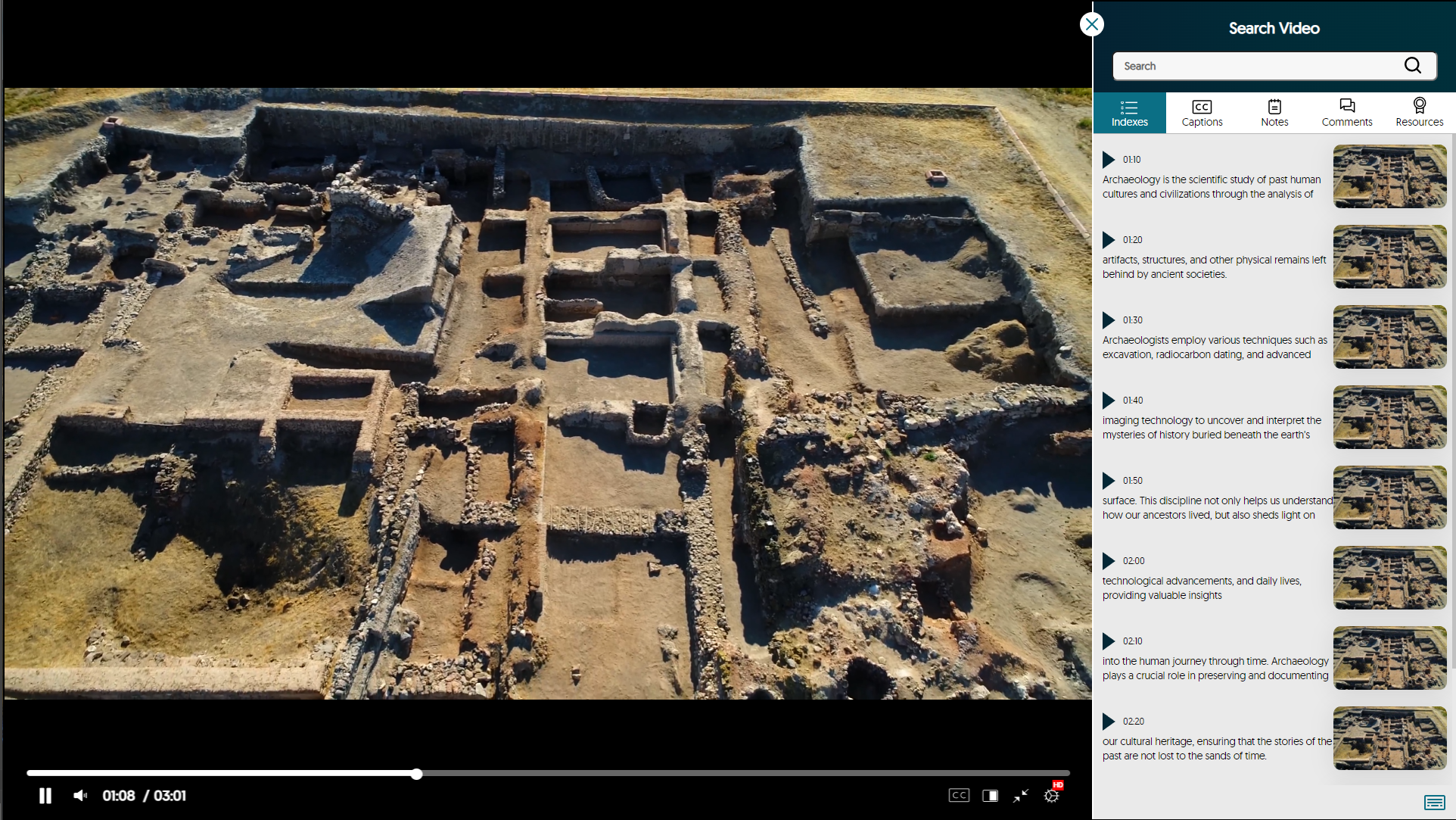
    1. Refreshed Media Player with Enhanced Search Video Sidebar As part of our multi-release commitment to refining the Media Player, we’re introducing a new interface with redesigned icons and color adjustments. You can now view labeled timestamps for the Index, Captions, and Notes to ensure seamless navigation. Redesigned Media Player.
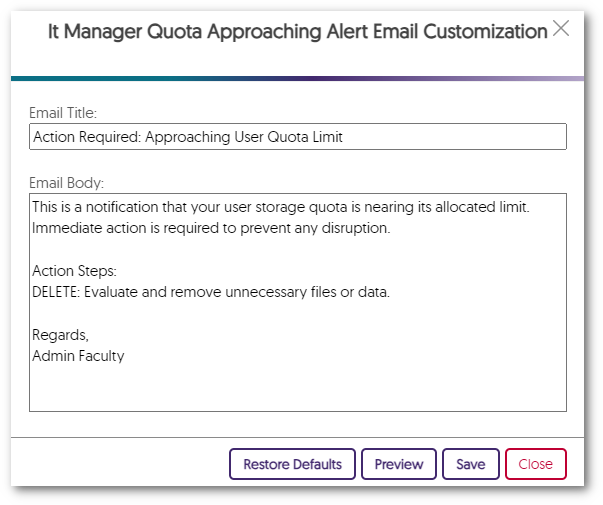
    2. Edit All Platform Emails to Align with Brand and Communication Preferences Administrators can tailor their email notifications to meet their specific preferences. Simply choose the Edit option next to any email notification in the Platform tab to customize the email’s content to align with school-specific branding. A customized email in the Email Editor.
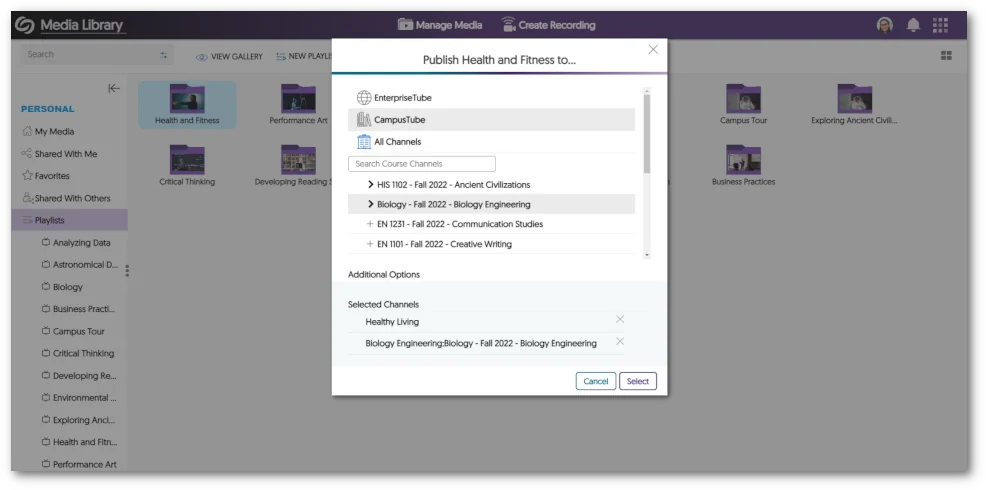
    3. Publish Playlists to the EnterpriseTube, CampusTube, and Course Channels with Real-Time Updating Playlists now offer the flexibility to be published across EnterpriseTube, CampusTube, and Course Channels. After publication, Content Creators can continue to modify Playlists, with the changes instantly reflected across all published locations. A Playlist being published into multiple areas.
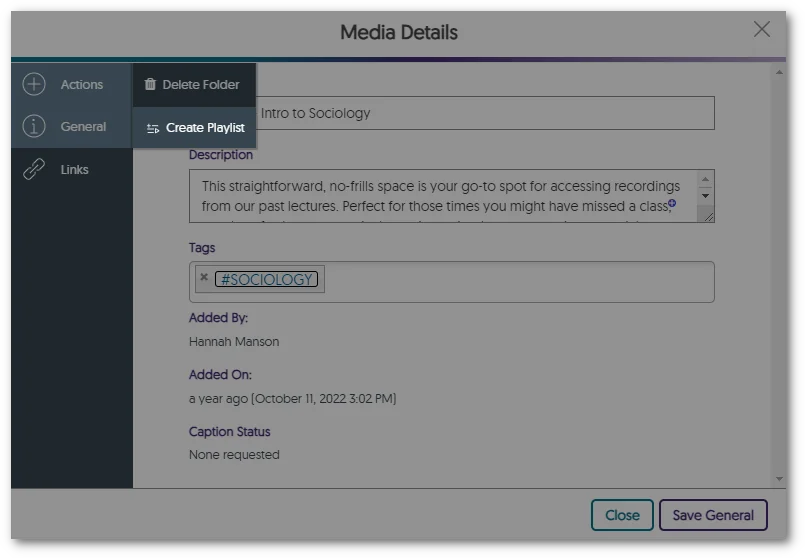
    4. Transform Folders into Playlists Users with curated content within folders can seamlessly transform folders of video content into sharable Playlists, enabling them to share and dynamically update their content across the Video Platform. To recap, Playlists will eventually be the preferred way to distribute lists of videos, and Folders will remain the preferred way to organize content. Option to turn folder into Playlist in the Media Details panel.
    5. Viewers Can Dynamically Select Layout Preference Between Grid, List, and Gallery with Default View Options To establish a default viewing experience for each Channel on the Video Platform, administrators and Channel Owners have the option to configure the default view for a given Course Channel.
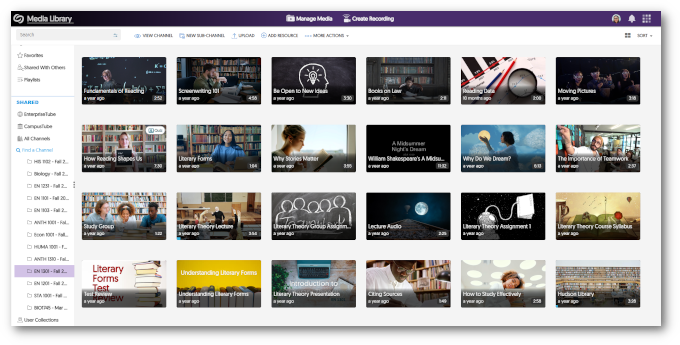
      • Grid Grid view of a course channel.
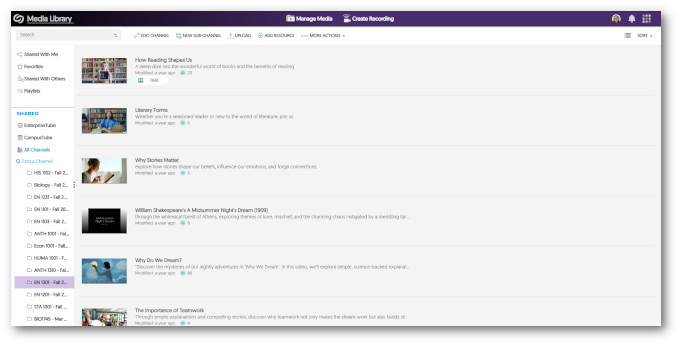
      • List List view of a course channel.
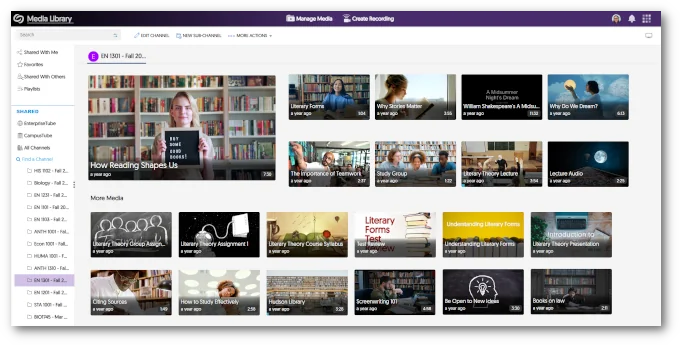
      • Gallery Gallery view of a course channel.
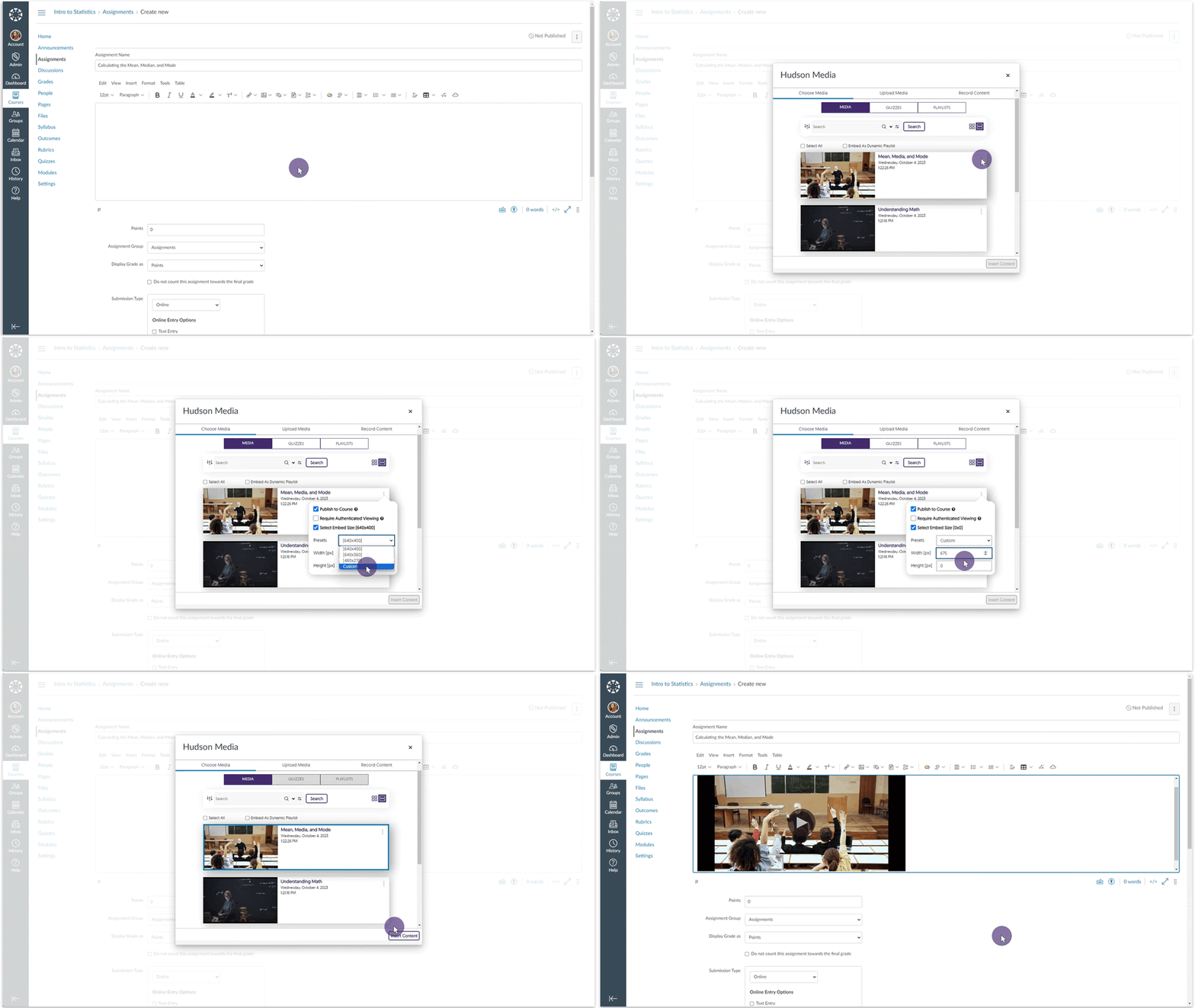
    6. Set Custom Embed Sizes for the Media Chooser Content Creators can select a default standardized embed size for their media content when selecting to embed videos through the Media Chooser. Furthermore, Creators can customize the embed sizes.
    7. Video Editor – “Undo” Function Now Works with Recently Introduced Split Tool In the previous release, we introduced a Split tool to complement the existing Cut tool. We have now added compatibility with the Video Editor’s “Undo” capability and the Split tool. Undoing a split in the Video Editor.
    8. Umbrella System – Manage Dedicated Rosters for Campuses With the introduction of our Umbrella System Panel designed for Super Admins overseeing multi-campus institutions, our attention now turns to the distribution of Admin Panel settings to the System Panel, commencing with the Roster panel. Super Admins and Campus Admins will be able to oversee lists of provisioned users within each campus, enabling precise user role adjustments that exclusively impact individuals within their designated campus. In addition, we’re actively exploring how aspects of the Umbrella System could help large organizations, such as research institutions, to provide hierarchical distribution of administration and permission management for Campus and Sub-Admin roles to better support single-campus entities. Accessing the Roster tab from the System Panel.
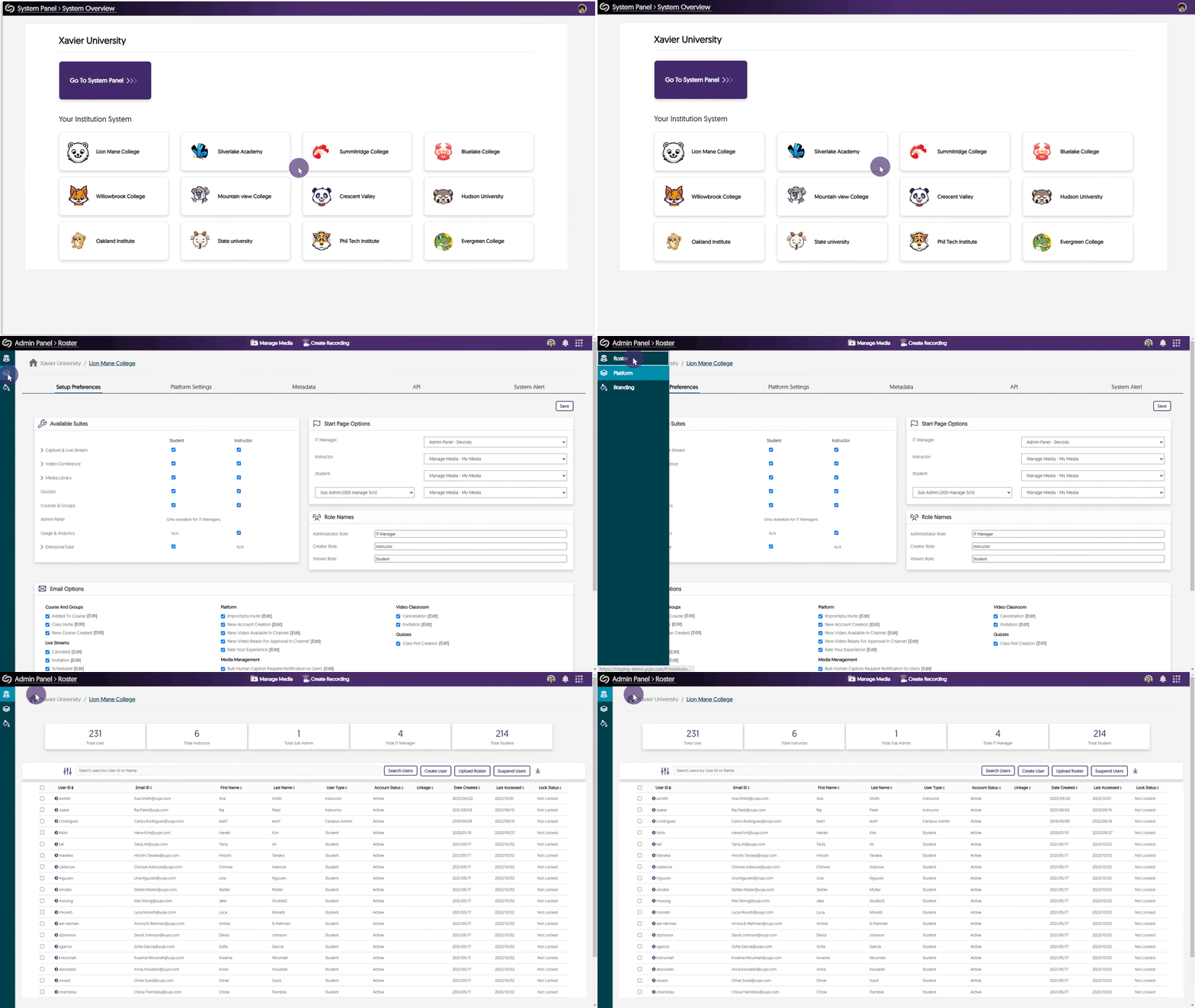
    9. Mirror Single Sign-on ID Names in the Video Platform With Existing YuJa IDs In our previous update, we allowed Single Sign-on (SSO) ID names to be mirrored on the Video Platform when creating a new user. We have updated this feature to allow the YuJa IDs of existing users to be mirrored based on their SSO ID names.
    10. Pre-Select the Course Channel for Browser Capture Publication When launching the Browser Capture Studio from within a course channel, Content Creators now have the option to publish recordings to the course. The option to publish recording into the Course Channel from the Create Recording panel.
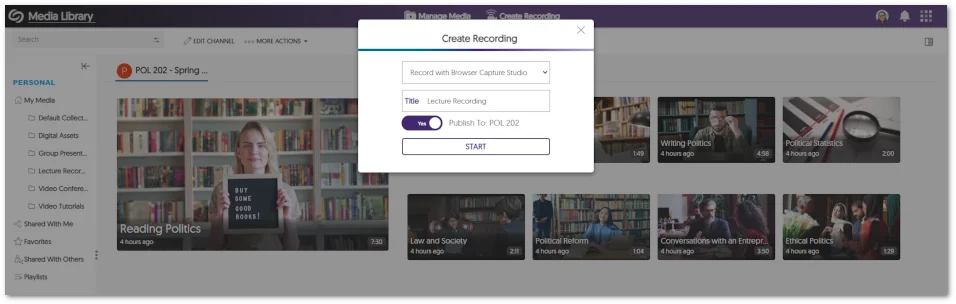
    11. Copied LMS Courses Will Have Their Published Videos and Quizzes Migrated to Pre-Existing Courses In our last update, while we allowed LMS-copied courses to be connected with pre-existing courses on the Video Platform, the migration of published videos and Video Quizzes associated with these courses needed to be supported. We’ve now updated this functionality to allow associated videos and quizzes to migrate into courses previously established on the Video Platform.
    12. API to Schedule Events and Publish Them to CampusTube We’ve introduced an API (4.2.8) that enables administrators to schedule live streams and media for direct publication to their CampusTube folder. To learn how to use this and any of our other APIs, please visit our API Support guide.
  • October 6, 2023

    YuJa Himalayas Data Archiving Platform Update – “Zelkova” Released to CAN, AU and EU Zones

    We have successfully pushed an update to all YuJa Himalayas Data Archiving Platform instances residing in Canada, Australia, and the European Union. This update provides a new Modeling and Forecasting Report for recurring policies, a new policy rule to delete users, and enhanced processing speeds for auto Zoom imports.
    1. Modeling and Forecasting Report Generation To provide admins with information regarding how recurring policies will affect their Video Platform instance, we now provide an at-a-glance summary of how the policy will affect files, users, and storage during its next run date. Modal Forecast of a data policy showing the number of files, users, and storage affected.

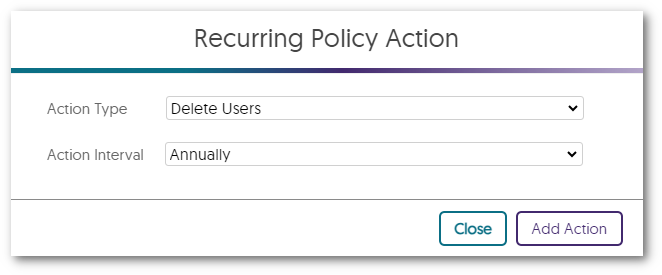
    2. New Data Policy Rule – Delete Users After a Specified Date Institutions with an extensive Roster list can manage user removal through our new recurring policy. By designating a date for users who haven’t logged in, the recurring policy will delete users, relocating their content to the My Media library of the policy creator’s account. Recurring Policy Action modal has the action type of Delete Users.
    3. Enhanced Processing Speeds for Auto Zoom Imports Previously, auto imports for Zoom recordings could take over an hour to appear on the Video Platform. We have reduced this time to provide recordings within 10-15 minutes. 
  • October 6, 2023

    YuJa Verity Test Proctoring Platform – “Opal” Version Released to US, CAN, AUS, and EU Zones

    We have successfully pushed an update to all instances residing in the United States, Canada, Australia, and the European Union. This update includes the option to enable the Lockdown App for Canvas New Quizzes, improved processing times for recordings, the option to adjust email settings at the institution level, and enhanced design and text elements across the platform. 

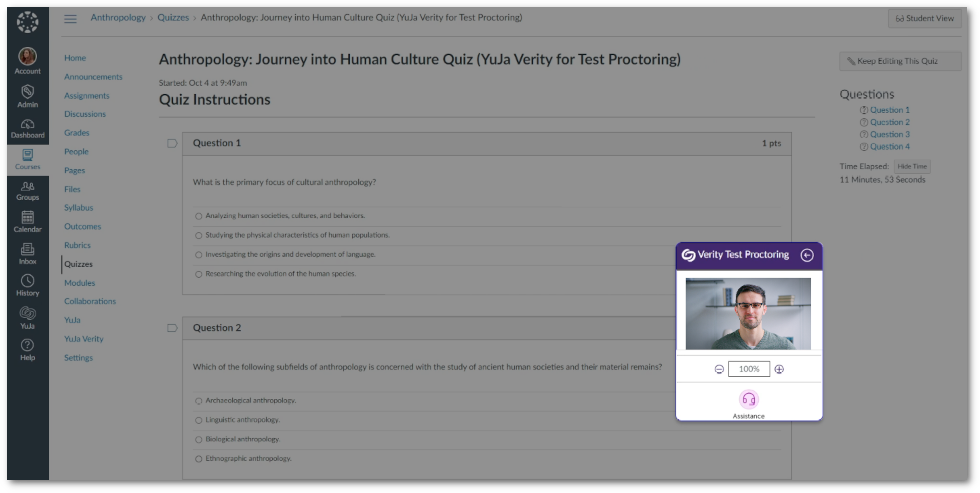
    1. Improved Design for the Verity Recording Panel The Verity Recording Panel now provides a new look and feel that seamlessly aligns with our brand development goals. Our intuitively refined design enhances the user experience, particularly when utilizing the Zoom feature. The Verity Recording Panel.
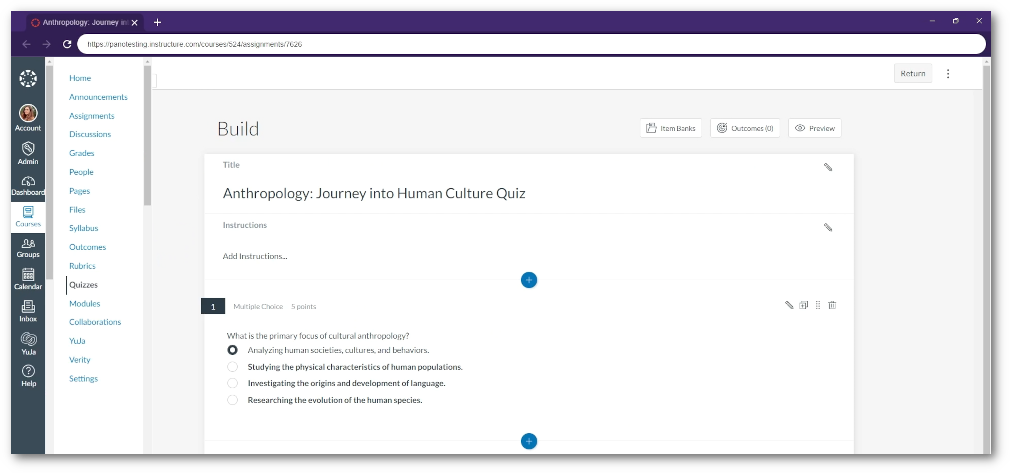
    2. Lockdown App now Supports Canvas New Quizzes Instructors who prefer to use “New Quizzes” in Canvas can now utilize the Lockdown App and its available settings to create the most reliable proctoring environment for online assessments. A new Quiz assessment being viewed inside the Lockdown App.
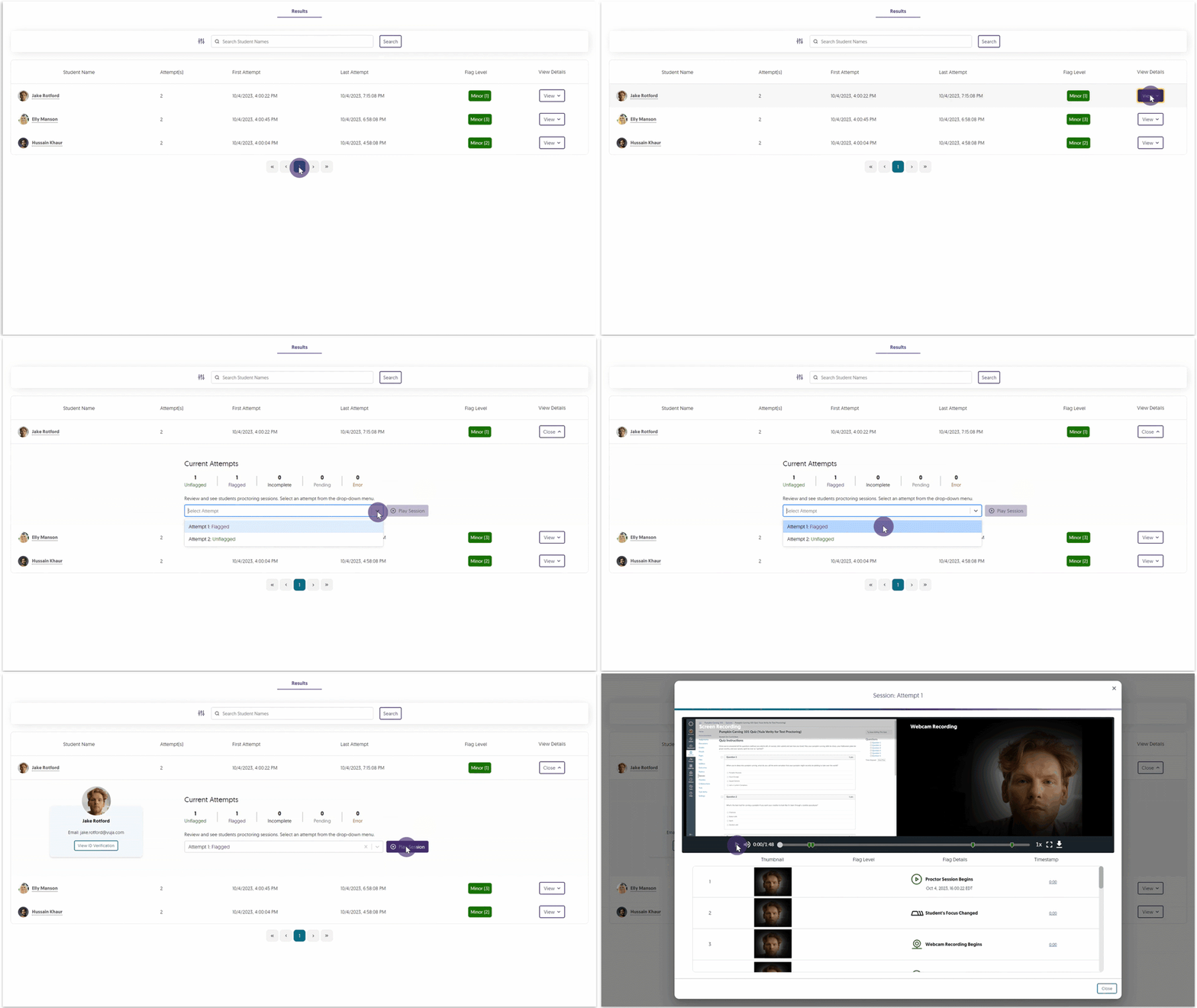
    3. Improved Processing Time for Recorded Assessments We’ve enhanced our processing efficiency to ensure that recorded assessments are available within the Results table in as little as a few minutes, whereas previously, instructors could have to wait up to three hours. A recording is selected from the Verity Results table.
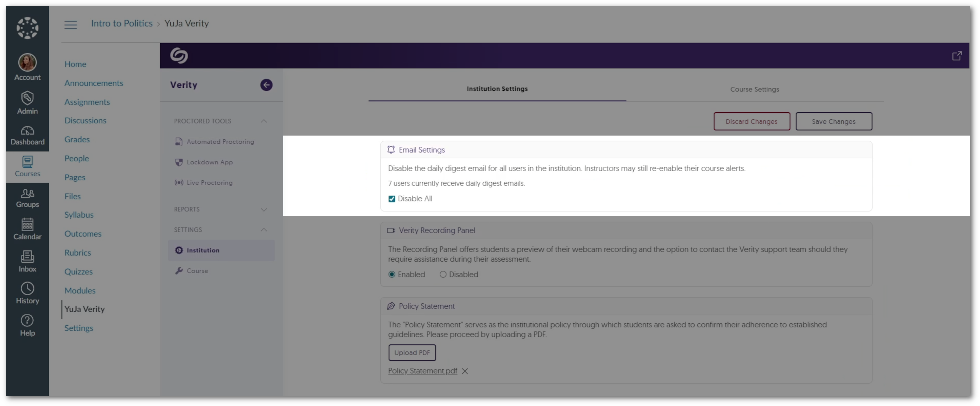
    4. Adjust Email Settings at the Institution Level Verity provides daily emails detailing a summary of all proctored sessions submitted. This setting can now be disabled on an institutional level and available on a per-course basis. Option to disable emails in the Institution Settings.
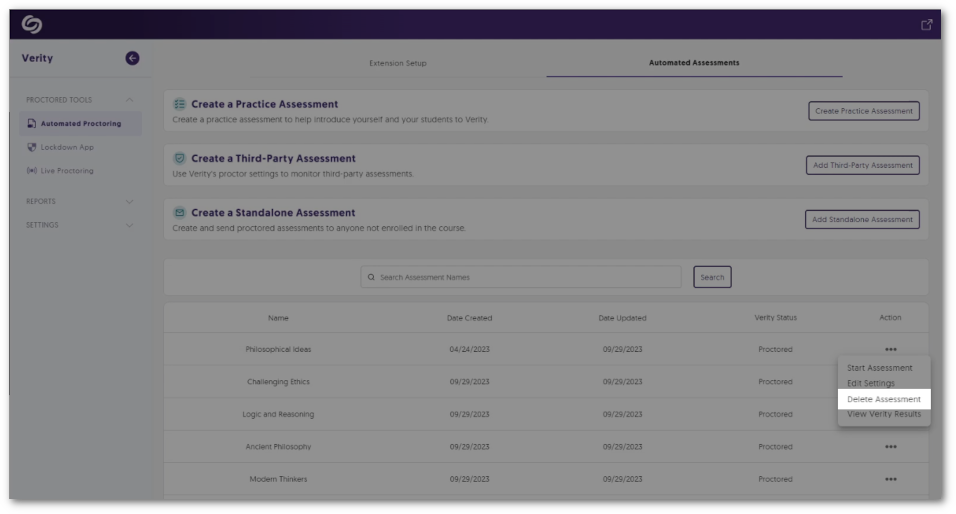
    5. Delete Assessments from the Assessment Tab The Verity Portal offers a dedicated tab on the Automated Proctoring, Lockdown App, and Live Proctoring pages, presenting a convenient list of assessments. Instructors can access this Assessment tab for each proctoring tool, allowing them to delete assessments without the need to locate them within the LMS. Option to delete an assessment from the Assessment tab.
    6. Enhanced Design Elements and Text Across the Lockdown App To enhance the user experience, we have taken a step toward updating areas of improvement for the Lockdown App through incremental design elements and text adjustments. The refreshed UI and text have been curated to guide students through the essential proctor checks, ensuring a seamless transition into their assessments.
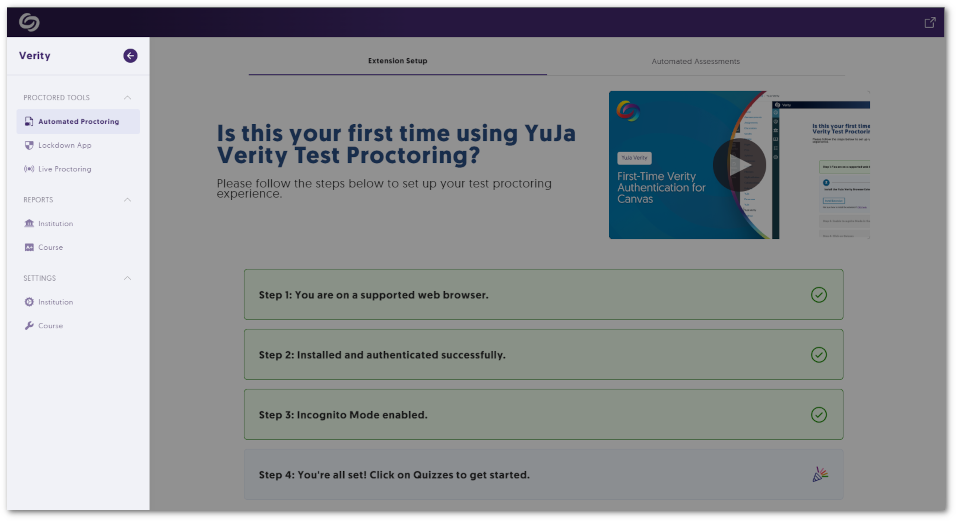
    7. Visual Refresh for the Verity Portal We have provided a new look and feel to the Verity Portal, providing a structured approach to the various Proctored Tools accessible from the left-side navigation menu. Instructors and students will be able to select their preferred tool, view setup steps, and have access to view and edit associated assessments. Highlight of the Verity navigation panel.
    8. Streamlined User-Friendly Updates As we continue to expand upon Verity, we’ve taken a close look at providing minor updates to existing features to help elevate the experience for instructors, proctors, and students. Below are some of these enhancements.
      • Microphone and Camera permissions will automatically be enabled on the Chrome browser.
      • When students register for a time slot, if only one option is available, it will be automatically selected.
      • Proctors will receive a notification if students leave a live proctoring session. 
  • September 29, 2023

    YuJa Engage Student Response System Update – “Perth” Released to US, CAN, AUS, and EU Zones

    We have successfully pushed an update to all YuJa Engage Student Response System instances residing in the United States, Canada, Australia, and the European Union. This release provides our users with the option to pre-schedule Poll releases, filtering options for locating Polls and Surveys, and overall enhancements to the platform through element redesigns and bug fixes.
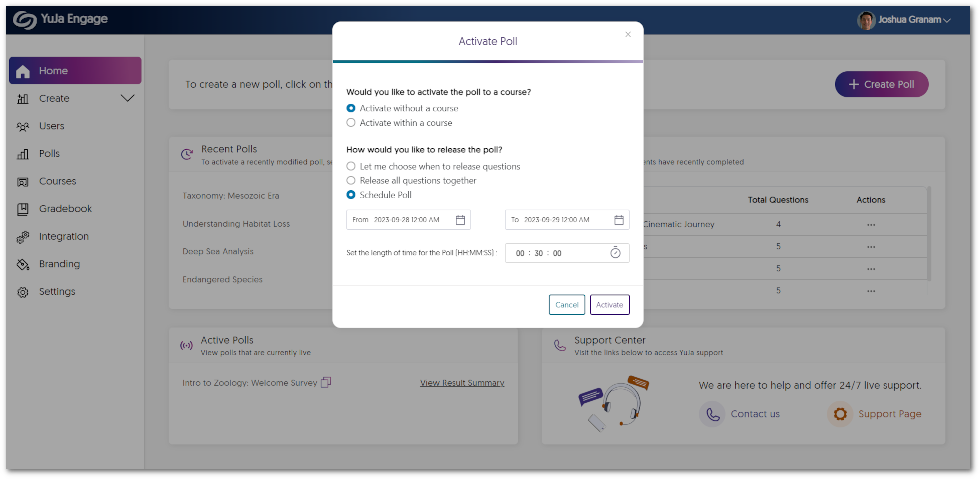
    1. Ability to Pre-Schedule Poll Releases We’re enhancing the way Creators can initiate Polls by introducing the option to schedule active Polls. This enables Creators to provide asynchronous Polls that participants can complete within a specified timeframe with the option for gradebook synchronization. To learn more about this feature, please visit our guide on Scheduling Polls for YuJa Engage. The option to schedule a date and time for a Poll.
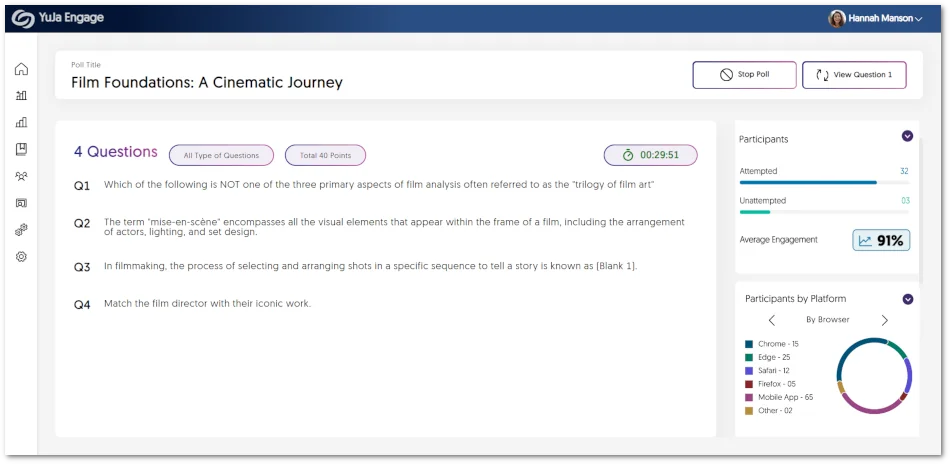
    2. More In-Depth Engagement Analytics When sharing polls, Creators can now access the Average Engagement analytic, which displays the percentage of participants who have attempted to answer questions. Furthermore, the Participants Platform panel offers a detailed breakdown of how users access the poll, including their choice of browsers and platforms, such as Windows, Mac, or Mobile. Share Poll page showcasing new analytics.
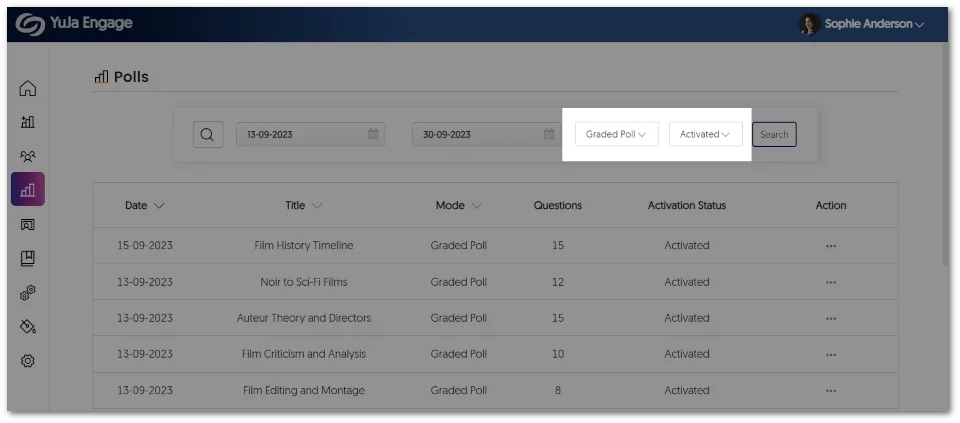
    3. New Filtering Options for Locating Polls and Surveys IT Managers and Creators now have greater precision when locating Polls and Surveys with the help of new filtering options. These options allow users to specify their preferences, such as choosing whether to view Polls or Surveys and selecting whether they are active. The option to select a Poll and Whether it is active.
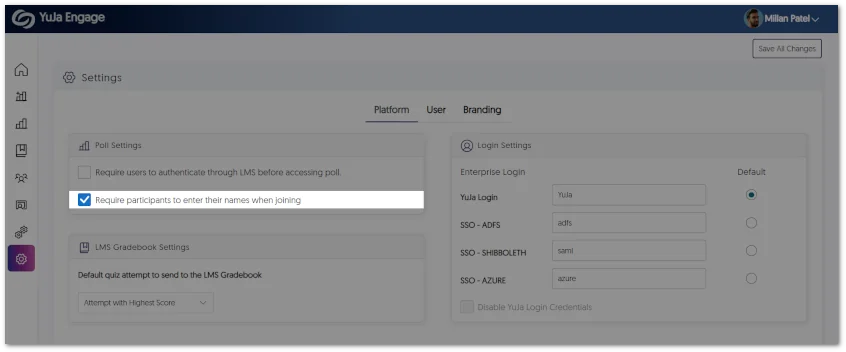
    4. Require Names When Participants Join Anonymously Previously, participants joining anonymously were not required to enter a name. In this update, we introduced a setting allowing IT managers and Creators to require participants to enter a name. Setting option to require participants to enter their name when joining a Poll.
    5. Enhanced Design Elements and Text Across the Platform To enhance the user experience, we have taken a step toward updating areas of improvement through incremental design elements and text adjustments that can help facilitate ease of navigation across the platform. We encourage IT Managers and Creators to take a look at our new design spacing, buttons, messages, and more. We thank you for your valuable feedback as we continue to roll out even more enhancements to the platform. Comparison between the old Poll page and the new Poll page.
    6. Bug Fixes and Optimizations We have optimized the performance of YuJa Engage and made several bug fixes to improve the user experience. Highlighting some of these optimizations and fixes are:
      • Resolved issues with SSO and LTI linkage.
      • Resolved issues with Polls having blank titles.
      • Resolved issues that prevented Poll questions from being shared individually.
  • September 8, 2023

    YuJa Panorama Digital Accessibility Platform – “Jackson Peak” Version Released to US, CAN, and EU Zones

    We have successfully pushed an update to all YuJa Panorama Digital Accessibility Platform instances residing in the United States, Canada, and the European Union. This release provides our users with a new workflow for remediating accessibility issues, a Remediation Engine that fully supports Microsoft Word issues, a refreshed Accessibility Report, custom weighting for severity types, the option to replace the original document with a generated alternative format, localization support for Dutch and Finnish languages, and so much more.
     
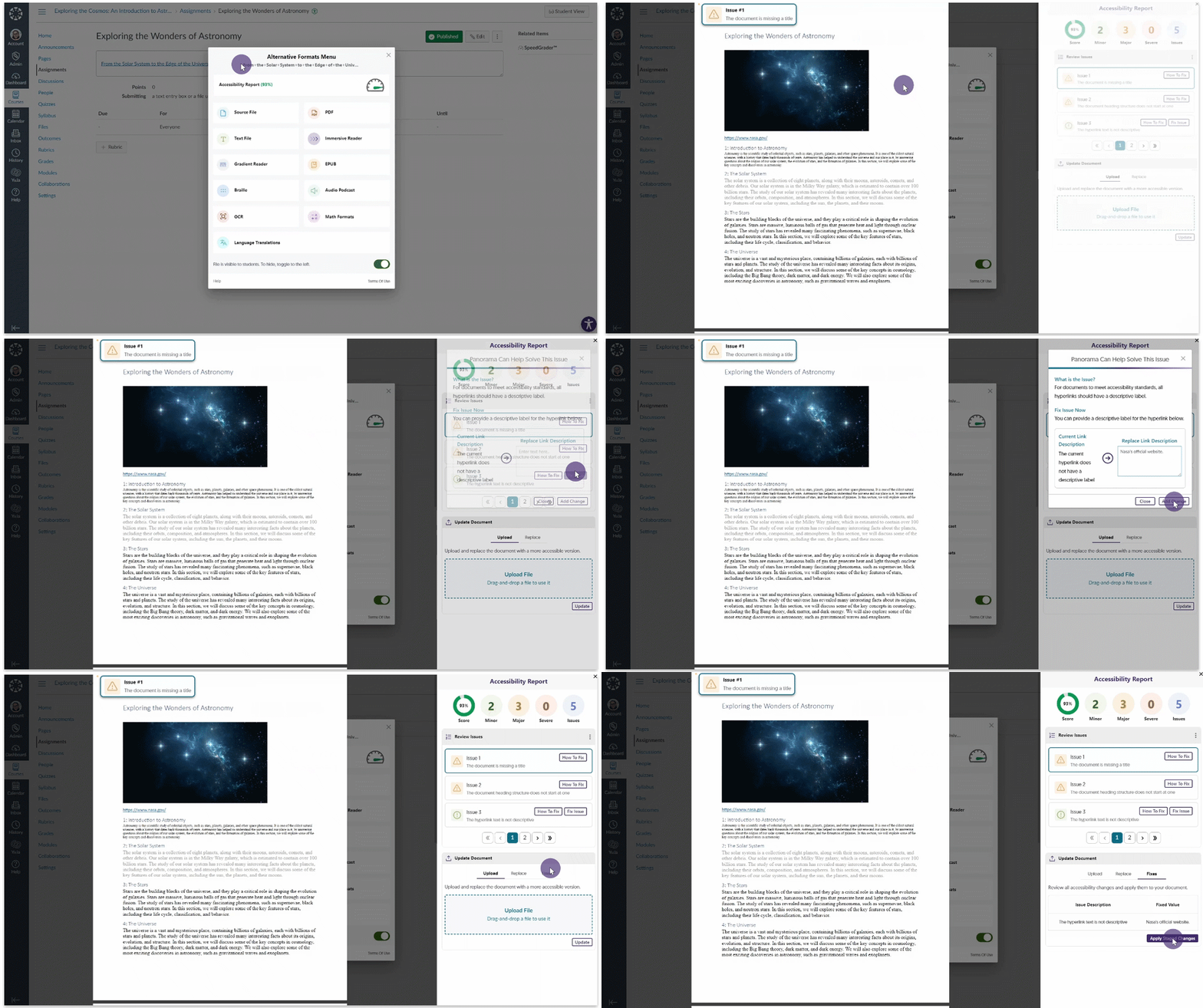
    1. Streamlined Workflow for Remediating Accessibility Issues As part of our development for Panorama’s Remediation Engine, we have taken a deep dive into how users can easily resolve issues in real time within the Accessibility Report. As a result, we are introducing a dedicated ‘Fix Issue’ feature that offers immediate insights into the current problem and practical suggestions for a resolution. After adding the necessary changes, a comprehensive list of all fixes can be reviewed before applying the changes to update the document. Remediating an issue.
    2. Expanded Support for Microsoft Word Remediation Engine for Inline Remediation Within the LMS Our previous release introduced our new Microsoft Word Remediation Engine, designed to address font-size issues in real-time within Microsoft Word documents. Building upon this, we’re expanding our remediation capabilities by allowing users to resolve more WCAG 2.1 Microsoft Word issues:

      • Contrast issues
      • Alternative text for images
      • Non-descriptive hyperlink text
    3. Refreshed Accessibility Report Interface We have updated the Accessibility Report with a modernized UI showcasing an organized display of issues. To accomplish this, we have made the following changes: 1) issue can be seen within the new list-style view; 2) The number of issues have been categorized by their severity; 3) Filtering options to allow users to view specific issues in each severity.
      Accessibility Report
    4. Create a Custom Weighted Scale for Severity Types Panorama has consistently assessed accessibility issues with Severe, Major, and Minor importance. We’re now providing administrators the option to fine-tune the weight of each severity, allowing institutions to create a more precise accessibility score aligning with their unique priorities.
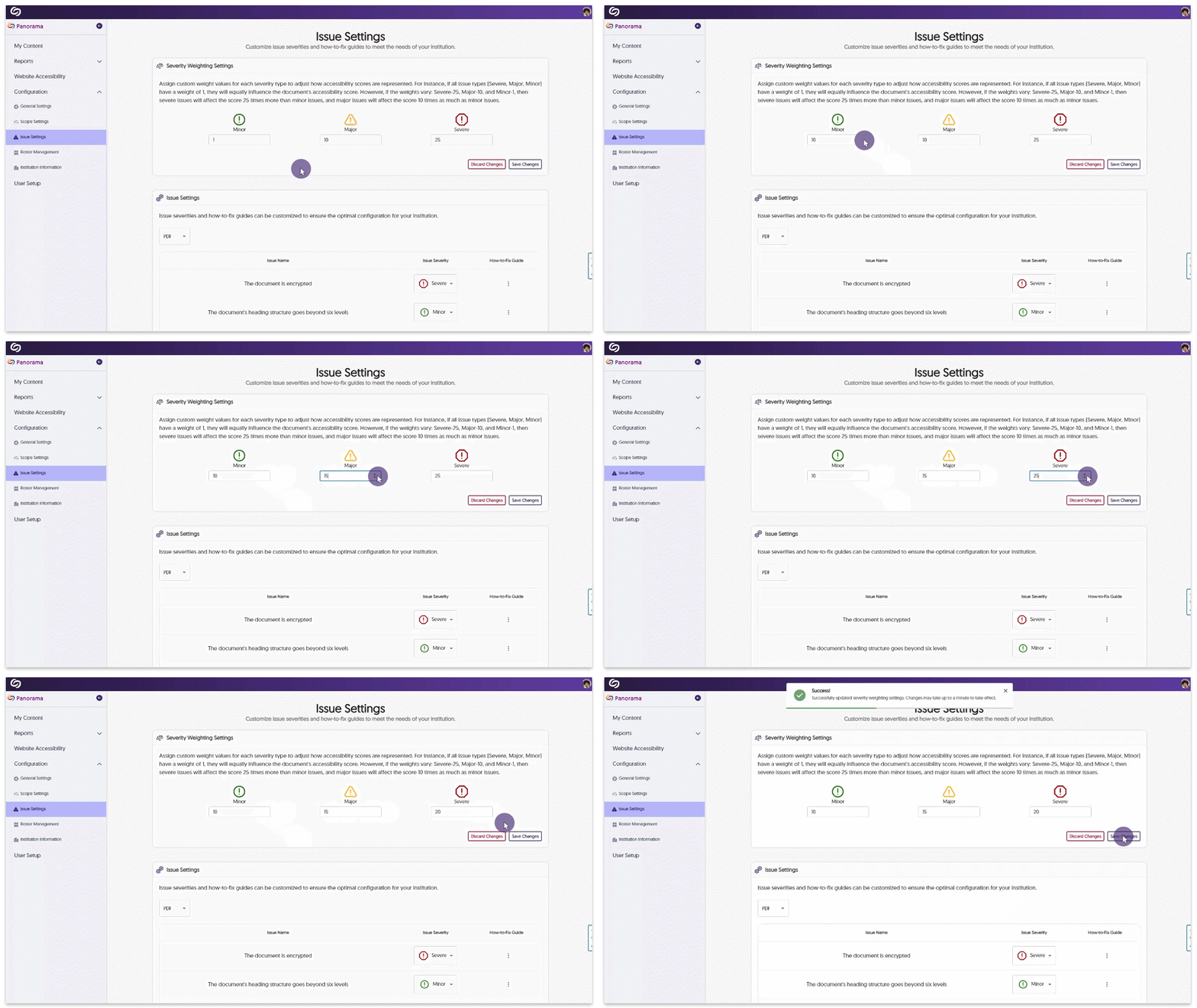
      Each severity level will now uniquely influence the final accessibility score through its customized weight. For instance, if Major issues are assigned a weight of 10 and Minor issues a weight of 1, Major issues will affect the accessibility score ten times more than Minor issues. To learn more about this feature and how to set custom weights for the severity of issues, please visit our guide on Customizing Severity Weighting Settings for Panorama Adjusting the weight scores.
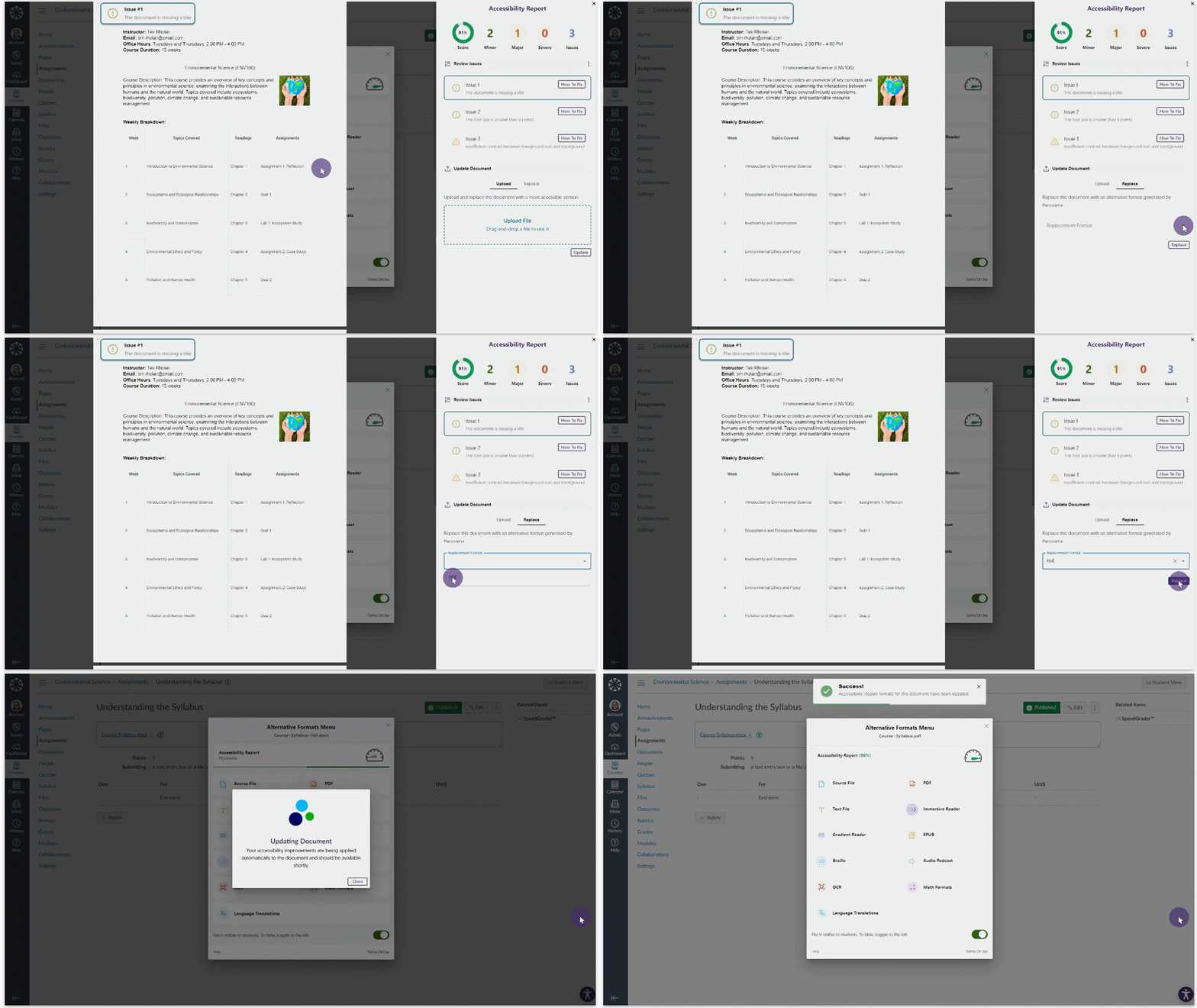
    5. Replace Original Documents with a Generated Alternative Format Instructors have the option to seamlessly replace the original document within their Learning Management System with a newly generated alternative format. Replacing a document with its alternative format.
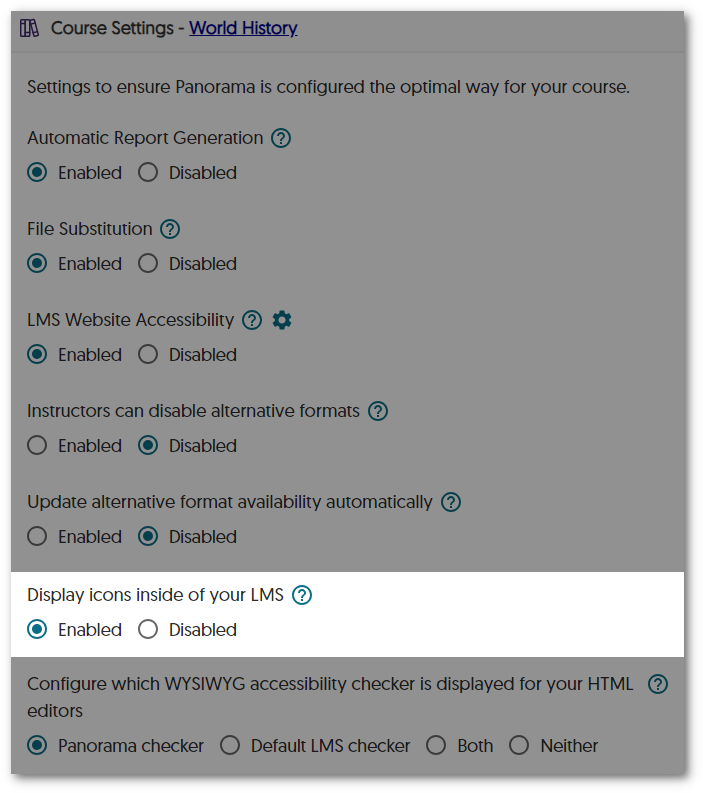
    6. Accessibility Icons Can Be Hidden at the Course Level To give instructors more control over their courses, they can now disable accessibility icons at the course level. This option will prevent students and instructors from accessing the Alternative Formats menu and Accessibility Reports within their LMS but will still provide analytical tracking for the course. Disable icon setting at the course level.
    7. Integrate Panorama into Specific LMS Sub-Accounts for LTI 1.3 Panorama now offers targeted integration within specific LTI 1.3 sub-accounts to accommodate institutions utilizing hierarchical sub-accounts in their LMS. This will allow administrators to only enable Panorama for their desired accounts instead of applying it to the top-level account, which would activate Panorama for all sub-accounts.
    8. The Course Setting Page Offers Access to the LMS Course Administrators and instructors who wish to navigate back to their course after making course-setting adjustments can, with a click of a button, navigate directly to their course. Accessing a course from the Course Settings page in Panorama.
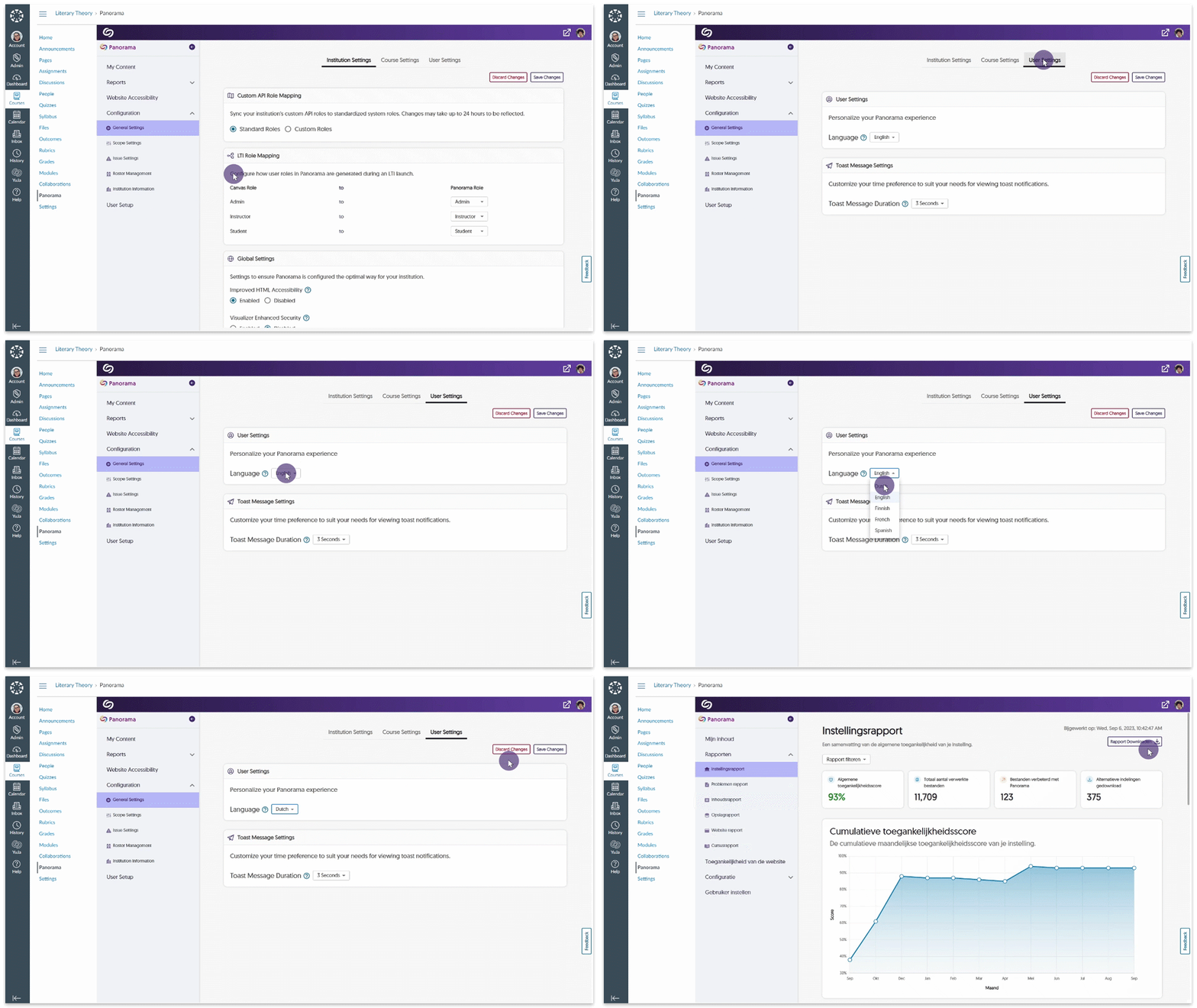
    9. Local Support for Dutch and Finnish Languages Complementing our English, French, and Spanish localization, Panorama will now fully support Dutch and Finnish languages across the entire Platform. Simply access your settings to adjust your language preferences. Adjusting language settings in Panorama.
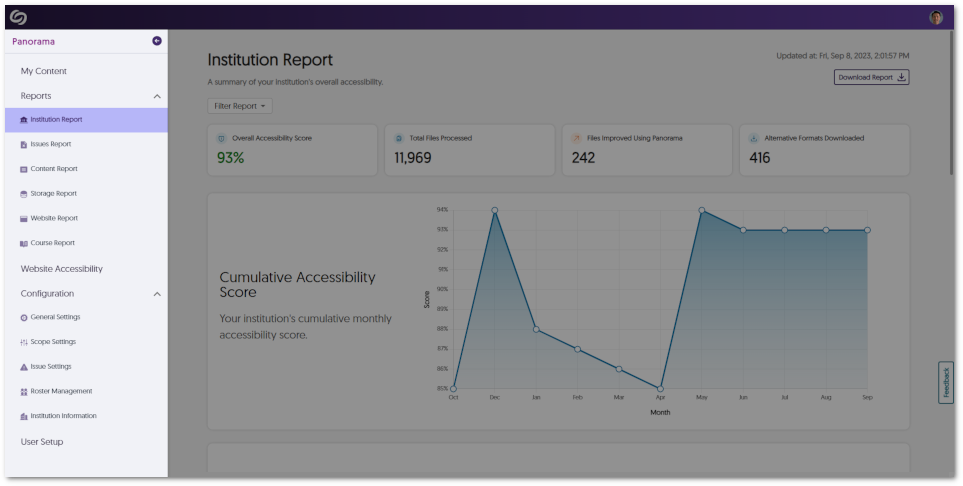
    10. Updated Colors and Icons for the Panorama Sidebar As part of our ongoing commitment to elevate the Panorama experience with our new branding, administrators can expect vibrant color enhancements and new icons that provide a refreshed look to the sidebar. Panorama sidebar.
    11. Screen Readers Can Detect When Alternative Formats Are Generated Users who navigate through Panorama with the help of accessibility tools will now be notified by their screen reader when an alternative format has been successfully generated.
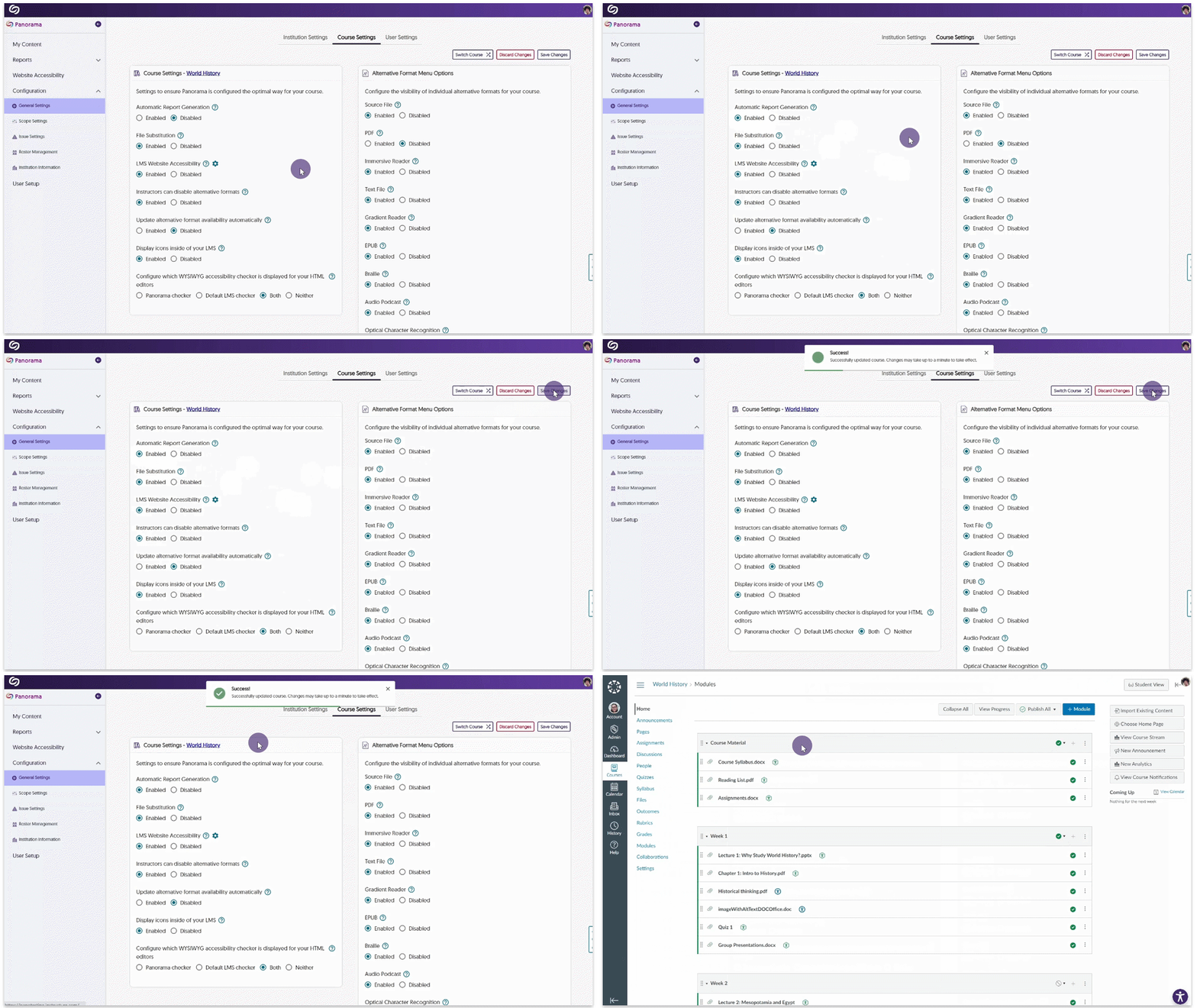
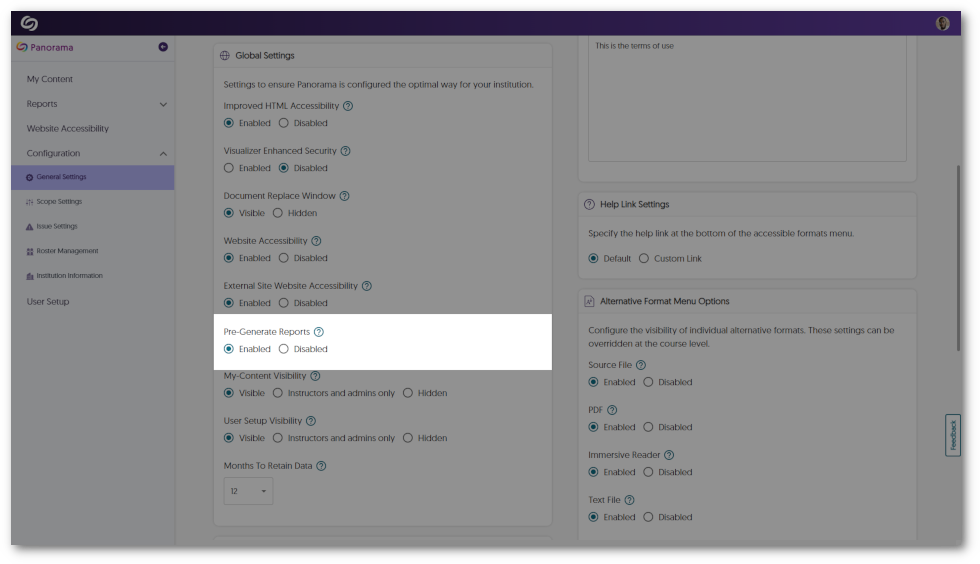
    12. Pre-Generate Course Reports to Provide Instant Viewing of Analytics Similar to pre-generating institution reports, activating this feature ensures that the Course Report stays consistently up-to-date, providing institutions with large data sets instant access to their analytics. Pre-Generate report setting.
    13. Increased Responsiveness for the Panorama LTI App on Canvas To enhance Panorama’s accessibility for users who prefer utilizing their browser’s zoom functionalities, Panorama will now dynamically adapt its interface to accommodate zoom levels exceeding 100%.

Join the 1,000+ Organizations Deploying High-Impact Solutions

A collection of logos representing various organizations and institutions that use YuJa’s platform.