

Product Updates
Get the latest platform updates, features, and announcements—all in one place.
Boost Video Accessibility with the GenAI Video PowerPack!
Try Now
Supercharge Your Compliance Efforts with AutoPilot Remediation Max!
Try Now
Strengthen Your PDF Accessibility Efforts with Structural Remediation Max!
Try Now
Don't Miss Any of Our Upcoming Webinars—Save Your Spot!
Register
The YuJa Community is here! Connect, get updates, and access exclusive content.
Join Now

Get the latest platform updates, features, and announcements—all in one place.
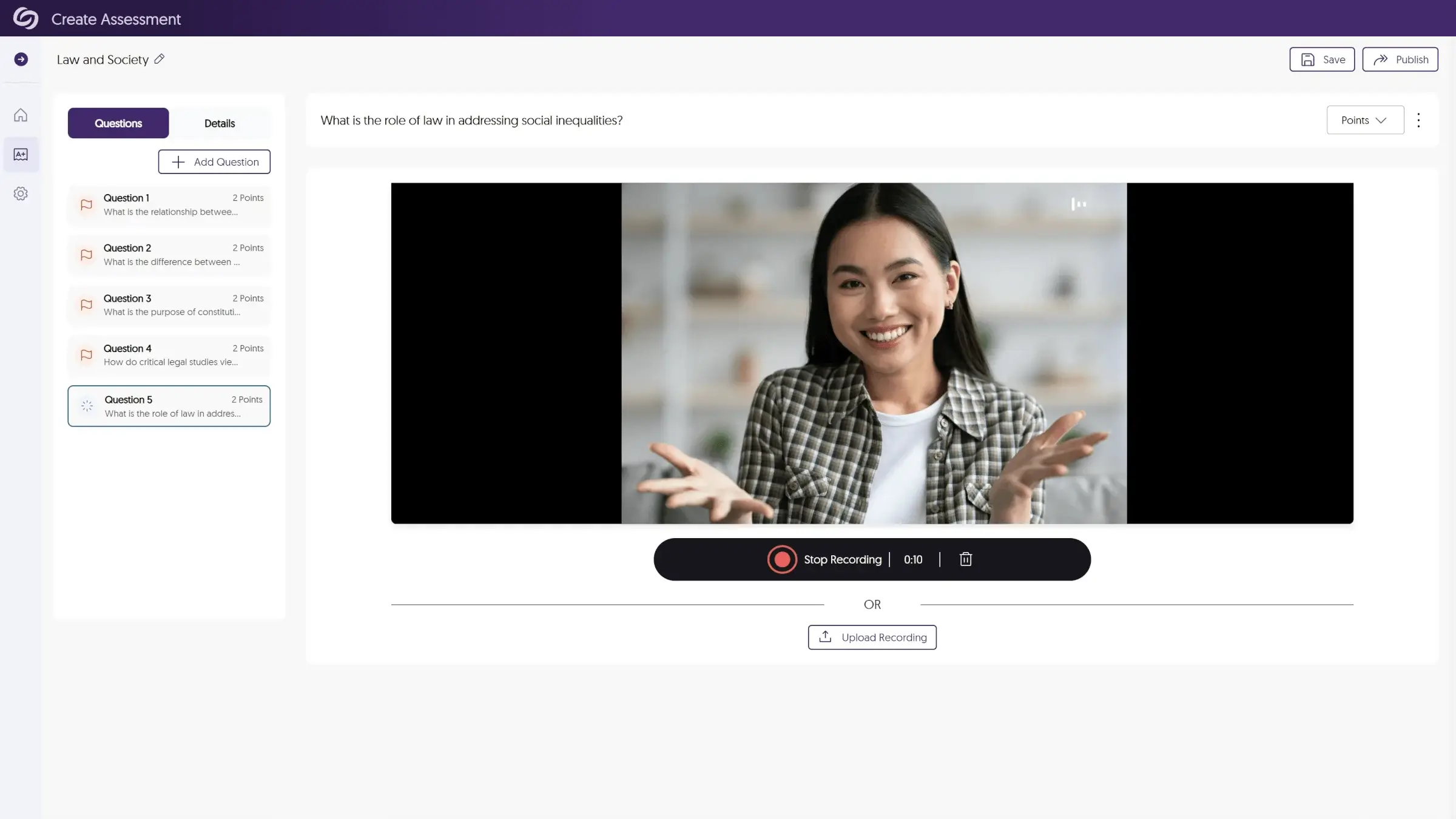 2. Video feedback helps create a sense of connection: Video establishes an instructor’s presence when physical distance separates the instructor and learner. When students see and hear their instructor speak directly to them about their work, it creates a sense of personal attention that fosters engagement. This “social presence” has been linked to higher motivation, increased course satisfaction, and better learning outcomes.
3. Video feedback can save time: Contrary to what many educators initially think, video assessment can actually save time compared to traditional written feedback. Speaking naturally about a student’s work often allows instructors to convey more information in less time than typing detailed comments. For example, a two-minute video feedback recording can deliver the equivalent of several paragraphs of written feedback, complete with nuance, context, and personalization.
4. It helps build a culture of continuous improvement: Traditional grading often focuses on justifying a score, while video feedback naturally emphasizes growth and improvement. Feedback becomes a conversation where instructors can explain concepts, suggest approaches, and acknowledge areas they did well or that need improvement. Assessment offers a learning opportunity rather than simply the end of an assignment.
5. Video Makes Feedback More Accessible: For many learners, video feedback is a more accessible alternative to densely written feedback. Additionally, the ability to replay video feedback multiple times helps students process complex suggestions at their own pace, returning to challenging concepts for a better understanding.
By incorporating video assessment and feedback into existing learning management systems, institutions can create more effective feedback processes that better prepare students and professionals for success
2. Video feedback helps create a sense of connection: Video establishes an instructor’s presence when physical distance separates the instructor and learner. When students see and hear their instructor speak directly to them about their work, it creates a sense of personal attention that fosters engagement. This “social presence” has been linked to higher motivation, increased course satisfaction, and better learning outcomes.
3. Video feedback can save time: Contrary to what many educators initially think, video assessment can actually save time compared to traditional written feedback. Speaking naturally about a student’s work often allows instructors to convey more information in less time than typing detailed comments. For example, a two-minute video feedback recording can deliver the equivalent of several paragraphs of written feedback, complete with nuance, context, and personalization.
4. It helps build a culture of continuous improvement: Traditional grading often focuses on justifying a score, while video feedback naturally emphasizes growth and improvement. Feedback becomes a conversation where instructors can explain concepts, suggest approaches, and acknowledge areas they did well or that need improvement. Assessment offers a learning opportunity rather than simply the end of an assignment.
5. Video Makes Feedback More Accessible: For many learners, video feedback is a more accessible alternative to densely written feedback. Additionally, the ability to replay video feedback multiple times helps students process complex suggestions at their own pace, returning to challenging concepts for a better understanding.
By incorporating video assessment and feedback into existing learning management systems, institutions can create more effective feedback processes that better prepare students and professionals for success
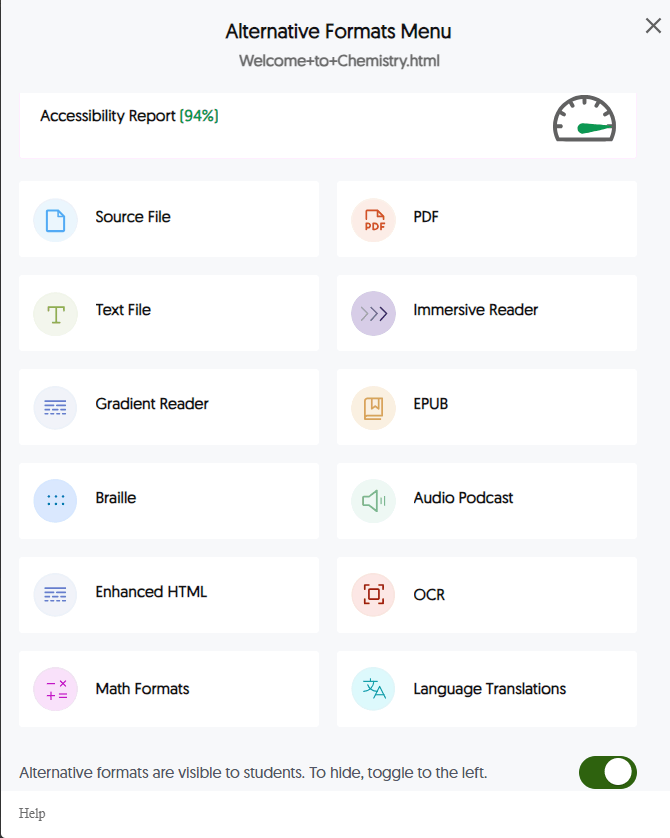 Source File, the original document with its native formatting, allows users with specific software tools to manipulate the content according to their needs, such as adjusting formatting, extracting text for use with assistive technologies, or converting to other formats. For students who use screen readers or require specialized navigation, having access to the source file enables the most comprehensive access to educational content.
PDF (Portable Document Format) is a standardized format that preserves layout across devices. It often includes built-in accessibility features like tags and reading order structures. Well-structured PDFs with proper tagging and optical character recognition (OCR) ensure that text is machine-readable, making them compatible with assistive technologies while maintaining the original document’s appearance.
Text File, a plain text version without complex formatting, delivers clean, simplified text that works well with screen readers and assistive technologies. This format removes formatting distractions for students with visual processing difficulties or those who prefer distraction-free reading.
Enhanced HTML, a web-optimized version with improved accessibility features, offers better navigation, responsive design, and compatibility with assistive technologies. This format maintains visual elements while ensuring screen reader compatibility and keyboard navigation.
Source File, the original document with its native formatting, allows users with specific software tools to manipulate the content according to their needs, such as adjusting formatting, extracting text for use with assistive technologies, or converting to other formats. For students who use screen readers or require specialized navigation, having access to the source file enables the most comprehensive access to educational content.
PDF (Portable Document Format) is a standardized format that preserves layout across devices. It often includes built-in accessibility features like tags and reading order structures. Well-structured PDFs with proper tagging and optical character recognition (OCR) ensure that text is machine-readable, making them compatible with assistive technologies while maintaining the original document’s appearance.
Text File, a plain text version without complex formatting, delivers clean, simplified text that works well with screen readers and assistive technologies. This format removes formatting distractions for students with visual processing difficulties or those who prefer distraction-free reading.
Enhanced HTML, a web-optimized version with improved accessibility features, offers better navigation, responsive design, and compatibility with assistive technologies. This format maintains visual elements while ensuring screen reader compatibility and keyboard navigation.
 Immersive Reader enhances the reading experience with customizable text display. The reader combines a simplified visual presentation with text-to-speech capabilities. Features like syllable highlighting and grammar identification make it especially valuable for students with dyslexia or other reading challenges.
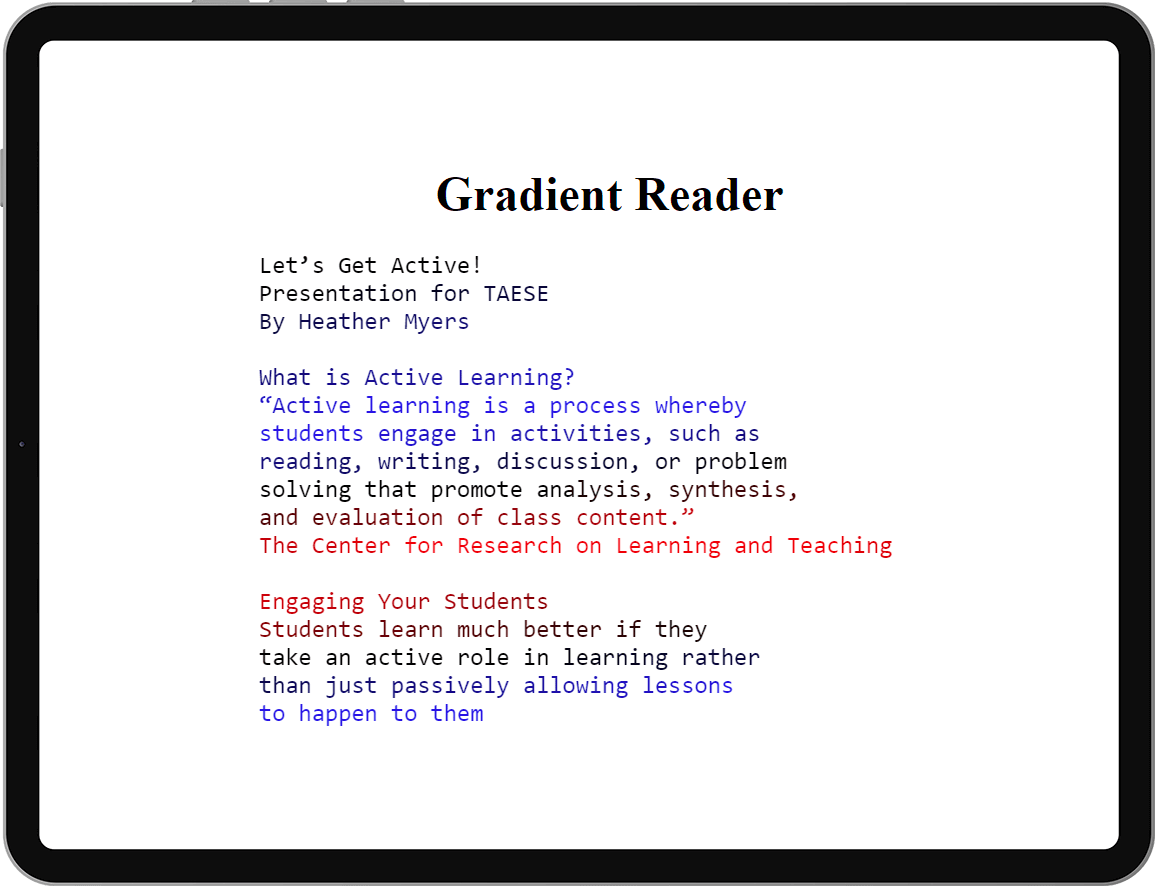
Gradient Reader provides text with color gradients to improve readability and applies color transitions to make it easier to track lines of text and maintain focus. This format helps students with attention difficulties, visual tracking issues, or dyslexia.
Immersive Reader enhances the reading experience with customizable text display. The reader combines a simplified visual presentation with text-to-speech capabilities. Features like syllable highlighting and grammar identification make it especially valuable for students with dyslexia or other reading challenges.
Gradient Reader provides text with color gradients to improve readability and applies color transitions to make it easier to track lines of text and maintain focus. This format helps students with attention difficulties, visual tracking issues, or dyslexia.
The need for accessible PDFs extends beyond good practice — it’s a legal requirement.While general web accessibility has improved in recent years, PDF accessibility presents unique challenges due to the complex nature of document structure and the prevalence of untagged documents in circulation. In fact, studies show that over 90 percent of PDFs opens in a new tab in circulation today are at least partially inaccessible, appearing as blank pages, garbled text, or incomprehensible code to those using assistive technologies. One of the key accessibility issues with PDFs is the lack of proper structure. PDF tags are metadata elements that define the structure of a document, making it navigable for assistive technologies. While an untagged PDF may contain all the necessary information, it’s nearly impossible to navigate effectively, resulting in a poor user experience and failure to meet accessibility compliance standards like WCAG 2.1 and Section 508 opens in a new tab . When a PDF lacks proper structure:
Join the 1,000+ Organizations Deploying High-Impact Solutions














